9
3.2 Photometric Measurement
This mode allows the user to measure the Abs or transmittance at a fixed wavelength, and perform
measurement by using K factor; you also can print out the measurement result.
Main menu of photometric measurement
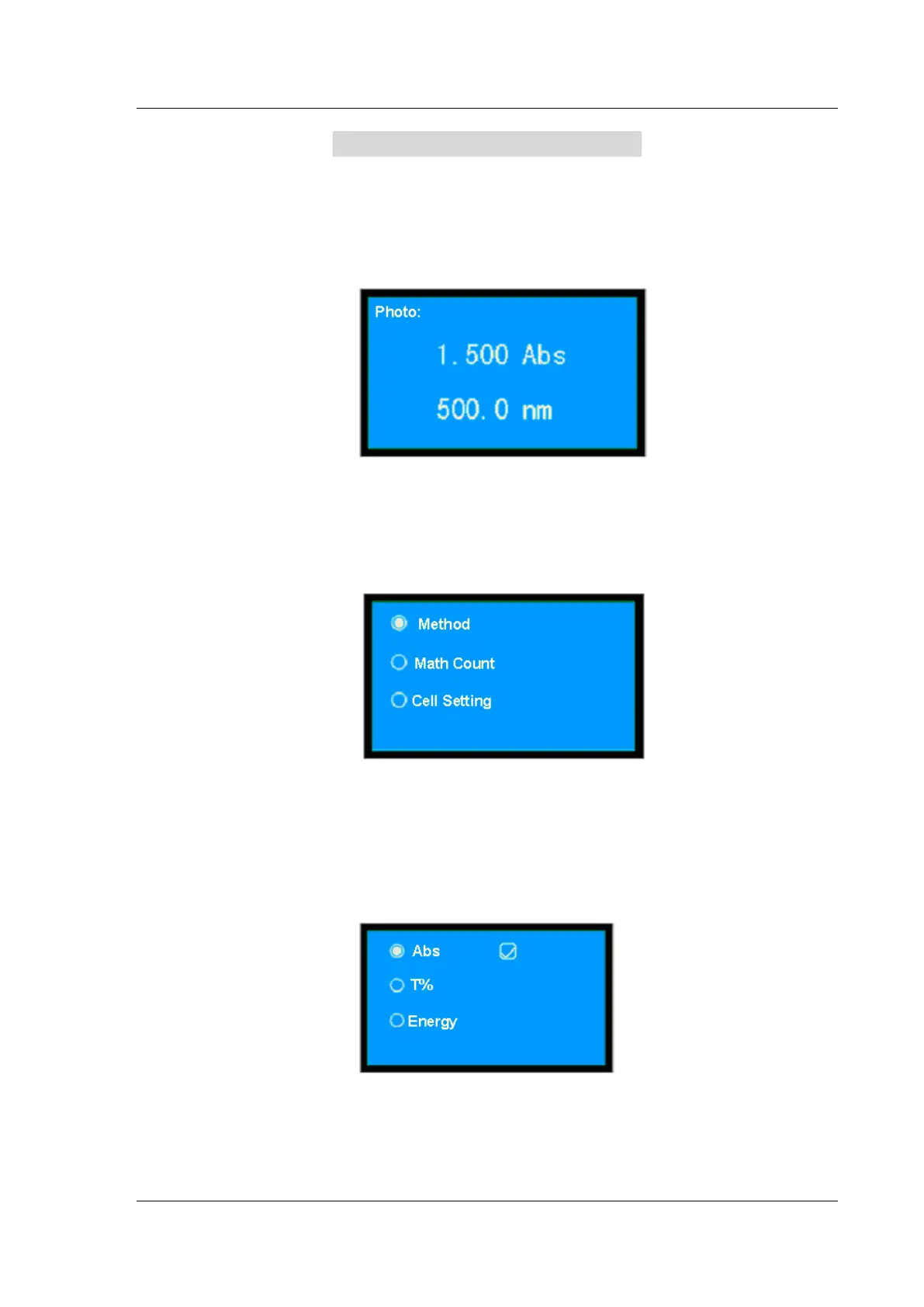
Press【▲】 and 【▼】 to select “Photo”, then press【ENTER】to gain access to the main menu of
photometric measurement.
(Fig.3-2)
Setting parameters
In the case of photometric measurement (Fig.3-2), press【SET】to gain access to the menu of
parameters setting.
(Fig.3-3)
Press 【▲】 and 【▼】 to move the cursor to the required option, then press 【ENTER】 to gain
access to the required menu. Press 【RETURN】 to quit, returning to the preceding menu.
Selecting the photometric method
On the menu of (Fig.3-3), select ⊙ Method, then press 【ENTER】 to display the menu as shown
in (Fig.3-4):
(Fig.3-4)
Press 【▲】 and 【▼】 to move the cursor to the required option, then press【ENTER】 to gain
access to the relevant menu. Press 【RETURN】 to quit, returning to the preceding menu.
When the user selects energy, the gain setting menu will be displayed (Fig.3-5):


 To Next Page