Before First Use
5
STEP ONE
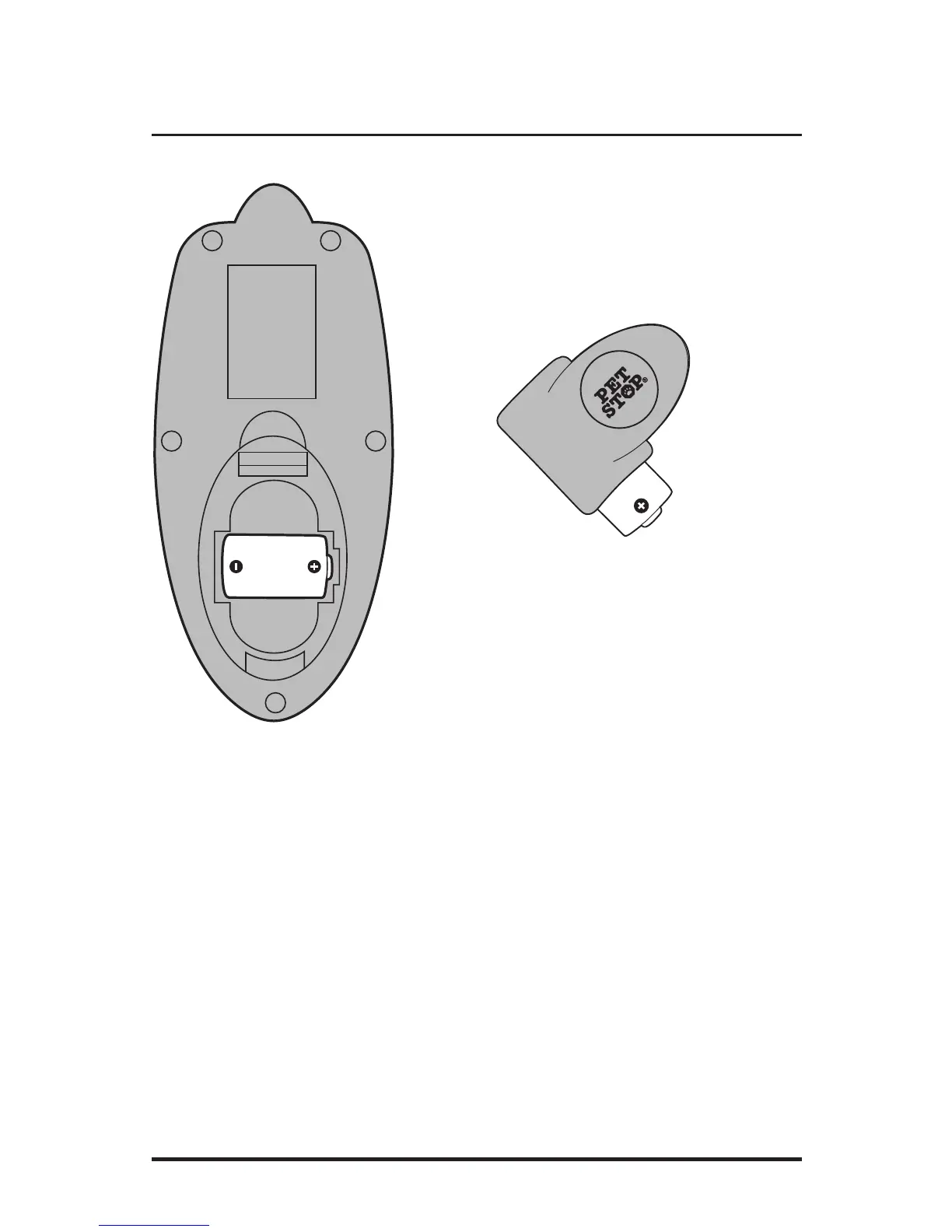
Insert one 3.6v lithium ion battery in the back of
the Handheld remote with the (+) terminal facing
to the right of the battery compartment.
Insert the second 3.6v lithium ion battery in the
Remote Receiver with the (+) terminal facing
towards the battery compartment opening. Using
a small coin, replace the battery cap turning
clockwise. You have 2 minutes to complete the set
up procedure once the battery is inserted into the
remote Receiver. After 2 minutes the battery must
be removed and reinserted to set up.
STEP TWO
• Press and hold the ON/OFF button for
one second; there is a small delay to
power up the Handheld remote. The
indicator lights will briefly blink.
• Select DOG 1 (left) or DOG 2 (right)
by pressing and releasing the DOG
TOGGLE button.
• Press and hold the DOG TOGGLE button.
The DOG LIGHT will slowly flash red.
Successful set up will be confirmed
with a flashing green light.
• This setup function only needs to be
performed once. The Universal Remote
will retain the collar’s unique code.
• Press and hold the TONE or VIBRATE
functions to ensure proper operation of
the remote Receiver unit.



 To Next Page