37
3. Incorrect Wi-Fi password
If Petcube app is showing
the «Incorrect Wi-Fi password» error
message after the setup, here are a few
possible reasons behind that:
1. Case sensitivity: check the entered
password for uppercase
or lowercase characters.
Keep in mind that «Password» and
«password» would be two different
passwords because the «P»
is uppercase in the first example and
lowercase in the second example;
2. Password length: check the entered
password length and keep in mind
that normally the password length
is 8+ characters long;
3. Keyboard language: check
the onscreen keyboard language
and make sure you enter password
in the correct keyboard layout.
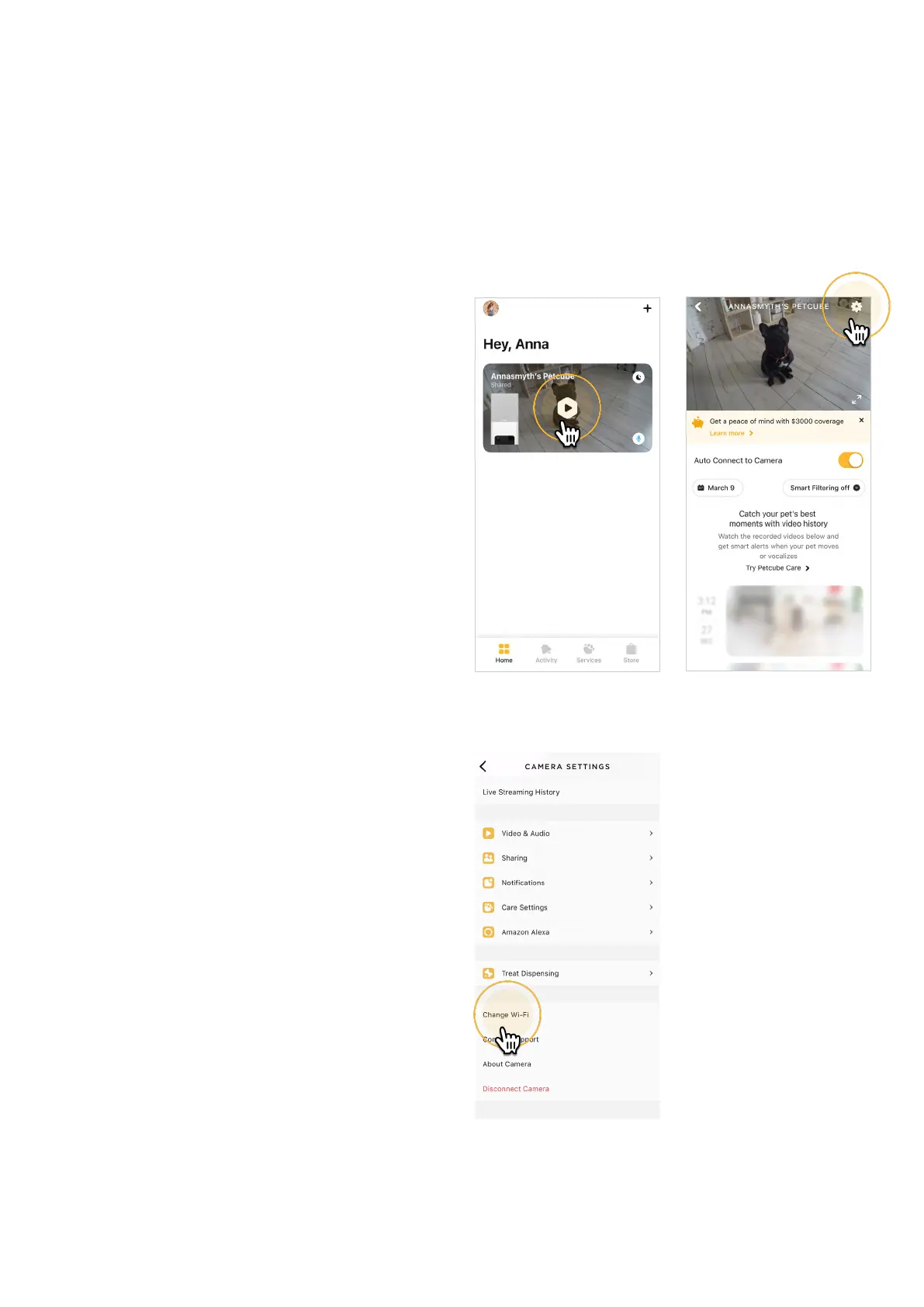
To reset the Wi-Fi password:
1. Open the Petcube app;
2. Go to the camera profile, tap
the ‘Settings’ wheel in the upper
right corner (fig 8.3.1);
5. Tap ‘Change Wi-Fi’ (fig 8.3.4);
6. Power up your Petcube, wait
1 minute until it starts up;
Fig. 8.3.1
Fig. 8.3.3
Fig. 8.3.2



 To Next Page