Introduction
•RewindButton
•ForwardButton
•PhoneButton
•SetupButton
•USBjack
•3.5AUXjack
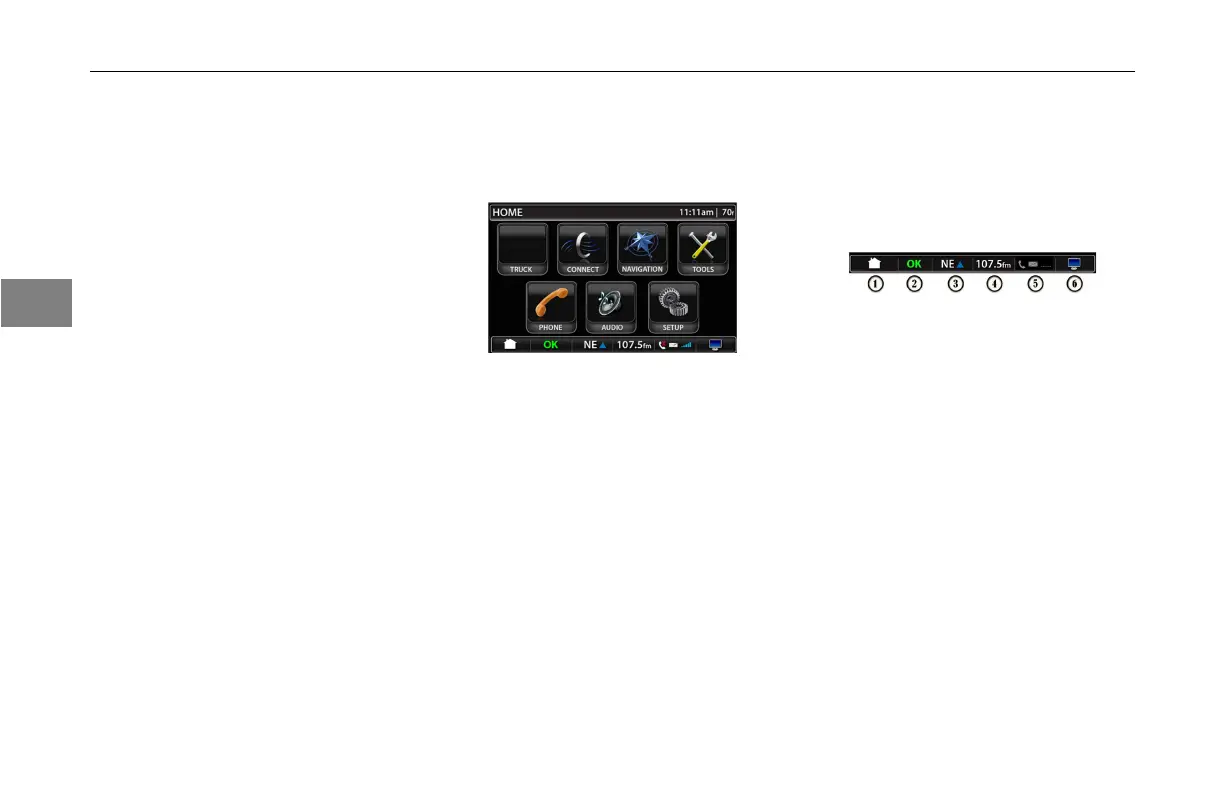
TouchScreenHomeMenu
Whenthesystemisrstturnedonit
willdefaulttothehomescreen.
•Truck
•Connect
•Navigation
•Tools
•Phone
•Audio
•SetUp
QuickJumpBar
The‘QuickJumpBar’isatthebottom
ofthescreen.Itallowsyoutogo
directlytootherscreenswithonepress
ofthebutton.
1.Home
Takesyoutothehomescreen.It
willdisplayoneveryscreenexcept
thehomemenuscreen.Itwillbe
grayandinactiveonthehome
screen.
2.OK
Takesyoutothetruckscreen
options.ThegreenOKiconwillbe
onifallsystemsworkingOK.Ifthe
systemsarenotOKa“!”warning
iconwillappear.
3.Navigation
Takesyoutothenavigation
screen.Itwilldisplaythecurrent
compassheading.
3-
4
3



 To Next Page