Introduction
4.Audio
Takesyoutothecurrentactive
audioscreen.
5.Phone
Takesyoutothecurrentactive
phonescreen.
Ifnophoneisconnectedthe
phonewillbegray.TheredXwill
bepresentifacallismissedona
Bluetooth®connectedphone.
Theenvelopeisgrayifthereare
notextmessages.
6.ScreenDisplaySettings
Allowstheusertomakechanges
tothescreensuchasturning
thescreenoff,displayinginday
ornightmode,andadjusting
brightness.
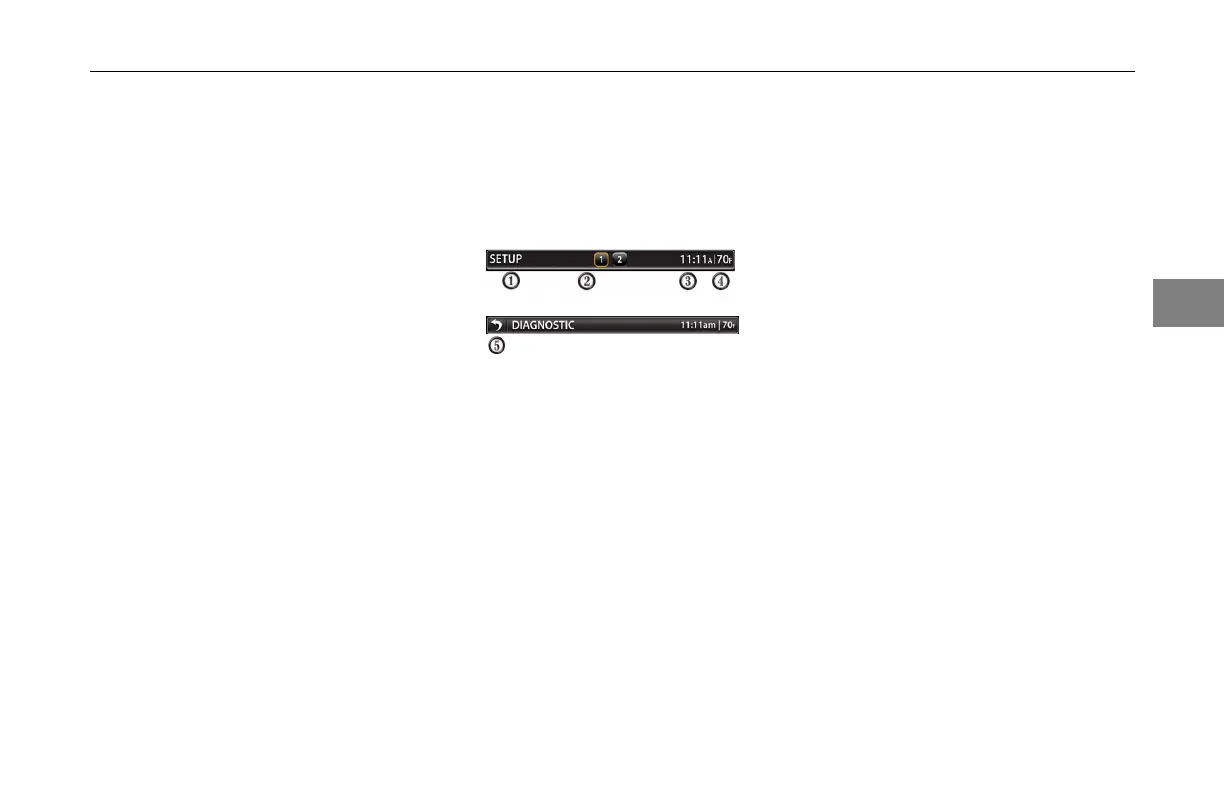
TitleBar
TheTitleBarisatthetopofthescreen.
Noteveryscreenwillhavethetitlebar
duetotheparticularoptionsforeach
screen.
1.Identicationof
Screen/Function
Thescreen/functionshowsthe
screentheuseriscurrentlyon.
2.AvailableScreenPages
Thescreenpagesshowtheuser
ifmultiplepagesareavailable.
Thisfeatureisonlyavailableon
menuswheremorethanonepage
isavailable.Youcanpressthe
pagenumberonthescreentogo
tothatpage.
3.Time
Thetimedisplaydisplaysthe
currentsystemtime.
4.Temperature
Thetemperaturedisplaydisplays
theoutsidetemperature.
5.BackButton
Pressingthebackbuttonallows
theusertogobackonescreen.
Thebackbuttonisonlyvisible
whenyougettothethirdscreenof
thecurrentmenuyouarein.
3-5
3



 To Next Page