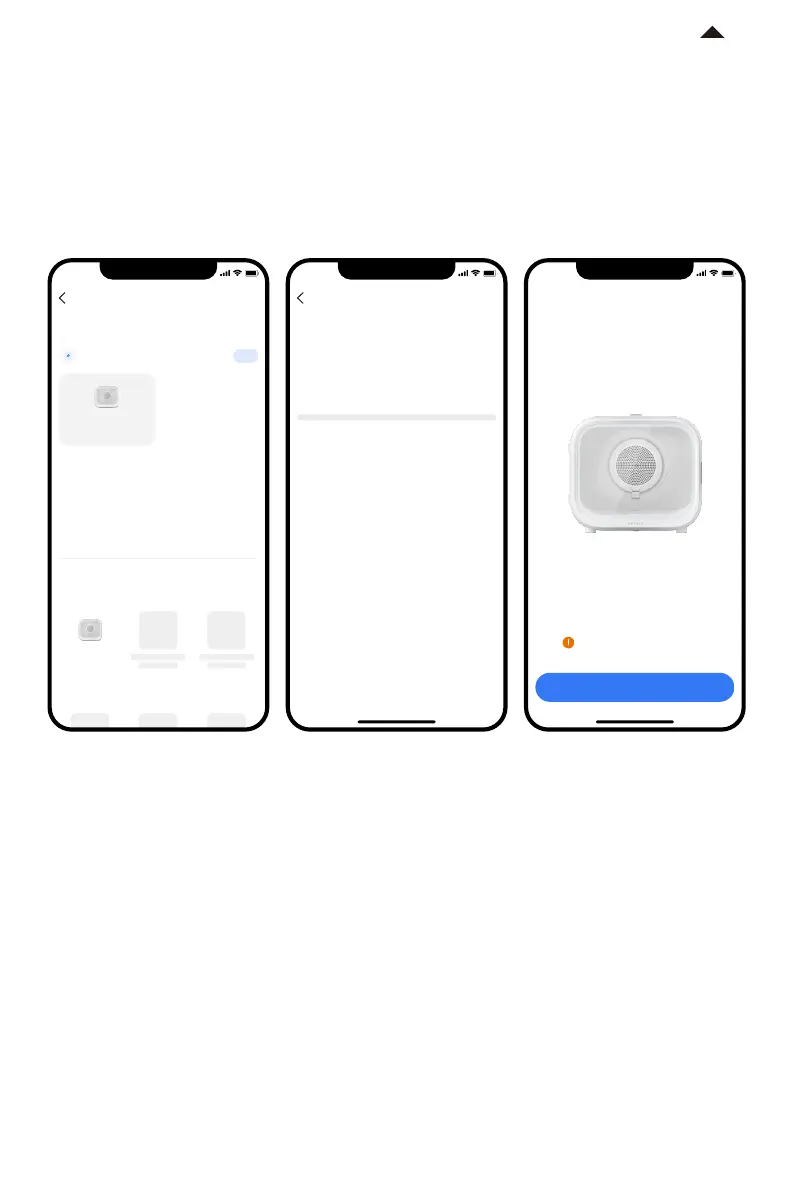
4. Start connection
① Scan and click "PETKIT AIRSALON MAX”, or manually select "PETKIT AIRSALON MAX ”
from the list and start connection.
② The App will attempt to connect to the device, please wait until “Connected” is displayed.
9:41
Add a device
Add manually
Nearby devices
Cleaning
PETKIT AIRSALON
MAX
Food Dispenser
Searching for FIT nearby
1
PETKIT AIRSALON
MAX
-7-
*Note: In order to provide better products, we will
regularly update and improve the App.
If there are dierences with APP pictures,
please refer to the actual product.
9:41
Connectdevice
Connecting…
9:41
Read the instruction
Connected
Super large space to bring you a new
experience of smart drying care
For your pet's safety, please read
the instruction carefully
RETURN TO
CONTENT




 To Next Page