19
Battery Replacement
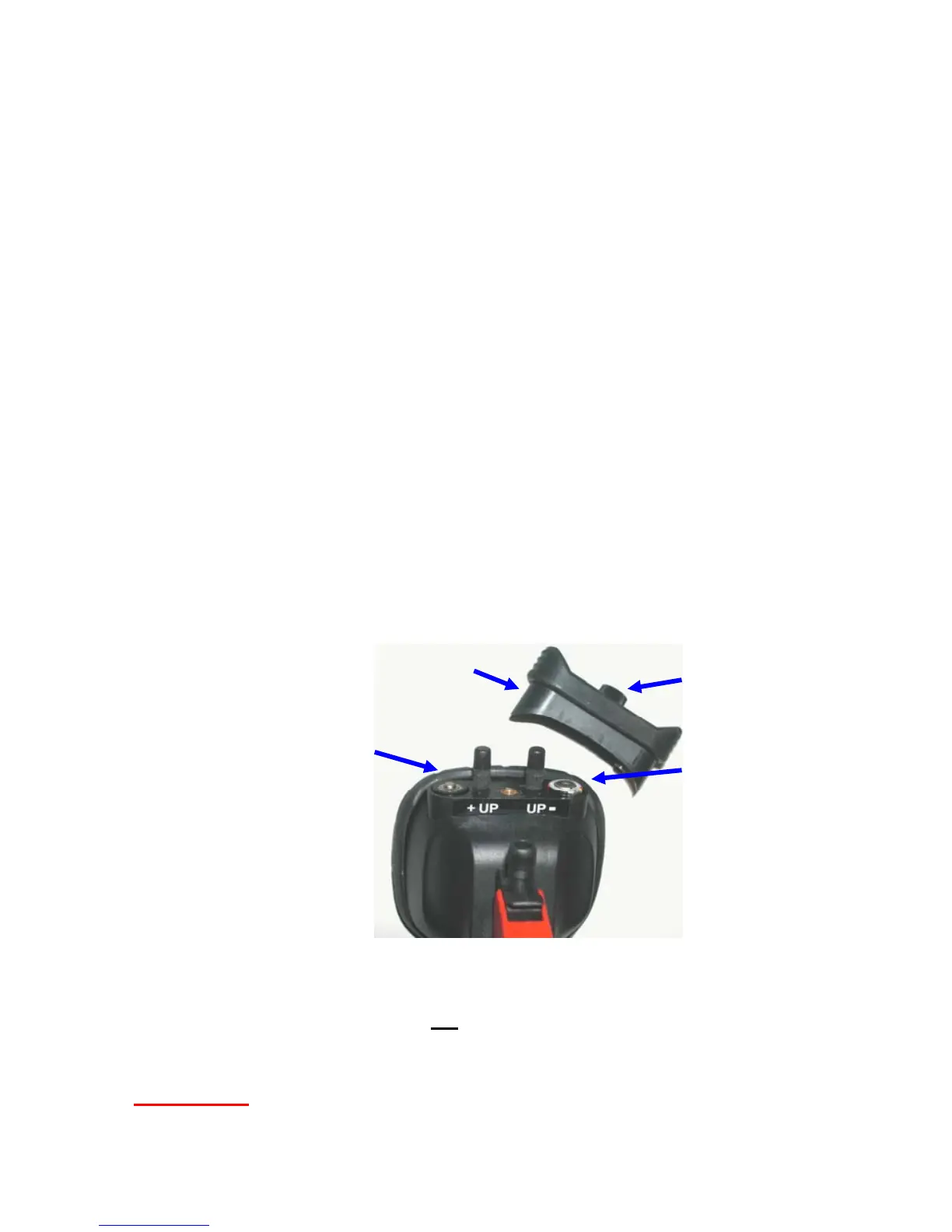
Loosen the battery change screw and remove the battery cover.
While observing polarity, replace the depleted batteries with fresh
ones. To reinstall the cover:
1) press it firmly down against the battery compartment
using two fingers (one on each side of the screw)
2) retighten the screw firmly (Do not over tighten)
Always replace both batteries
Do not mix types, brands, or models of batteries in petMAP
Be certain the batteries are installed according to the polarity
symbols marked on the battery compartment.
Warning: Improper installation of batteries will prevent
petMAP from working and may damage the device.
Use new AAA batteries (Alkaline, Lithium, Nickel Metal
Hydride (Rechargeable), no
NICAD or “Heavy Duty”)
WARNING:
IMPROPER INSTALLATION OF BATTERIES WILL
PREVENT THE petMAP FROM WORKING AND MAY CAUSE
DAMAGE TO THE DEVICE!
Negative
Terminal Up
After replacing
batteries, turn
petMAP ON to
confirm proper
operation.
Battery
Change Screw
Battery
Cover
Positive
Terminal Up
LoBat signal activates. However, if either lithium batteries or
NiMH rechargeable batteries are being used, a much shorter
period of continuous use following the LoBat signal is to be
expected.



 To Next Page