EasyManua.ls Logo

Pettersson D500X - User Manual

Pettersson D500X
26 pages
Print Icon
To Next Page IconTo Next Page
Loading...
D500X USER’S MANUAL
Firmware version 2.2.6
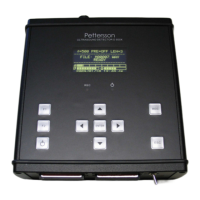
The D 500X is an ultrasound recording unit intended for long-term, unattended recording of
bat calls. The recorder is equipped with four slots for CF cards. The triggering system allows
the device to start recording as a sound is detected. The recording length can be selected in
steps from 0.3 up to 20 seconds. In order not to fill the card too fast at locations with high
activity, a minimum time between two recordings can be applied. The recorder is normally
operated in a low-power mode with no pre-trigger (i.e. the recording starts as the sound
exceeds the chosen threshold level), but both pre-and post-trigger functions are available in
the standard (not low-power) mode.
Some of the features of the D500X are:
Built-in electret microphone
Jack for external microphone
Powered either from 4 AA cells (internal) or external batteries/power supply
Timer to turn the unit on/off at desired intervals
Weather-protected housing (built-in microphone requires some protection)
Size: 165 x 170 x 53 mm, rugged aluminium housing
Sampling rates: 44.1 kHz, 300 kHz and 500 kHz (optimized for 500 kHz)
ADC resolution: 16 bits
Selectable high-pass filter to attenuate low frequency signals
Optional external trigger input jack
Time/date stamped sound files
Question and Answer IconNeed help?

Do you have a question about the Pettersson D500X and is the answer not in the manual?

Summary

GUARANTEE

LIMITATION OF LIABILITIES

Limits Pettersson's liability for damages from product misuse, modifications, or accidents; customer indemnifies Pettersson.

PRODUCT SAFETY NOTICE AND RESTRICTIONS

Intended for commercial use only. Not for life support or critical applications; customer assumes risk and indemnifies Pettersson.

Whats new in version 2.2.6?

Upgrading from version 2.1.3?

Top panel overview

CF card panel overview

Microphone panel overview

Settings menu overview

USER PROFILES

Defines and allows selection/editing of recording parameters for different scenarios.

RECORDING SETTINGS

Configuration options for gain, trigger level, and minimum recording interval.

TIMERS

Configuration for setting absolute or relative timers for automatic device activation.

TIME SETTINGS

Configuration for date, time, time zone, and geographical location for accurate timing.

DISPLAY

Settings to control screen mode, timeout duration, and brightness.

UTILITIES

Access to CF card information, formatting, and battery settings.

Powering the D500 X

Using the D500 X for the first time

Changing the settings

USER PROFILES

Detailed parameters within user profiles: sampling frequency, pre-trigger, recording length, HP filter, etc.

RECORDING SETTINGS

TIMERS

TIME SETTINGS

DISPLAY

UTILITIES

Service modes

Formatting a CF card

Using more than one CF card

Choosing CF card type

Using the D500 X for automatic recording

Using the D500 X for manual recording

The Power Fail Resume function

File management

File metadata

The D500 X Utility

Transfer D500 X firmware to CF card

Recorded data files

Copy & Rename function

Connecting external devices to the D500 X

External microphone

Details the pinout for connecting an external microphone to the D500X.

External batteries

Details the pinout and voltage requirements for connecting external DC power.

External trigger signal

Weather protection

System requirements

Pettersson D500X Specifications

General IconGeneral
BrandPettersson
ModelD500X
CategoryRecording Equipment
LanguageEnglish