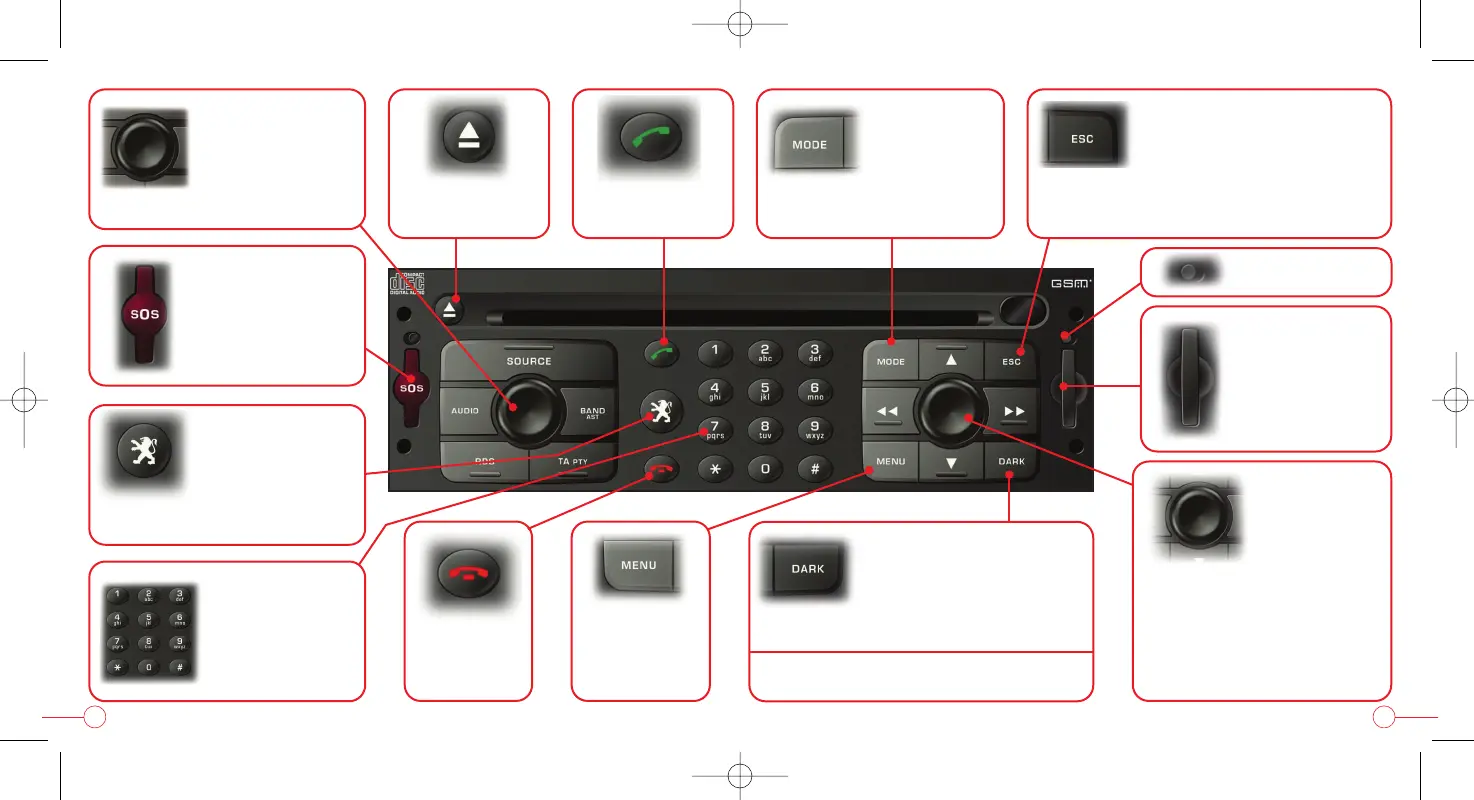
Press = on / off /
switching off of
the audio source
Rotation = volume
adjustment
CD eject (audio
or navigation)
Services menu
Press for between
2 and 8 seconds =
SIM card flap
SIM card eject
Pick up
Telephone menu
Alphanumeric
inputting keypad
Cancelling the current
operation
Press for more than 2 seconds =
clearing of the superimposed displays
Press = confirmation of the
function - menu of
the function displayed
Rotation = moving around
the menu or the screen -
adjustment - map zoom
1st press: displaying of
the upper band
2nd press: cutting off of
the brightness
3rd press: return to
the function displayed
Press for more than 5 seconds =
restarting of the system (Reset)
"PEUGEOT assistance"
Changing
the function
displayed
Press for more than 2 seconds =
general information
Main menu
Press for more
than 2 seconds -
Help menu
Press for
between 2 and
8 seconds =
emergency call
54
Hang up


 To Next Page