11
4.5. LC-Display
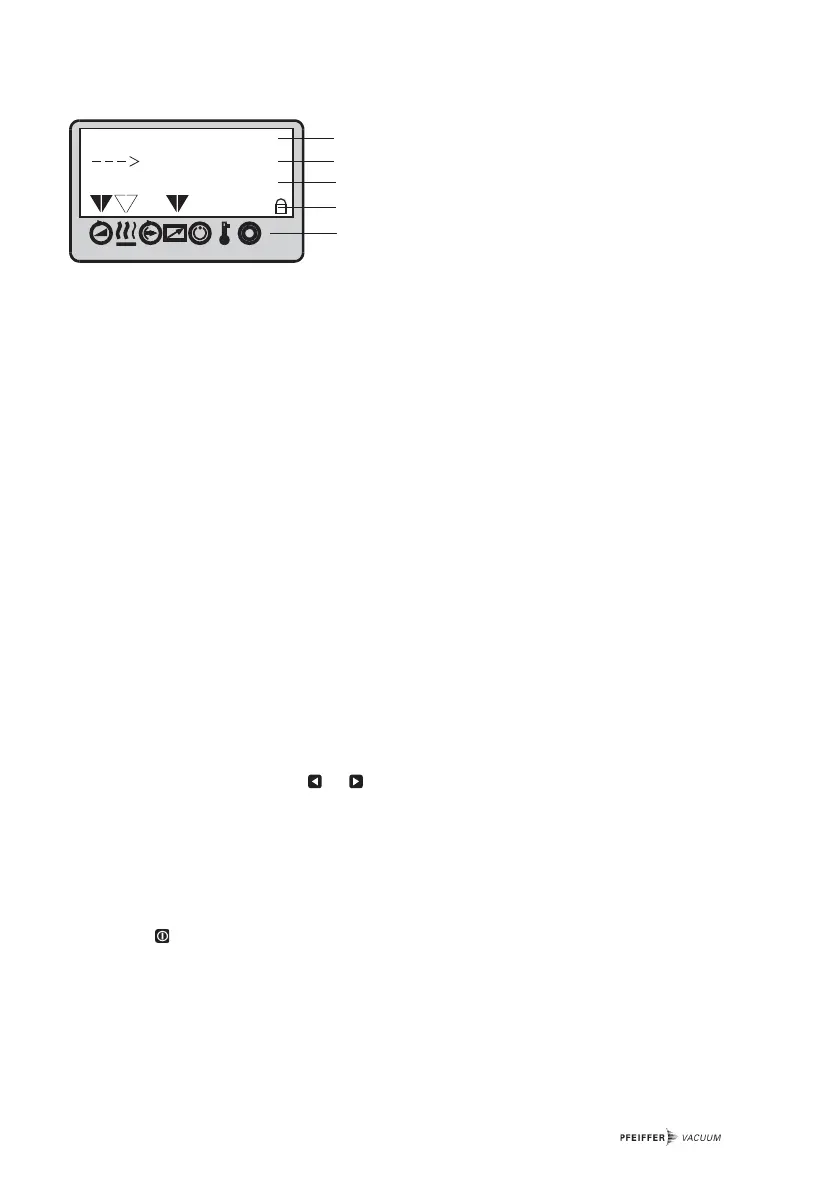
The functions are displayed via a four line LC display. A special function is assigned to each line:
–
LLiinnee 11::
Number and name of the selected parameter (for example 721: >>Vent time<<).
–
LLiinnee 22
: Relating value. If an arrow (--->) is displayed, the displayed value can be altered.
–
LLiinnee 33::
Two functions
FFuunnccttiioonn 11
: Messages relating to operations and operating are displayed. (see table
“Operating Messages” in the operating instruction “Pumping Operations with DCU” and
“Error Codes”, section 5).
FFuunnccttiioonn 22
: An optional second parameter in the form of >>Parameter number<< : >>value<<
is displayed. The function of this line enables setting via parameter
[[PP::779955]]
>>Servicelin<< at
line 1 . With >>Servicelin<< all parameters can be displayed. Error messages are displayed
independent of the selected function.
–
LLiinnee 44
: Arrows which points to the underlying symbol. This restores the unit status.
Please note:
Prolonged depressing of the key or enables rapid scrolling and/or alterations to the data.
The data mode (arrow ”--->” is displayed) is automatically relinquished, without taking over the
values to be altered, under the following conditions:
– No settings or key depressing for longer than 10 seconds.
– The occurrence of an error.
– The key has been depressed.
Line 1
Line 2
Line 3
Line 4
Symbols



 To Next Page