The UTG-2800 is a digital ultrasonic thickness gauge designed for accurate measurement of various materials. It operates on principles similar to SONAR, allowing it to determine material thickness with high precision, up to 0.001 inches. This instrument is suitable for testing a wide range of metallic and non-metallic materials.
Function Description:
The gauge measures thickness by accurately timing a short ultrasonic pulse generated by a transducer. This pulse travels through the material, reflects off the back or inside surface, and returns to the transducer. The measured two-way transit time is divided by two (to account for the down-and-back travel path) and then multiplied by the material's sound velocity to calculate the thickness. The formula used is H = (v * t) / 2, where H is thickness, v is sound velocity, and t is the round-trip transit time.
Key functions include:
- Material Versatility: Capable of measuring metals, plastics, ceramics, composites, glass, and other ultrasonic wave-conductive materials.
- Optional Transducers: Supports specialized transducers for rough surfaces and high-temperature applications.
- Calibration Functions: Features Probe-Zero, Sound-Velocity-Calibration, and Two-Point Calibration for enhanced accuracy.
- Work Modes: Offers both Single Point mode (four measurements per second) and Scan mode (ten measurements per second) for different inspection needs.
- Coupling Status Indicator: Provides visual feedback on transducer contact quality.
- Battery Indicator: Displays remaining battery capacity.
- Power Management: Includes auto-sleep and auto-power-off functions to conserve battery life.
- Data Printing: Compatible with an optional thermal mini-printer (MP-2800) for printing measured data via a USB port.
- Memory Management: Stores up to 20 files, with each file holding up to 99 thickness values.
- Sound Velocity Storage: Allows users to store multiple sound velocities for quick recall when testing different known materials (e.g., steel, aluminum, brass, plastic).
Important Technical Specifications:
- Display: 4.5 digits LCD with EL backlight.
- Measuring Range: 0.030” – 12.0” (0.75~300mm) in Steel.
- Sound Velocity Range: 3280-32805 ft/s (1000~9999 m/s).
- Resolution: Selectable between 0.001”/0.01mm.
- Accuracy: (± 0.5%Thickness+0.001”), dependent on materials and conditions.
- Units: Selectable Metric/Imperial.
- Measurement Rate: 4 readings/second in single point mode, 10 readings/second in Scan Mode.
- Memory: Up to 20 files (99 values per file).
- Power Source: Two “AA” size, 1.5 Volt alkaline batteries, providing approximately 100 hours of typical operating time (with EL backlight off).
- Communication: USB via output cable.
- Outline Dimensions: 150×74×32 mm.
- Weight: 245g.
- Operating Temperature: 0°- 140°F (-20~+60℃).
- Storage Temperature: 22° - 150°F (-30℃~+70℃).
- Relative Humidity: ≤90%.
Usage Features:
- Transducer Selection: Critical for accurate measurements, different transducers are required for various materials and applications (e.g., rough surfaces, high temperatures, thin walls, small curvatures). Factors like initial signal strength, absorption/scattering, transducer geometry, and material temperature influence selection.
- Surface Preparation: The test surface must be clean, free of particulate matter, rust, or scale to ensure proper transducer seating and reliable measurements. Extremely rough surfaces can diffuse and scatter the sound beam, making measurements difficult. Uneven wear on the transducer wearface can also lead to erroneous readings.
- Power On/Off: The instrument is turned on by pressing the power key and retains all settings when powered off.
- Probe Zero: Essential for correcting fixed error values. This procedure involves applying couplant to a metal probe-disc on the gauge, pressing the transducer against it, and activating the probe zero mode. It's recommended to perform a probe zero whenever the gauge is turned on or a different transducer is used.
- Sound Velocity Calibration:
- Calibration to Known Thickness: Requires a sample piece of known thickness. After a Probe-Zero, couplant is applied, the transducer is pressed against the sample, and the displayed thickness is adjusted to match the known value. The gauge then calculates and stores the sound velocity.
- Calibration to Known Velocity: Requires knowing the material's sound velocity. The user enters the known velocity, and the gauge is ready for measurements. A table of common sound velocities is provided in Appendix A.
- Two-Point Calibration: For greater accuracy over small ranges, this method involves calibrating at two known thickness points on the test piece.
- Making Measurements: Apply a small amount of couplant to the surface, then firmly press the transducer against the material. The coupling status indicator and a stable digit reading confirm a valid measurement. If the indicator is unstable or readings are erratic, check couplant and transducer seating. The gauge updates readings four times per second in normal mode.
- Scan Mode: For examining larger regions and finding the thinnest point, Scan Mode performs ten measurements per second. The gauge tracks and displays the lowest measurement found while scanning.
- Changing Resolution: Selectable between 0.01" / 0.001” (0.1mm and 0.01mm) by pressing the UNIT/RES key while powering on.
- Changing Measuring Units: Switch between imperial and metric units by pressing the UNIT/RES key in measurement mode.
- Memory Management (Storing, Clearing, Viewing/Deleting):
- Storing: Press the data save key after a new measurement to save the thickness value to the current file. Files can be selected for storage.
- Clearing: Entire files can be cleared by selecting the file and pressing the appropriate key.
- Viewing/Deleting: Records can be viewed and individually deleted from stored files.
- Sound Mode: Activates a short beep when a key is pressed, a measurement is taken, or a value exceeds tolerance limits. Can be switched on/off.
- EL Backlight: Provides illumination for use in dark conditions. Can be switched on/off as needed, but consumes more power.
- Battery Information: Displays battery capacity. Flashing battery icon indicates low battery, requiring replacement.
Maintenance Features:
- Cleaning: Clean the probe and cable after each use to prevent grease, oil, and dust from causing aging and cracking.
- Battery Removal: Remove batteries if the UTG-2800 will not be used for an extended period to prevent leakage and corrosion.
- Storage: Avoid storing the unit in damp or extremely hot environments.
- System Reset: Pressing the PRB/CAL key while powering on restores factory defaults and clears all memory data. This is useful if parameters become corrupted.
- Servicing: All service and repairs must be conducted through the Phase II Service Department. A return authorization number is required for defective testers. Any attempt at home repair will void the warranty.

 Need help?
 General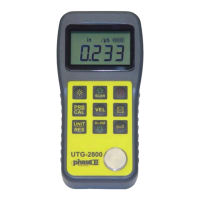

 To Next Page