4.13 Auto Power Off
The instrument features an auto power off function designed to conserve battery life. If the tool is idle for 5
minutes, it will turn itself off.
4.14 System Reset
Press down the
key while powering on the instrument will restore factory defaults. All the memory data
will be cleared during system reset. The only time this might possibly helpful is if the parameter in the gauge was
somehow corrupted.
4.15 Connecting to a Computer
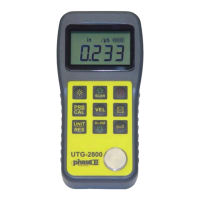
The UTG-2800 is equipped with a USB port. Using the accessory cable, the gauge has the ability to connect
to a computer, or external storage device. Measurement data stored in the memory of the gauge can be
transferred to the computer through the USB port.
5 Service
ALL SERVICE AND/OR REPAIRS MUST BE DONE THROUGH THE PHASE II SERVICE DEPARTMENT.
A return authorization number is mandatory in order for a defective tester to be accepted for repair and/or replacement.
All testers must be accompanied by your warranty card or serial number. Complete description of problem and a
contact person for authorization of repairs must be supplied as well.
ANY ATTEMPT AT HOME REPAIR WILL AUTOMATICALLY VOID THE STATED WARRANTY!
NO EXCEPTIONS!
6 Transport and Storage
Be sure to clean the probe and cable after each use. Grease, oil and dust will cause the cable of the probe to age and
crack.
If the unit is not to be used for a long period of time, remove the batteries to avoid battery leakage and corrosion of the
battery contacts.
Avoid storing the unit in a damp or extremely hot environment.
www.calcert.com sales@calcert.com1.888.610.7664
0
5
10
15
20
25
30


 To Next Page