17
SETTING OF TEMPERATURE ALARM
This unit is provided with the high and low temperature alarm and the temperature at which the alarm is
activated is changeable.
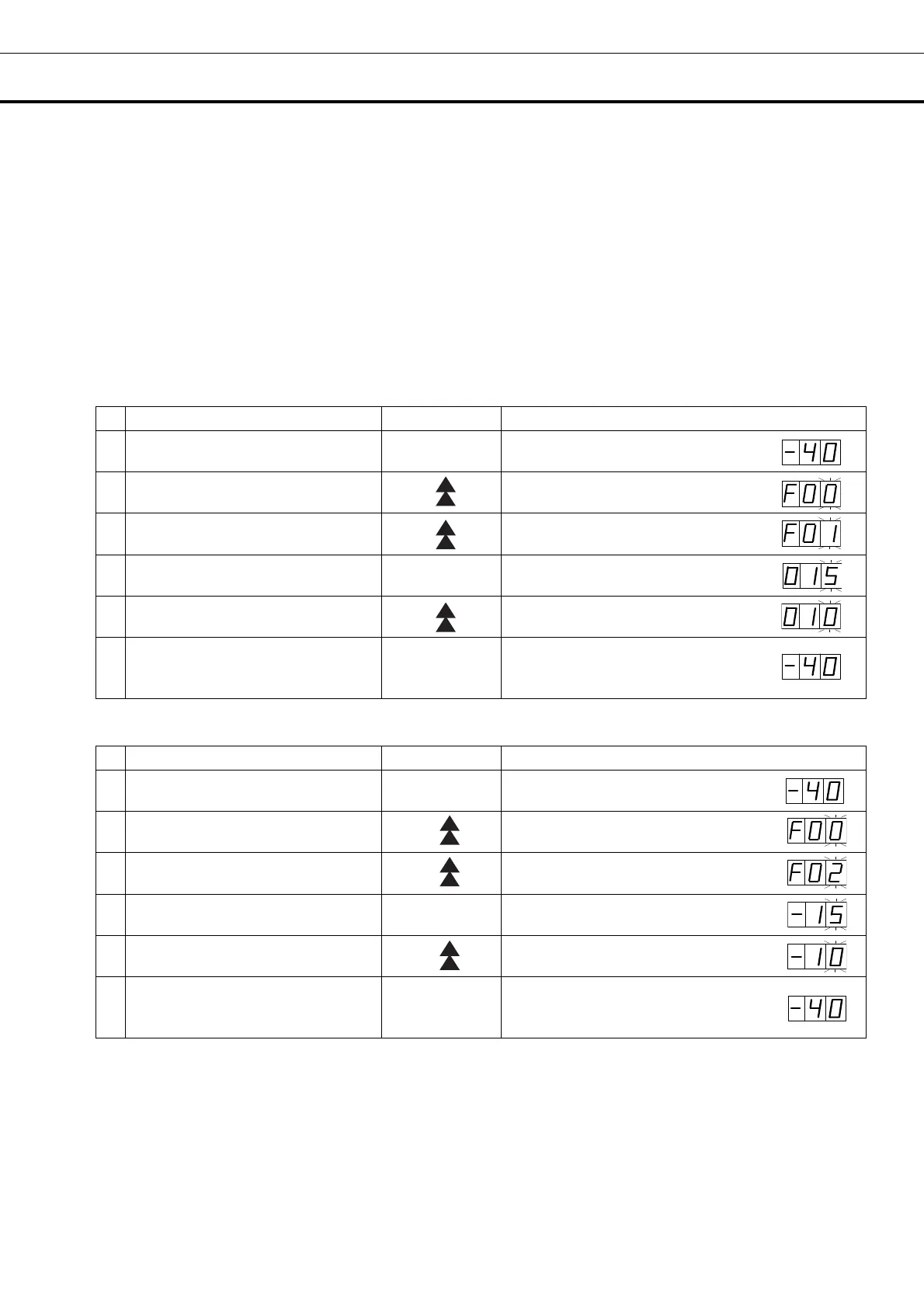
The following procedure shows the setting of alarm temperature according to the condition below:
High temperature alarm: activates at the temperature +10
o
C higher than the set temperature
Low temperature alarm: activates at the temperature -10
o
C lower than the set temperature
Note:
The alarm temperature is set at the factory +15
o
C higher and lower than the set temperature.
The available range of alarm temperature is between +5
o
C and +20
o
C higher or lower than the set
temperature.
Table 4. Procedure for setting high temperature alarm (Change from +15
o
C to +10
o
C)
Description of operation Key operated Indication after operation
1 ----
The current chamber temperature is
displayed.
2
Press numerical value shift key for
about 5 seconds.
The first digit is flashed.
3
Press numerical value shift key
and scroll the figure to 1.
When pressed, the figure of settable
digit change.
4 Press set key. SET
The current setting is displayed and
the first digit is flashed.
5
Scroll the figure to 010 by using the
numerical value shift key
When pressed, the figure of settable
digit changes.
6 Press set key. SET
Alarm temperature is memorized and
the current chamber temperature is
displayed.
Table 5. Procedure for setting low temperature alarm (Change from -15
o
C to -10
o
C)
Description of operation Key operated Indication after operation
1 ----
The current chamber temperature is
displayed.
2
Press numerical value shift key for
about 5 seconds.
The first digit is flashed.
3
Press numerical value shift key
and scroll the figure to 2.
When pressed, the figure of settable
digit change.
4 Press set key. SET
The current setting is displayed and
the first digit is flashed.
5
Scroll the figure to -10 by using the
numerical value shift key
When pressed, the figure of settable
digit changes.
6 Press set key. SET
Alarm temperature is memorized and
the current chamber temperature is
displayed.
■ The alarm temperature set mode returns to the temperature display mode automatically when 90
seconds has passed without any key operation.


 To Next Page