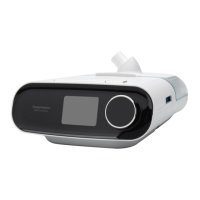
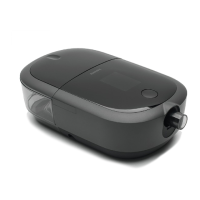
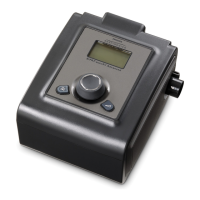
The Philips Respironics BiPAP autoSV Advanced System One is a non-invasive ventilatory support device designed for adult patients (over 30 kg/66 lbs) suffering from Obstructive Sleep Apnea, Respiratory Insufficiency caused by central and/or mixed apneas, and periodic breathing. It can be used in both hospital and home settings.
Function Description:
The device augments breathing by supplying pressurized air through a circuit. It monitors the patient's breathing effort by sensing airflow and adjusts its output to assist with both inhalation and exhalation. This is known as Bi-level ventilation, where a higher Inspiratory Positive Airway Pressure (IPAP) is provided during inhalation and a lower Expiratory Positive Airway Pressure (EPAP) during exhalation, making breathing easier.
Important Technical Specifications:
- Environmental:
- Operating Temperature: 5° to 35° C (41° to 95° F)
- Storage Temperature: -20° to 60° C (-4° to 140°F)
- Relative Humidity (operating & storage): 15 to 95% (non-condensing)
- Atmospheric Pressure: 101 to 77 kPa (0 - 2286 m / 0 - 7500 ft)
- Physical:
- Dimensions: 18 x 14 x 10 cm (7" L x 5.5" W x 4" H)
- Weight (Device with power supply): Approximately 1.53 kg (3.37 lbs)
- Electrical:
- AC Power Consumption (with 60W power supply): 100 – 240 VAC, 50/60 Hz, 2.1 A
- AC Power Consumption (with 80W power supply): 100 – 240 VAC, 50/60 Hz, 2.0 A
- DC Power Consumption: 12 VDC, 6.67 A
- Fuses: No user-replaceable fuses.
- Noise:
- Minimum Alarm Sound Level: 45 dB(A)
- A-weighted emission sound pressure level: 27 dB(A) with an uncertainty of 2 dB(A).
- A-weighted sound power level: 35 dB(A) with an uncertainty of 2 dB(A).
- Pressure Accuracy:
- Pressure Increments: 4.0 to 25.0 cm H₂O (in 0.5 cm H₂O increments)
- Static: ± 0.5 cm H₂O (device and device w/ humidifier)
- Dynamic (< 10 cm H₂O): ≤ 0.5 cm H₂O (device and device w/ humidifier)
- Dynamic (≥ 10.0 to 25 cm H₂O): ≤ 1.0 cm H₂O (device and device w/ humidifier)
- Control Accuracy:
- Breath Rate: 4 to 30 BPM (greater of ± 1 BPM or ± 10% of setting)
- Inspiration time: 0.5 to 3 seconds (± (10% of setting + 0.1 second))
- Displayed Parameter Accuracy:
- Estimated Leak Rate: ± (5 + 15% of reading) LPM (Resolution: 1 LPM, Range: 0 to 200 LPM)
- Exhaled Tidal Volume: ± (25 + 15% of reading) mL (Resolution: 1 mL, Range: 0 to 2000 mL)
- Respiratory Rate: greater of ± 1 BPM or ± 10% of reading (Resolution: 1 BPM, Range: 0 to 60 BPM)
- Exhaled Minute Ventilation: ± (1 + 15% of reading) LPM (Resolution: 1 LPM, Range: 0 to 99 LPM)
- Standards Compliance: IEC 60601-1, IEC 10651-6, EN 60601-1-2, RTCA/DO-160F section 21.
- Ingress Protection: Device: Drip Proof, IP22; Power supplies: Drip Proof, IP22.
Usage Features:
- Control Buttons:
- LCD Display Screen: Shows therapy settings, patient data, and messages.
- Humidifier Icon and Number Settings: Indicates humidifier/heated tube status and allows adjustment of humidifier/heated tube settings (0-5).
- Control Wheel/Push Button: Toggles between options, selects options, and turns airflow on/off.
- Ramp Button: Activates/restarts ramp function when airflow is on, or Mask Fit Check when airflow is off. Lights up during therapy or alerts.
- Alarm Silence/Indicator Button: Silences audible alarms and indicates alarm conditions (red flashing for high priority, yellow flashing for medium, yellow solid for low).
- Therapy Features:
- Bi-Flex Comfort Feature: Provides pressure relief during the latter stages of inspiration and active exhalation. Levels 1-3 offer progressively increased relief.
- Ramp Feature: Gradually increases pressure from a lower starting point to the prescription pressure, aiding in falling asleep. Ramp time is adjustable from 0 to 45 minutes, and ramp start pressure from 4 cm H₂O to minimum EPAP.
- Rise Time: Adjusts the time it takes for the device to transition from EPAP to IPAP. Levels 0-3, with 0 being fastest and 3 slowest. Not adjustable when Bi-Flex is enabled.
- Mask Fit Check Feature: Delivers a test pressure for 40 seconds to measure mask leak before therapy, indicating optimal fit (✔) or potential issues (X).
- Humidifier Preheat: Preheats the water tank for up to 30 minutes before therapy starts when a humidifier is attached and the blower is off.
- Auto On: Automatically starts airflow when the mask is applied to the airway and breathing begins.
- Humidifier LED Backlight/Ramp Backlight: Enables/disables the LED backlight for humidifier number settings and the Ramp button.
- Device Screens:
- Home Screen: Displays "Therapy," "Bi-Flex" (or "Rise time"), "Info," and "Setup" options.
- Monitor Pressure Screen: Shows current pressure, timed breath indication, I/E state indication, ramp indication, icon bar, and therapy parameters (Respiratory Rate, Tidal Volume, Minute Ventilation, Leak).
- Setup Screen: Allows users to change settings such as Bi-Flex level, Rise time, Ramp time, Ramp start, Tubing Type (15, 22, 15H), SYSTEM ONE resistance (X1-X5), Heated tube humidification, Humidity level, Tube temperature, SYSTEM ONE humidification, Humidifier settings, Auto on, Humidifier LED Backlight/Ramp Backlight, and Language (EN/ES).
- Info Screen: Displays read-only information including Oximetry parameters (if module attached), Status (peripherals), Device Settings (max pressure, EPAP min/max, BPM, PS min/max), Monitor Parameters (Estimated Patient Pressure, Leak, Minute Ventilation, Tidal Volume, Respiratory Rate, SpO₂), Phone-in (total therapy/blower hours, days used, compliance check number), Compliance VIC, Therapy hours (1, 7, 30 day averages), Days > 4, Large leak (percentage of time in large leak, 1, 7, 30 day averages), AHI (Apnea/Hypopnea Indices, 1, 7, 30 day averages), Periodic Breathing (percentage of time in periodic breathing, 1, 7, 30 day averages), 90% EPAP (1, 7, 30 day averages), Average PS (Pressure Support, 1, 7, 30 day averages), and Humidifier settings (power supply, tubing type, humidifier/tube temperature setting).
- Device Alerts:
- High Priority Alarms: Require immediate response (e.g., Loss of Power, Device Inoperative, Low Pressure, Low Speed, High Pressure, Low Pressure Support, Apnea, Low Minute Ventilation, Patient Disconnect). Indicated by red flashing button and specific audible patterns.
- Medium Priority Alarms: Require prompt response (e.g., Low Input Voltage). Indicated by yellow flashing button and 3-beep pattern.
- Low Priority Alarms: Require operator awareness (e.g., SD Card Corrupted, SD Card Full, SD Card: Remove and Reinsert, SD Card: Prescription Rejected). Indicated by yellow solid button and 2-beep pattern.
- Informational Messages: Provide notifications without being alarm conditions (e.g., SD Card: Prescription Accepted, SD Card Removed, Check Power Alert, Humidifier Alert, Power Supply Alert, Heated Tube Error Alert). Indicated by a brief 1-beep audible sound.
Maintenance Features:
- Air Filters:
- Uses a washable, reusable gray foam filter and an optional disposable white ultra-fine filter.
- Gray foam filter should be cleaned every two weeks and replaced every six months.
- White ultra-fine filter should be replaced after 30 nights of use or sooner if dirty; it is not washable.
- Dirty inlet filters can cause high operating temperatures and affect device performance.
- Cleaning the Device:
- Unplug the device.
- Wipe the outside with a cloth dampened with water and mild detergent.
- Allow to dry completely before plugging in.
- Inspect for damage after cleaning.
- Cleaning the Tubing:
- Clean before first use and daily.
- Disconnect from the device.
- Wash in warm water with mild detergent, rinse thoroughly, and air dry.
- SD Card: Records device usage information for home care provider evaluation.
- Service: The device does not require routine servicing. In case of unexplained changes, unusual sounds, damage, or water spillage, disconnect power and contact the home care provider.


 To Next Page
 General