19” LCD Color Monitor 190B7
37
9. Mechanical Instructions
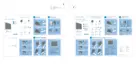
Steps of dismantling base stand from base column
Step 1: Place the monitor face down on a smooth surface as Fig 1. Be careful to avoid scratch and injury during the
uninstallation. Meanwhile, it is need to avoid pressing the control key.
Fig1
Step 2: Insert a sheet, as Fig 2.2, to the base stand as Fig 2.1.
The sheet’s dimension is about 5cm(L) x 1cm(W) x 1mm(D).
Fig2.1 Fig2.2



 To Next Page
 Loading...