EasyManua.ls Logo

Philips 21PT136B - Auto Store Function; Automatic Channel Finding; Initiating Auto Store; Television Operation

Philips 21PT136B
12 pages
Print Icon
To Next Page IconTo Next Page
To Previous Page IconTo Previous Page
Loading...
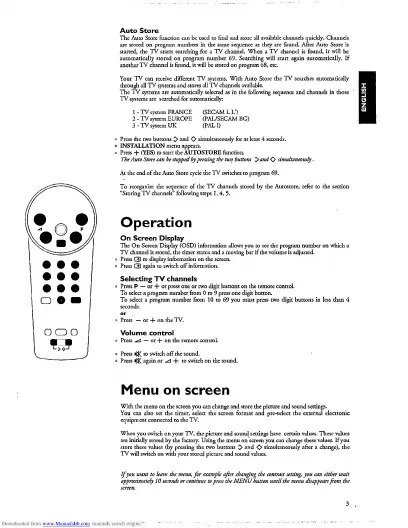
Auto
Store
are
stored
on
program
numbers
in
the
same
sequence
as
they
are
found.
After
Auto
Store
is
started,
the
TV
starts
searching
for
a
TV
channel.
When
a
TV
channel
is
found,
it
will
be
through
all
TV
systems
and.
The
TV
syster
.—
-
TV
systems
ar
res
all
TV
channels
available.
m
FRANCE
(SECAMLU)
:m
EUROPE
(PAL/SECAM
BG)
:m
UK
(PALI)
>
INSTALLATION
menu
appears,
o
Press
+
(YES)
to
start
the
AUTOSTORE
ftinction.
The
Auto
Store
can
be
stopped
by
pressing
the
two
buttons
0
and<>
simultaneously
.
(69.
To
reorganize
the
sequence
of
the
TV
channels
stored
by
the
Autostore,
refer
to
the
se
“Storing
TV
channels”
following
steps
1,4,
5.
Operation
On
Screen
Display
The
On
Screen
Display
(OSD)
information
allows
you
to
see
the
program
number
on
which
a
TV
channel
is
stored,
the
timer
status
and
a
moving
bar
if
the
volume
is
adjusted.
Press
G)
to
display
information
on
the
screen.
Press
CD
again
to
switch
off
information.
Selecting
TV
channels
Volume
control^
O
Press
|J£
to
switch
off
the
so
o
Press
ij$<
again
or
+
to;
Menu
on
screen
You
can
also
set
the
timer,
select
the
screen
format
and
pre-select
the
external
electronic
equipment
connected
to
the
TV.
are
initially
stored
by
the
factory.
Using
the
menu
on
screen
you
can
change
these
values.
If
you
store
these
values
(by
pressing
the
two
buttons
^
and
O'
simultaneously
after
a
change),
the
TV
will
switch
on
with
your
stored
picture
and
sound
values.
If
you
want
to
leave
the
menu,
for
example
after
changing
the
contrast
setting,
you
can
either
wait
approximately
10
seconds
or
continue
to
press
the
MENU
button
until
the
menu
disappears
from
the

Related product manuals