EasyManua.ls Logo

Philips 21PT136B - Per-Channel Volume Control; Setting Individual Channel Volumes; Peripheral Connections; Aerial Connection Guide

Philips 21PT136B
12 pages
Print Icon
To Next Page IconTo Next Page
To Previous Page IconTo Previous Page
Loading...
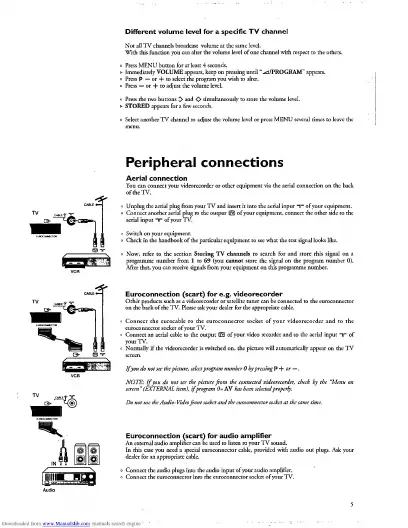
Different
volume
level
for
a
specific
TV
char
Not
all
TV
channels
broadcast
volume
at
the
same
level.
With
this
function
you
can
alter
the
volume
level
of
one
channel
with
respect
to
the
others.
o
Press
MENU
button
for
at
least
4
seconds.
>
Immediately
VOLUME
appears,
keep
on
pressing
until
“^/PROGRAM”
appears.
>
STORED
appears
for
a
few
seconds.
Peripheral
connections
Aerial
connection
°
Unplug
the
aerial
plug
from
your
TV
and
insert
it
into
the
aerial
input
ir
of
your
equipment.
°
Check
in
the
handbook
of
the
particular
equipment
to
see
what
the
test
signal
looks
like.
Now,
refer
Euroconnection
(scart)
for
e.g.
videorecorder
on
theb^kof’the'TV?KaseaSyowSer
fctdw^prapiiaecal
o
Connect
an
If
you
do
not
see
the
picture,
select
program
number
0
by
pressing
P
+
or
-
NOTE:
If
you
do
not
see
the
picture
from
the
connected
videorecorder
screen
(EXTERNAL
item),
if
program
0
=
AV
has
been
selected
properly.
Do
not
use
Euroconnection
(scart)
for
audio
amplifier
dealer
for
an
appropriate
cable.

Related product manuals