38
Meridian 4
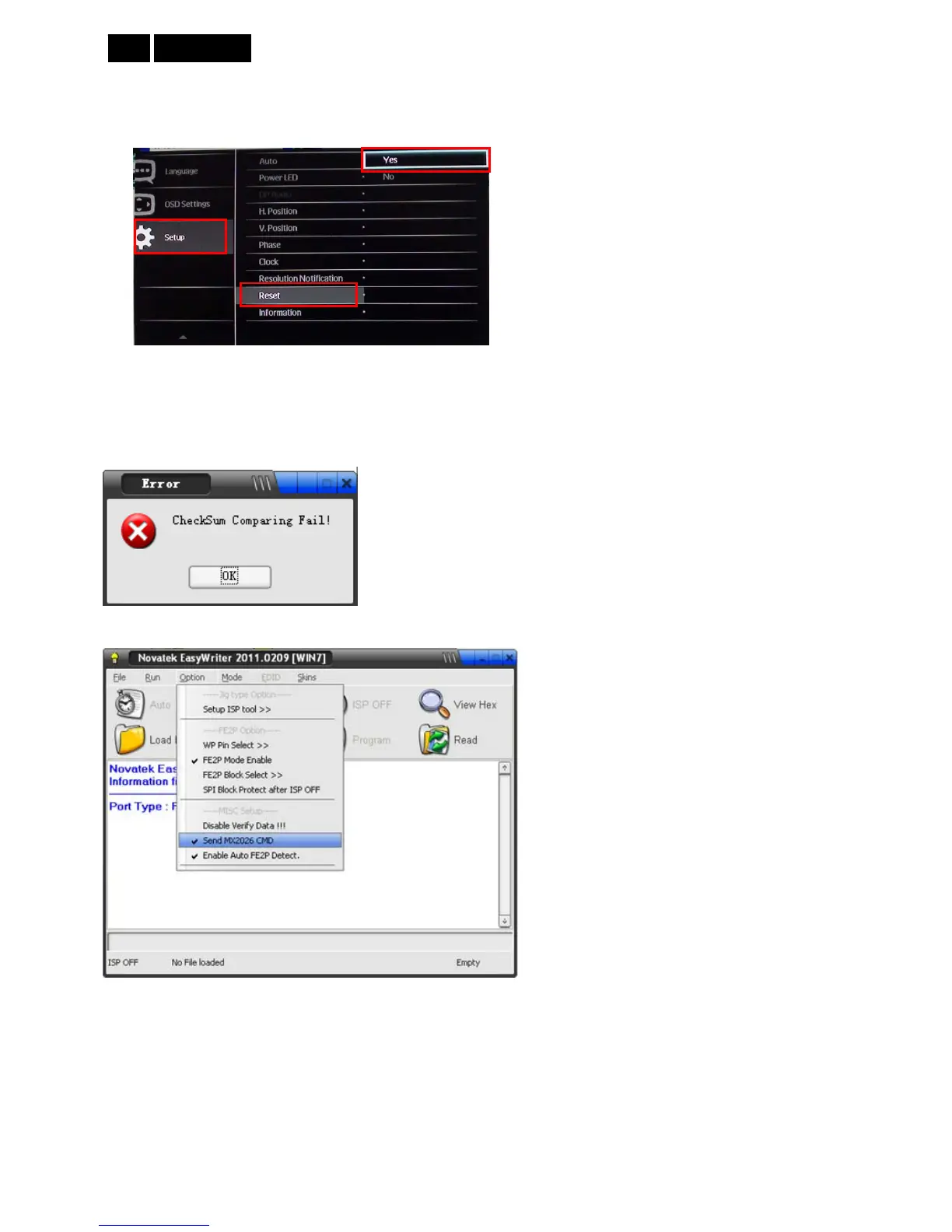
Reset the factory setting
1. Power on the monitor and open the user menu.
2. Do factory reset: Setup – Reset – Yes.
3. Factory reset will turn off “Burn in” mode which screen color switches among red, green, blue and black.
12.5 Troubleshooting:
“CheckSum Comparing Fail!” error.
Method: Tick the “Send MX2060 CMD” at Option item.
When can’t upgrade, please retry below several ways to upgrade.
(1) When the tool appears erase error, you can change another version tool to try.
(2) The program must be in the monitor standby state, while the fail communication with monitor might result the
monitor power off. In this situation, you may AC off the monitor for a while and then AC on to retry. Maybe the
defect will be cured.
(3) Change ISP JIG or cable.
(4) Change PC.













 To Next Page