72
TPE1.0U LA
8. Alignments
7.1.2 Use DVD Player:
Equipment: 1.Pioneer (model: DV-S969AVi) or equivalent
equipments.
2.DVD disk with "Macro Vision" protection.
Result : The picture should be shown Normally.
7. Preset EEPROM data
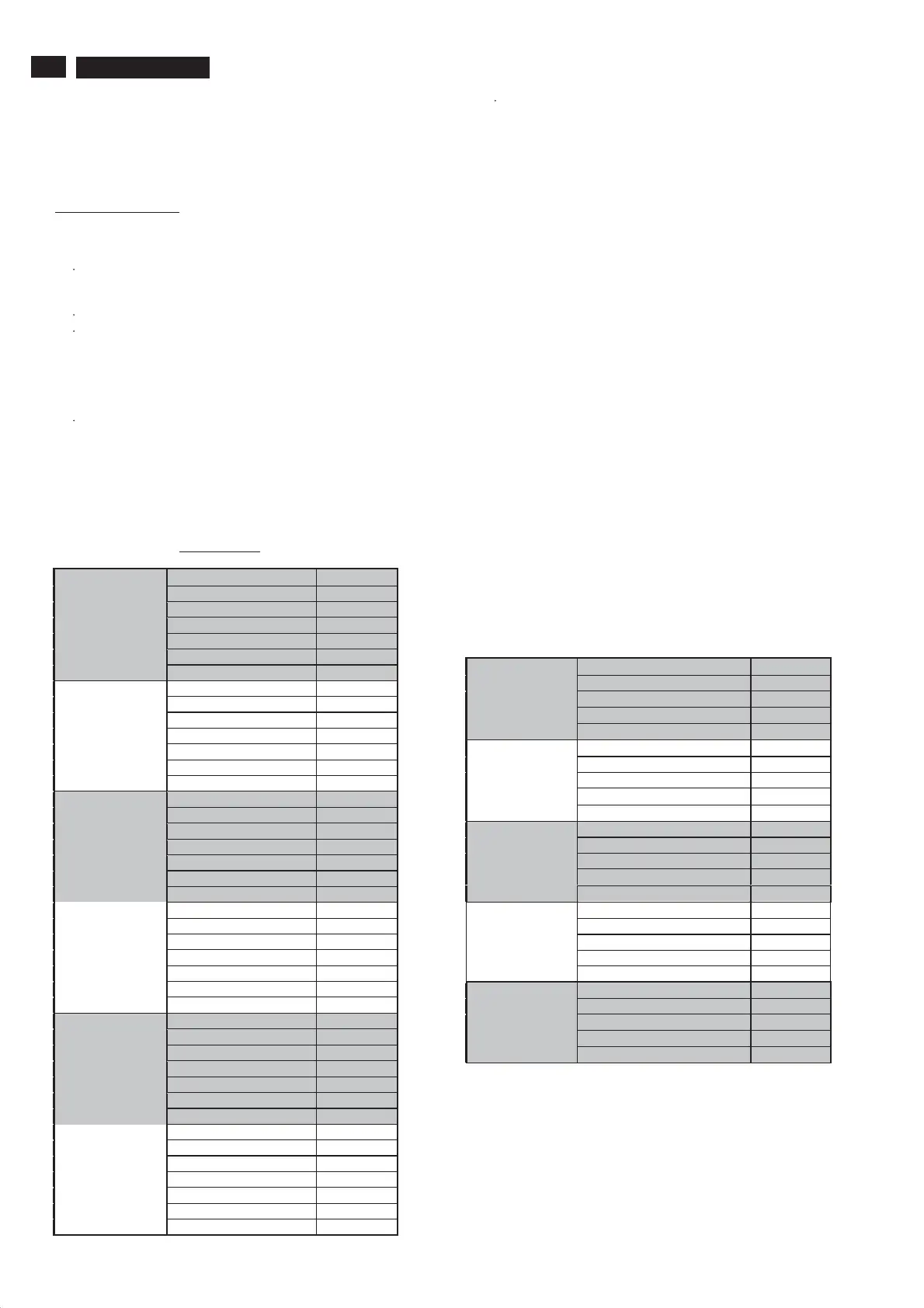
EEPROM data has to be preset data according following table.
7.1 Factory mode preset.
Hardware info:
A. SW version: EX11U-0.5.53.1_F FL2-0.1
B. SBY PROC version: 001.008.001.010
Operation hours: 0
Alignment
General
Tuner AGC: 32
Whitepoint
RedBLoffset:8
Green Bl offset: 5
Dealer options
Personal option
Picture mute: On
Virgin mode: Off
Digital caption options: default
Smart Picture
Personal
Contrast 90
Brightness 55
Color 62
Sharpness 3
Color temperature Normal
Tint 0
Picture format Automatic
Contrast 100
Brightness 50
Color 67
Sharpness 5
Color temperature Cool
Tint 0
Rich
Picture format Automatic
Natural
Contrast 83
Brightness 50
Color 55
Sharpness 3
Color temperature Normal
Tint 0
Picture format Automatic
Contrast 83
Brightness 50
Color 55
Sharpness 1
Color temperature Normal
Tint 0
Soft
Picture format Automatic
Multimedia
Contrast 100
Brightness 50
Color 67
Sharpness 1
Color temperature Cool
Tint 0
Picture format Automatic
Contrast 63
Brightness 50
Color 51
Sharpness 3
Color temperature Normal
Tint 0
Eco
Picture format Automatic
Options
Display
Screen: 021 26inch LCD LPL
Scanning backlight: Off
Dimming backlight: Off
Video repro
Comb filter: 3D comb
Ambient light: Off
MOP: Off
Source selection
HDMI1: with analog audio
HDMI2: None
USB version: USB 1.1
SPDIF input: None
Audio repro
Subwoofer internal present: Off
Acoustic system: None
7.2 Smart picture & Smart sound & Feature:
7.2.1 Fi nal TV mode out box setting.
a). Smart Picture : Personal
Color Temp in Factory mode : Normal
Notice: These setting only could modify in factory mode for
user , excluding "Personal", these menus should be blanking.
b).Smart Sound : Personal
SOUND VOLUME : 30
Balance :0
Head phone : 30
Sound mode : Stereo
Alternative audio : main
Digital audio language : English
Mono/Stereo : tbd
AVL : OFF
Delta volume: 0
EQ Setting
Personal
EQ BAND1 120Hz +0
EQ BAND2 500Hz +0
EQ BAND3 1.5KHz +0
EQ BAND4 5KHz +0
EQ BAND5 10KHz +0
EQ BAND1 120Hz -2
EQ BAND2 500Hz -1
EQ BAND3 1.5KHz +0
EQ BAND4 5KHz +1
Speech
EQ BAND5 10KHz +1
Music
EQ BAND1 120Hz +2
EQ BAND2 500Hz +1
EQ BAND3 1.5KHz +1
EQ BAND4 5KHz +2
EQ BAND5 10KHz +3
EQ BAND1 120Hz +1
EQ BAND2 500Hz +0
EQ BAND3 1.5KHz +0
EQ BAND4 5KHz +1
Movie
EQ BAND5 10KHz +2
EQ BAND1 120Hz +3
EQ BAND2 500Hz +2
EQ BAND3 1.5KHz +0
EQ BAND4 5KHz +0
Multimedia
EQ BAND5 10KHz +0
www.freeservicemanuals.info








 To Next Page