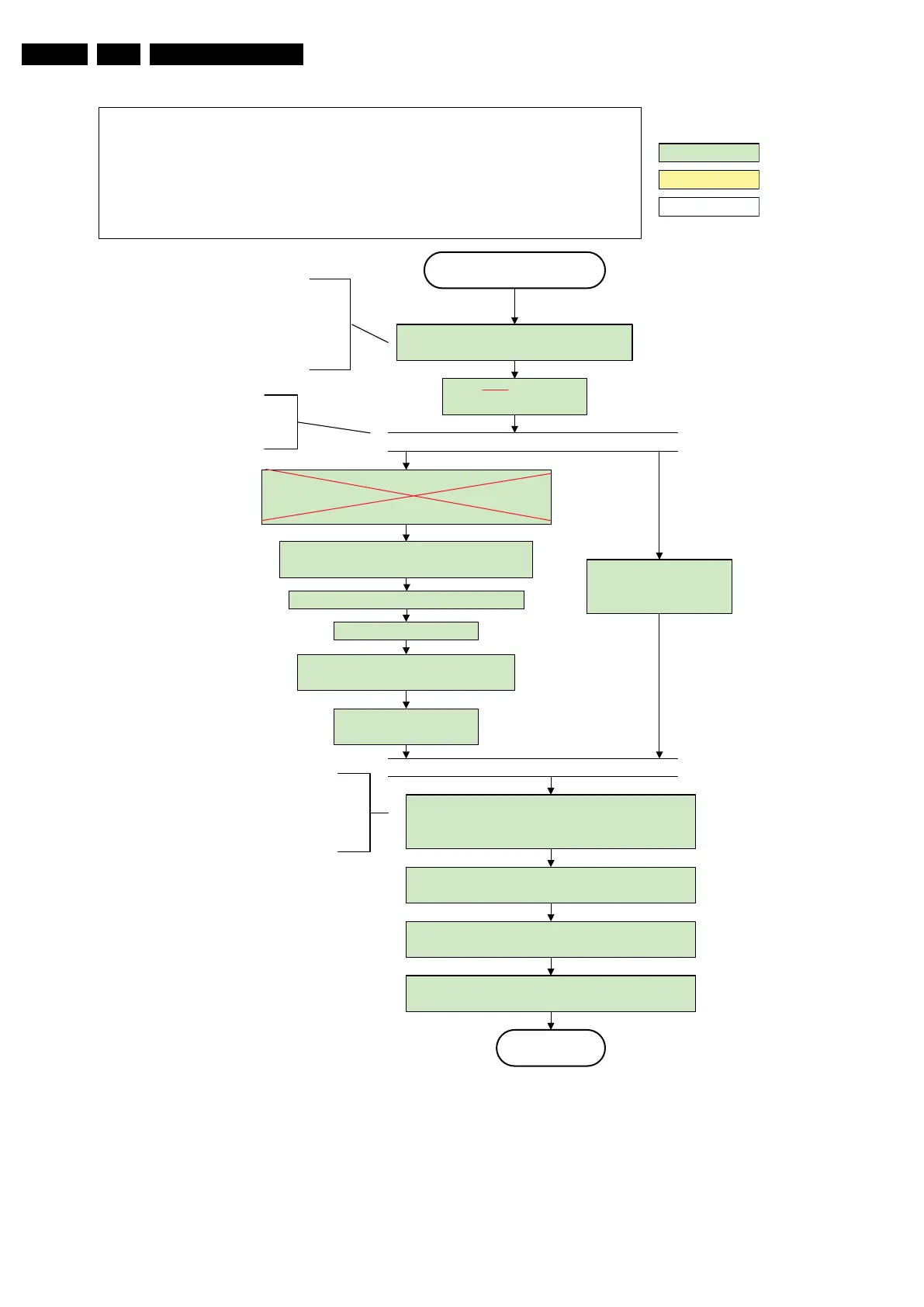
Active
Semi Standby
action holder: AVC
autonomous action
action holder: St-by
Initialize audio and video
processing IC's and functions
according needed use case.
Assert RGB video blanking
and audio mute
Wait until previous on-state is left more than 2
seconds ago. (to prevent LCD display problems)
The assumption here is that a fast toggle (<2s)
can only happen during ON->SEMI ->ON. In
these states, the AVC is still active and can
provide the 2s delay. If the transition ON->SEMI-
>STBY->SEMI->ON can be made in less than 2s,
we have to delay the semi -> stby transition until
the requirement is met.
Switch Audio-Reset low and wait 5ms
Constraints taken into account:
- Display may only be started when valid LVDS output clock can be delivered by the AVC .
- Between 5 and 50 ms after power is supplied, display should receive valid LVDS clock.
- Backlight Control PWM output should always keep low until LVDS power is supplied .
- Minimum wait time to switch “on” the lamp after power up is 200ms.
- To have a reliable operation of the backlight, the backlight should be driven with a PWM duty cycle of 100%
during the first 2 seconds. Only after this first 2 seconds, the PWM may be set to the required output level (Note
that the PWM output should be present before the backlight is switched on). To minimize the artefacts, the picture
should only be unblanked after this first second.
Restore dimming backlight feature, PWM output and unblank
the video.
Wait until valid and stable audio and video , corresponding to
the requested output is delivered by the AVC AND the
backlight PWM has been on for 2 seconds.
The higher level requirement is that
audio and video should be demuted
without transient effects and that the
audio should be demuted maximum 1s
before or at the same time as the
unblanking of the video.
Release audio mute and wait 100ms before any other audio
handling is done (e.g. volume change).
CPipe already generates a valid output
clock in the semi -standby state: display
startup can start immediately when leaving
the semi-standby state.
wait 250ms (min. = 200ms)
Switch “on” LCD backlight
Switch off the dimming backlight feature and
make sure PWM output is set to 100%
Switch on the display by switching CTRL1-MIPS_LCD-
PWR-ON to low.
Rewrite Pacific register 0x03 (output format) with TcuUpdate:
this command is sometimes not processed properly by the
Pacific at initialisation time , resending it here solves the issue.
Enable Backlight Control PWM output
I_18010_070.eps
110608











 To Next Page