28
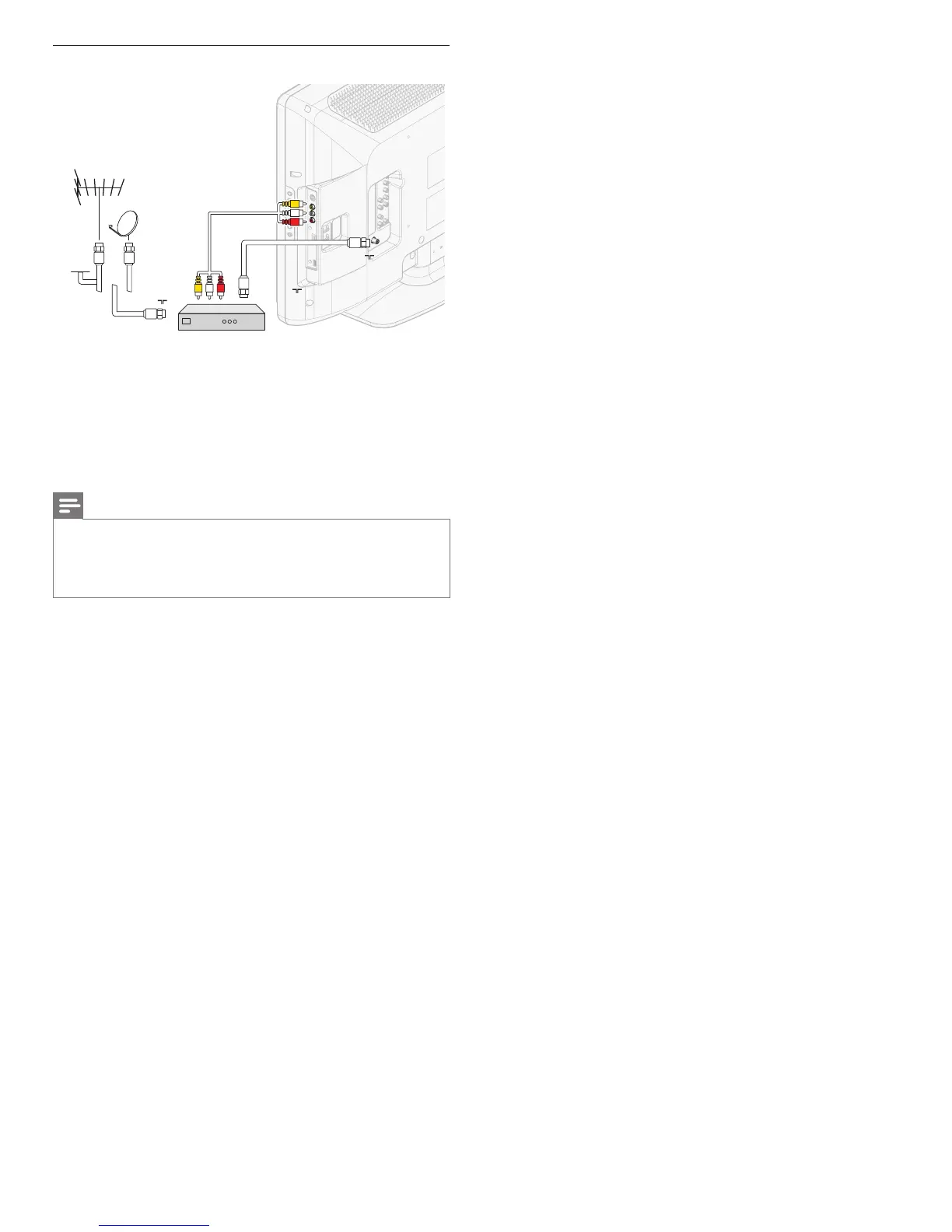
Connecting a set-top box via a composite connector
CABLE
RF IN
Set-top box
AUDIO L/R + VIDEO
OUT
RF OUT
IN
RF IN
RF OUT
IN
RF IN
If your device has an S-VHS video jack, improve the picture quality as
follows:
• Connect an S-Video cable to the S-Video input of VIDEO.
• Connect the audio cables to the audio L and R input jacks of
VIDEO.
Note
• When you use an S-Video connector, do not connect any device to the Composite
video jack.
• Only the left loudspeaker reproduces sound for mono equipment. Use a mono to
stereo adapter (not supplied) for sound reproduction via all internal loudspeakers.
• When you connect cables, match the cable colors to the connectors on the TV.
EN












 To Next Page