27
English
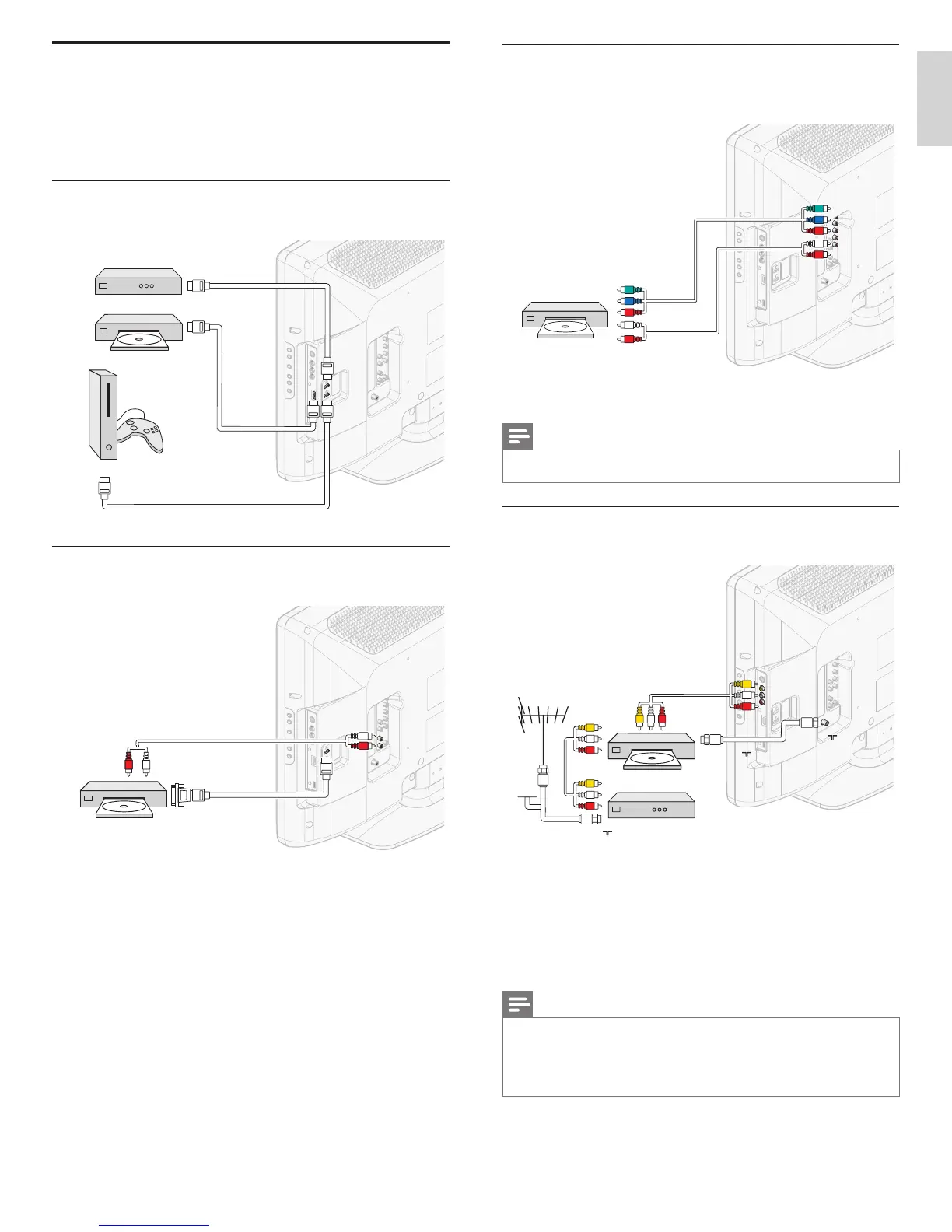
Connecting a set-top box, DVD player/recorder via
component video output connectors (YPbPr) and analog
audio
DVD / Set-top box
IN
IN
AUDIO L/R
IN
IN
OUT
YPbPr
AUDIO L/R
OUT
Note
• When you connect cables, match the cable colors to the connectors on the TV.
Connecting a set-top box, DVD player/recorder via
composite connectors
CABLE
RECORDER
IN
OUT
OUT
RF IN
RF IN
RF IN
RF OUT
RF OUT
IN
IN
AUDIO L/R + VIDEO
Set-top box
Do not place your recorder too close to the screen because some
recorders can be susceptible to signals.
If your recorder has an S-VHS video jack for improved picture quality,
connect an S-Video cable with the S-Video input. Connect the audio
cables to the audio L and R input jacks.
Note
• When you use an S-Video connector, do not connect any device to the Composite
video jack.
• Only the left loudspeaker reproduces sound for mono equipment. Use a mono to
stereo adapter (not supplied) for sound reproduction via all internal loudspeakers.
• When you connect cables, match the cable colors to the connectors on the TV.
Connecting your devices
This section describes how to connect a selection of devices with
different connectors. Different types of connectors can be used to
connect a device to your TV. The following sections describe examples
only, other confi gurations are possible.
Connecting a set-top box, Blu-ray Disc player and
HD game console via HDMI
OUT
OUT
OUT
IN
IN
IN
IN
IN
IN
HDMI
HDMI
HDMI
HDMI
HDMI
HDMI
Set-top box
Blu-ray Disc player
HD game console
Connecting a Blu-ray Disc player via HDMI-DVI and
DIGITAL AUDIO OUT connectors
DVI OUT
Blu-ray Disc player
OUT
IN
AUDIO L/R
IN
AUDIO L/R
HDMI 1 IN only
HDMI 1 IN only
EN











 To Next Page