MediaSuite xxHFL5573D/10 Page 12
4. Use your TV
Controls
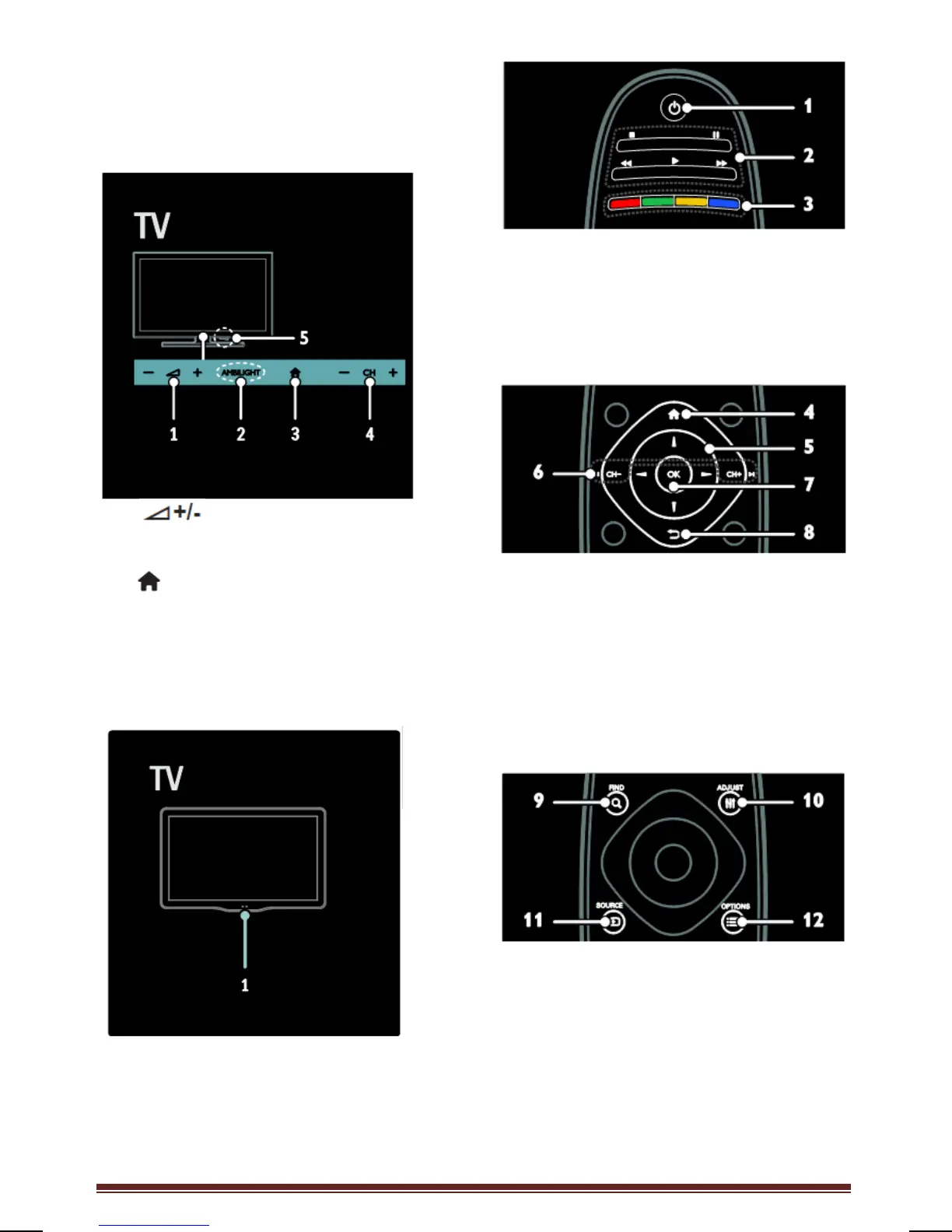
TV controls
1. : Increase or decrease
volume.
2. N.A.
3. (Home): Access the Home menu.
Press again to launch an activity in the
Home menu.
4. CH +/-: Switch to the next or previous
channel.
Indicators
1. Ambient sensor / remote control
sensor
Ambient sensor is available on certain
models only.
Remote control
1. (Standby): Switch the TV on or to
standby.
2. Play buttons: Control video or music play.
3. Color buttons: Select tasks or
options.
Not supported in MHEG mode.
4. (Home): Access the Home menu.
5. (Navigation buttons): Navigate
through menus and select items.
6. CH - / CH + (Previous/Next): Switch
channels, navigate through menu
pages, tracks, albums, or folders.
7. OK: Confirm an entry or selection.
8. (Back): Return to the previous menu
page or to exit from a TV function.
9. FIND: Access the menu to select TV
channel list.
10. NetTV: Access the NetTV page.
11. SOURCE: Select connected devices.
12. OPTIONS: Access options for the
current activity or selection.








 To Next Page