9
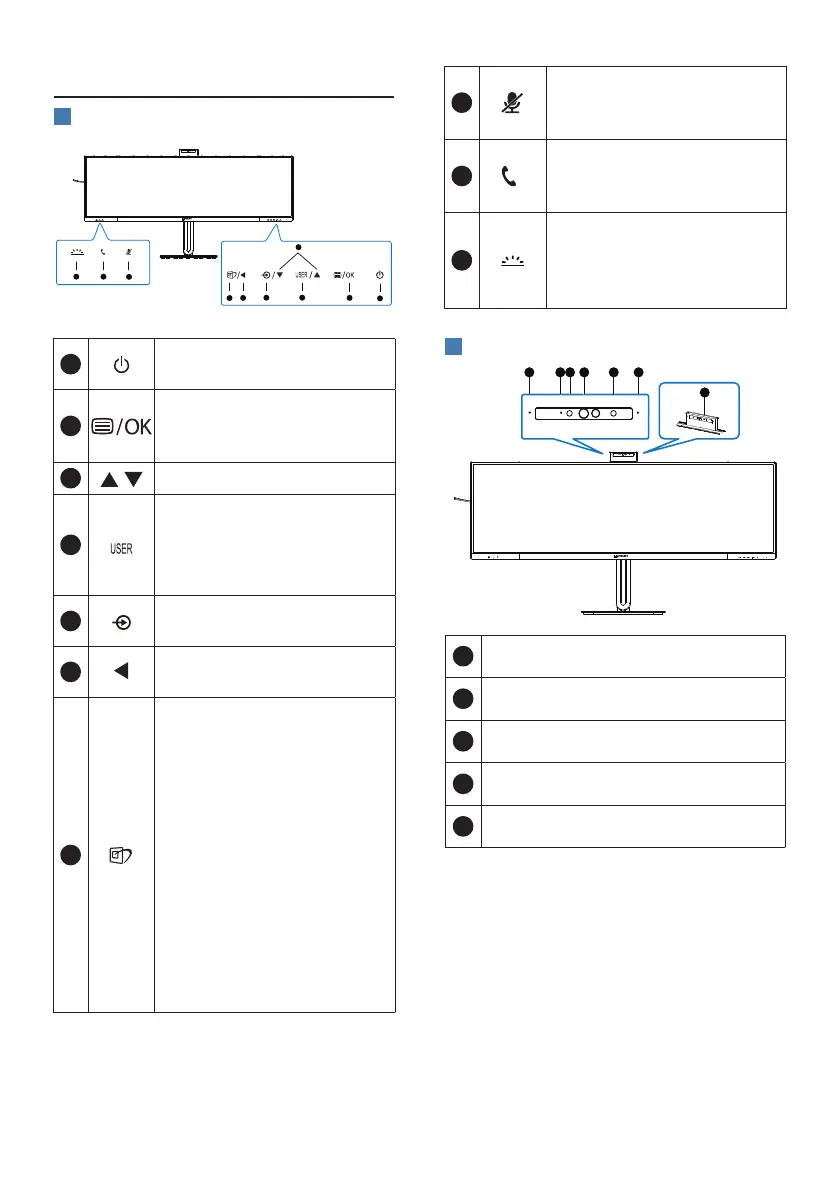
2.2 Operating the monitor
1
Description of the control buttons
5 4
3
2
1
7
6
8
10
9
1
Switch monitor’s power ON
or OFF.
2
Access the OSD menu
.
Conrm the OSD
adjustment.
3
Adjust the OSD menu.
4
User preference key.
Customize your own
preference function from
OSD to become the “user
key”.
5
Change the signal input
source.
6
Return to previous OSD
level.
7
SmartImage hot key. There
are multiple modes to
select: EasyRead, Oce,
Photo, Movie, Game,
Economy, SmartUniformity,
O.
When the monitor receives
HDR signal, SmartImage
will show HDR menu. There
are multiple selections in
this menu: HDR Premium,
HDR Movie, HDR Photo,
DisplayHDR 400, HDR Basic,
O.
8
Mute hot key, Switch
Microphone Mute or
UnMute.
9
Accept or decline
an incoming invite
notication.
10
Turn the Busylight on and
o. This can help signal
to others that you are in a
busy oce setting.
2
Webcam
1
Microphone
2
Webcam activity light
3
5.0 Megapixel Webcam
4
IR of Face identication
5
Busylight















 To Next Page