26
3.4 HDR
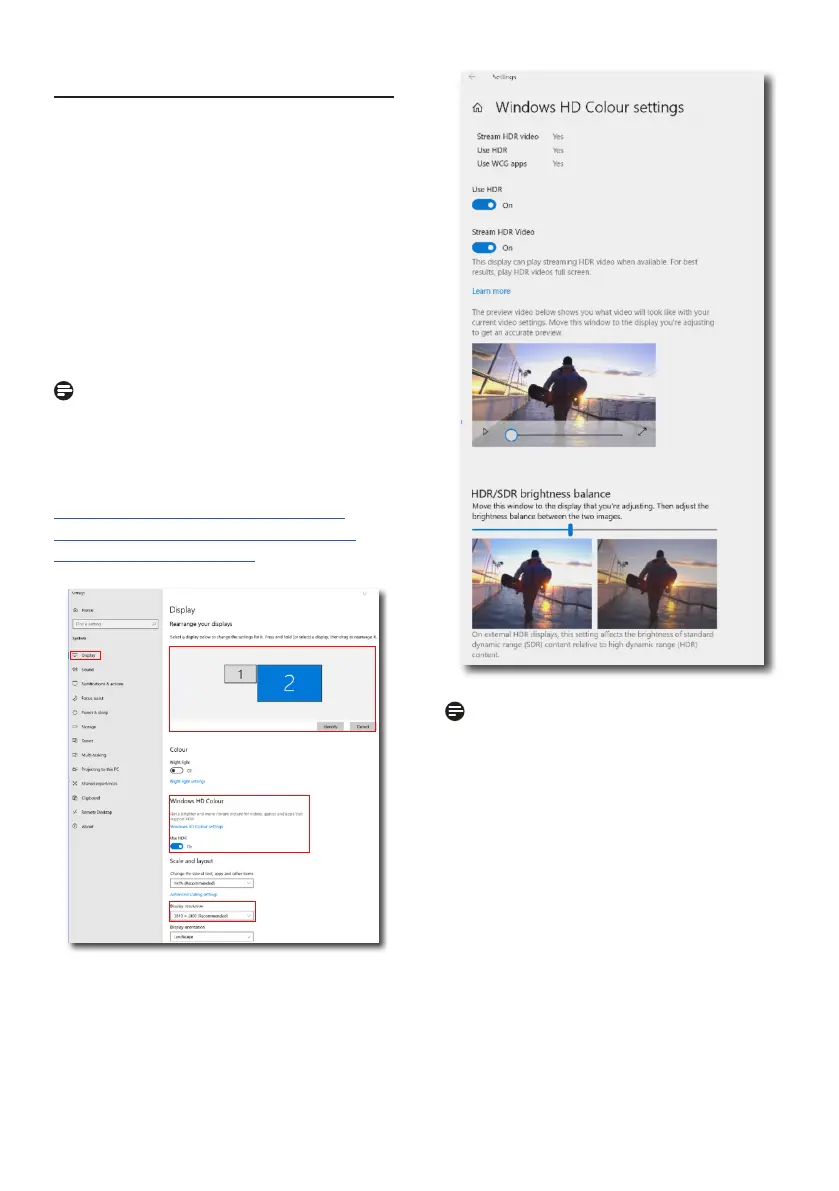
HDR Settings in Windows 11/10 system.
Steps
1. Right-click on the desktop, and enter
Display settings.
2. Select the display/monitor.
3. Select an HDR-capable display under
Rearrange your displays.
4. Select Windows HD Color settings.
5. Adjust Brightness for SDR content.
Note
Windows 10 edition is required. Always
upgrade to the most updated version.
The link below is for further information
from the Microsoft ocial website.
https://support.microsoft.com/en-
au/help/4040263/windows-10-hdr-
advanced-color-settings
STEP 2
STEP 3
STEP 4
STEP 1
STEP 5
Note
To switch o HDR function, please
disable from Input device and its
content. Inconsistent HDR settings
between input device and monitor may
cause unsatisfying images.















 To Next Page