EasyManua.ls Logo

Philips 6652C - Description of Controls

Philips 6652C
60 pages
Print Icon
To Next Page IconTo Next Page
To Previous Page IconTo Previous Page
Loading...
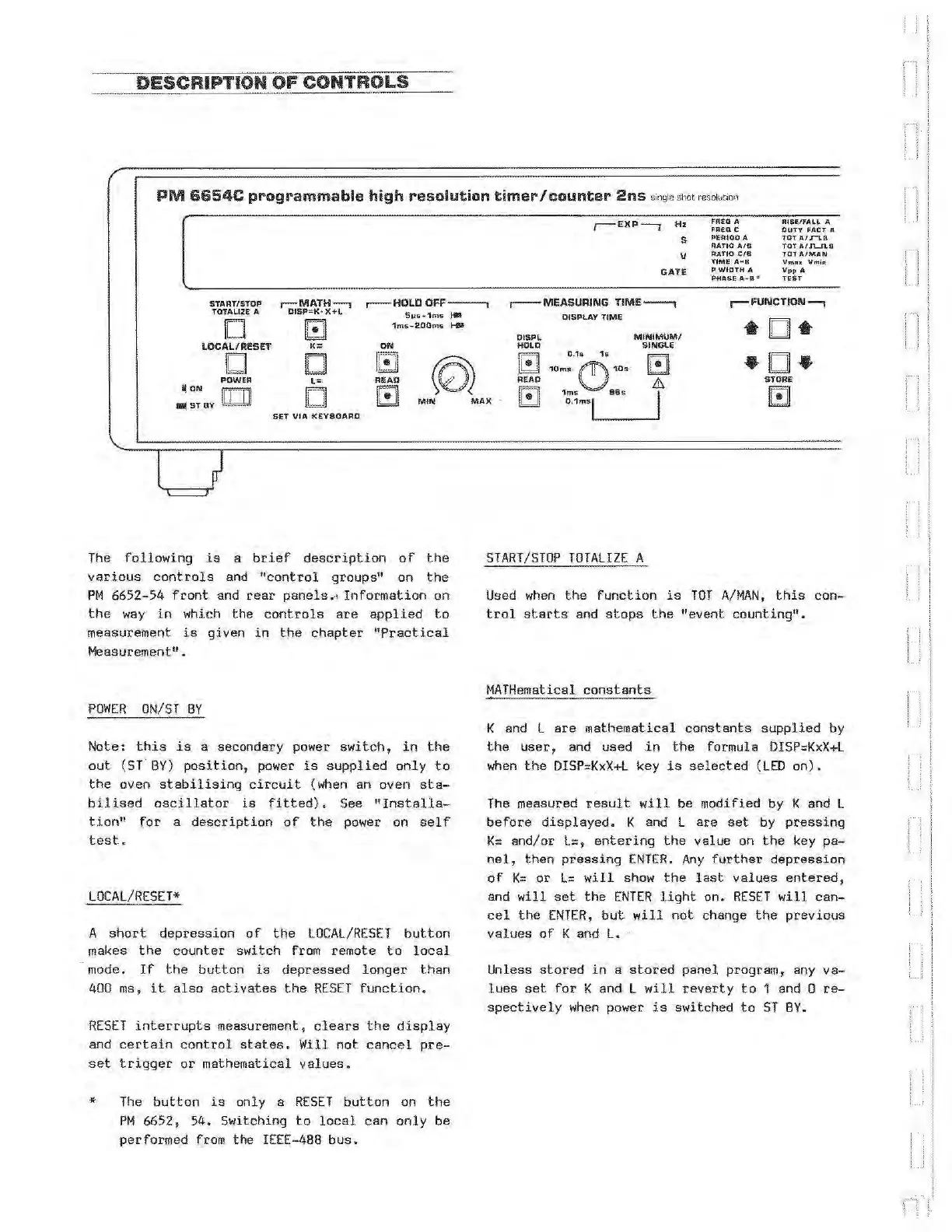
DESCRIPTION
OF
CONTROLS
=-=:_::_ _ _
PM
6654C
programmable
high
resolution
timer/counter
2ns
s
in
g
les
ho
t r
es
o
l
u
~Oil
r-EXP-,
Hz
s
v
GATE
FR£Q
A
FREQ
C
PERIOD
A
RATIO
A,/8
RATIO
C/8
TIME
A-s
P
WIDTH
A
PHASE
A-B
.,
RISE/FALL
A
DUTY
FAC:T A
TOT
A/F'\.8
TOY
A/J\....l\.8
TOT
AlMAN
Vmax
Vmin
Vpp
A
TE6T
START/STOP
TOTA~IZE
A
D
r-MATH--,
DISP=K·XH
F.1
I.!.:Jl
,--HOLD
OFF---,
5~,Js•1ms
,..
1rns-200ms
......
r-
MEASURING
TIME--,
DISPLAY
TII\IIE
r-
FUNCTION---,
•D•
•D•
LOCAL/RESET
K;
ON
D
.
D
[[!]
POWER
L=
READ
DISPl
HOlD
G
READ
MINIMUM I
SINGlE
0.1s
1s-
10ms
f1f\
10s
[!]
v
.&
STORE
.ON
w
rn
..
STBY
.
D
GJ
MIN
MAX
G
1m~
96s
I
0,
1msl._____.
Gl
SET
VIA
KEYBOARD
The
following
is
a
brief
description
of
the
various
controls
and
"control
groups" on
the
PM
6652-54
front
and
rear
panels.-•
Information
on
the
way
ih
which
the
controls
are
applied
to
measurement
is
given
in
the
chapter
"Practical
Measurement".
POWER
ON/ST
BY
Note:
this
is
a secondary power
switch,
in
the
out
(ST
BY)
position
, power
is
supplied
only
to
the
oven
stabilising
circuit
(when an oven
sta-
bilised
oscillator
is
fitted).
See
"Installa-
tion"
for
a
description
of
the
power
on
self
test.
LOCAL/RESET*
A
short
depression
of
the
LOCAL/RESET
button
makes
the
counter
switch
from remote
to
local
mode.
If
the
button
is
depressed
longer
than
400 ms,
it
also
activates
the
RESET
function.
RESET
interrupts
measurement,
clears
the
display
and
certain
control
states.
Will
not
cancel
pre-
set
trigger
or
mathematical
values.
*
The
button
i s only a
RESET
button
on
the
PM
6652, 54. Switching
to
local
can
only
be
performed from
the
IEEE-488
bus.
START/STOP
TOTALIZE
A
Used
when
the
function
is
TOT
A/MAN,
this
con-
trol
s
tarts
and
stops
the
"event
counting".
MATHematical
constants
K and L
are
mathematical
constants
supplied
by
the
user,
and used
in
the
formula
DISP:::KxX+L
when
the
DISP:::KxX+L
key
is
selected
(LED
on).
The
measured
result
will
be modified by K and L
before
displayed.
K and L
are
set
by
pressing
K=
and/or
L=
,
entering
the
value
on
the
key
pa-
nel,
th
en
pressing
ENTER.
Any
further
depression
of
K=
or
L=
will
show
the
last
values
entered,
and
will
set
the
ENTER
light
on.
RESET
will
can-
cel
the
ENTER,
but
will
not
change
the
previous
values
of
K and
L.
Unless
stored
in
a
stored
panel program, any
va-
lu
es
set
for
K and L
will
reverty
to
1 and 0
re-
spectively
when
power
is
switched
to
ST
BY.
Artisan Technology Group - Quality Instrumentation ... Guaranteed | (888) 88-SOURCE | www.artisantg.com