EasyManua.ls Logo

Philips 6652C - An Introduction to Operating PM 6652-54

Philips 6652C
60 pages
Print Icon
To Next Page IconTo Next Page
To Previous Page IconTo Previous Page
Loading...
AN
INTRODUCTION
TO
OPERATING
THE
PM
6652/54
This
brief
introductory
guide
has
been
created
to
avoid
the
use
of
lengthy
texts
to
describe
the
various
operating
characteristics
of
the
PM
6652/54
Timer/Counters.
In
it,
the
first
time
user
is
taken
on a
step
by
step
exercise,
using
most
of
the
controls
and
indicators
, and
having
any
doubtful
points
explained.
Note:
Before
applying
power,
ensure
that
the
in-
stallation
checks
have
been
carried
out
(chapter
2).
1
Before
switching
on,
look
at
the
STAND
BY
in-
dicator
at
the
far
:right
of
the
display
pa-
nel.
It
is
lit,
indicating
that
instruments
fitted
with
an oven
stabilised
oscillator
have
power
supplied
to
the
oscillator.
2
Switch
on,
and watch
the
self-test
program
run
(see
"Installation")
.
3
Switch
off
again,
then
find
the
rear
panel
switch
marked
"INT".
Put
this
switch
into
the
EXT
(down)
position.
4
Switch
on
again.
The
se
1
f-test
program
will
end
with
E4
- a
measuring
logic
circuit
er-
ror.
Put
the
INT/EXT
switch
back
to
INT,
then
press
RESET.
Alternatively,
put
the
switch
back
to
INT,
then
switch
the
power
off
and
on
again.
The
effect
is
the
same.
5
Make
sure
that
there
are
no
input
signals
connected.
6
Find
the
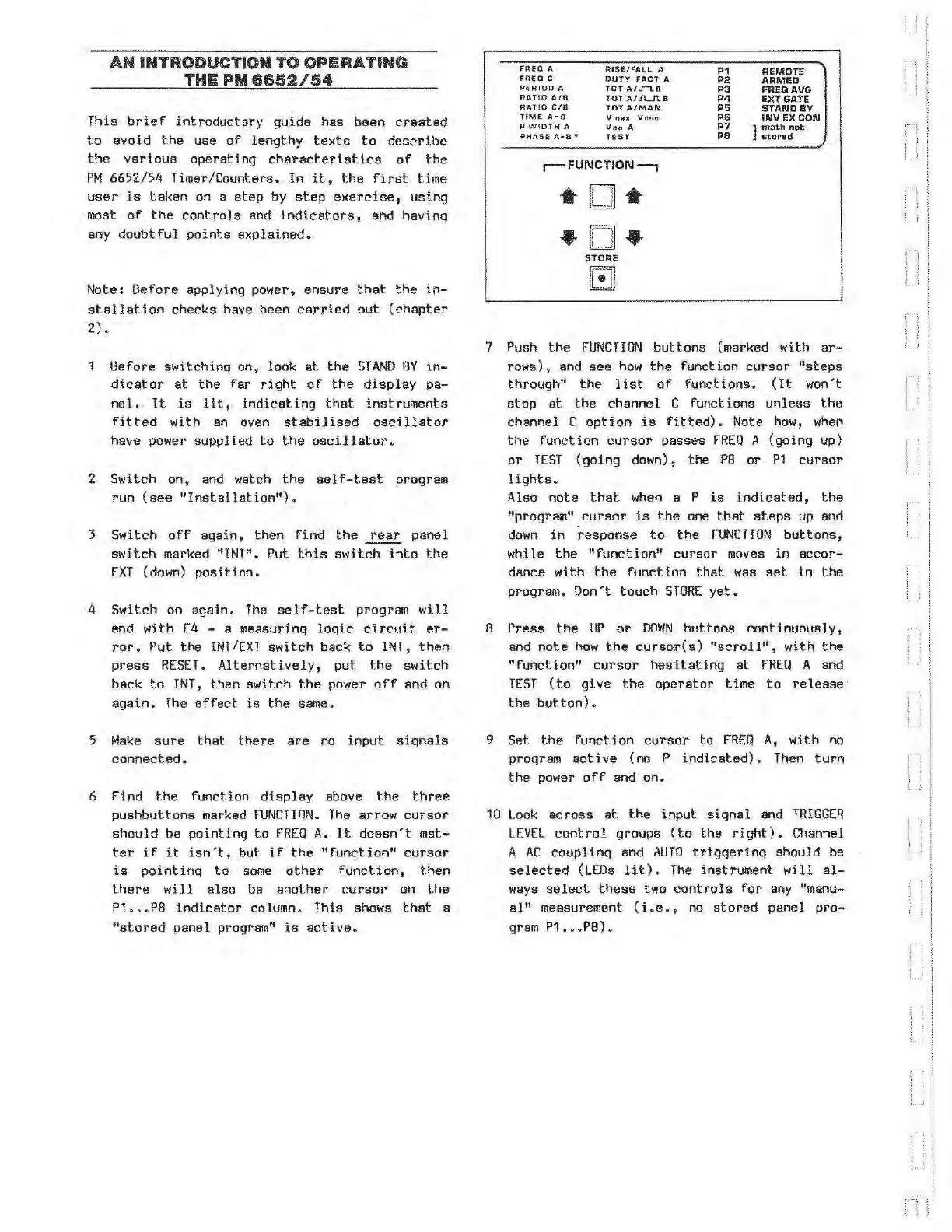
function
display
above
the
three
pushbuttons
marked
FUNCTinN.
The
arrow
cursor
should
be
pointing
to
FREQ
A.
It
doesn't
mat-
ter
if
it
isn't,
but
if
the
"function"
cursor
is
pointing
to
some
other
function,
then
there
will
also
be
another
cursor
on
the
P1
P8
indicator
column.
This
shows
that
a
"stored
pane 1 program"
is
active.
fREQ
A
FR£0
C
PERIOD
A
RATIO
A/9
RATIO
C/8
TIME
A-8
P.
WIDTH
A
PHAS£
A-8"'
RIS£/
F
AL~
A
DUT
Y
fACT
A
TOT
A/.r-1.8
TOT
A/J\.J\8
TOT
A/MAN
Vnu;
:.c
Vrn
in
Vpp
A
TEST
r-
FUNCTION---,
D
•D•
STORE
G
P1
P2
P3
P4
PS
P6
P7
PB
REMOTE
ARMED
FREGAVG
EXT GATE
STANDBY
INV EX
CON
]
math
not
stored
7
Push
the
FUNCTION
buttons
(marked
with
ar-
rows),
and
see
how
the
function
cursor
"steps
through"
the
list
of
functions.
(It
won't
stop
at
the
channel
C
functions
unless
the
channel
C
option
is
fitted).
Note
how
,
when
the
function
cursor
passes
FREQ
A
(going
up)
or
TEST
(going
down),
the
P8
or
P1
cursor
lights.
Also
note
that
when a P
is
indicated,
the
"program"
cursor
is
the
one
that
steps
up and
down
in
response
to
the
FUNCTION
buttons,
while
the
"function"
cursor
moves
in
accor-
dance
with
the
function
that
was
set
in
the
program.
Don't
touch
STORE
yet.
8
Press
the
UP
or
DOWN
buttons
continuous!
y,
and
note
how
the
cu:rsor(s)
"scroll",
with
the
"function"
cursor
hesitating
at
FREQ
A and
TEST
(to
give
the
operator
time
to
release
the
but
ton)
9
Set
the
function
cursor
to
FREQ
A,
with
no
program
active
(no
P
indicated).
Then
tur
n
the
power
off
and
on.
10
Look
across
at
the
input
signal
and
TRIGGER
LEVEL
control
groups
(to
the
right).
Channel
A
AC
coupling
and
AUTO
triggering
should
be
selected
(LEDs
lit).
The
instrument
will
al-
ways
select
these
two
controls
for
any "manu-
al"
measurement
(i
.
e.,
no
stored
panel
pro-
gram
P1
...
P8)
,
Artisan Technology Group - Quality Instrumentation ... Guaranteed | (888) 88-SOURCE | www.artisantg.com