EasyManua.ls Logo

Philips 6652C - Page 18

Philips 6652C
60 pages
Print Icon
To Next Page IconTo Next Page
To Previous Page IconTo Previous Page
Loading...
11
Press
READ.
The
values
on
the
display
are
the
trigger
levels
for
AUTO
mode. There
is
no
input
signal,
so
they
will
both
be 0.01V
(or,
possibly,
varying
between 0.01 and
0.02).
12
Press
AUTO
(LED
goes
off).
The
trigger
levels
shown
now'
are
those
set
on
the
two
variable
potentiometers
. Turn them.
13
Press
KEYBOARD.
The
values
on
the
display
are
the
"keyboard"
trigger
I eve 1
values
(they
should
be
zero).
Enter
two
ne.w
values.
14
Press
SET
A.
The
ENTER
light
on
the
keyboard
will
qlow
steadily.
Make
an
entry,
noting
that
the
enter
LEO
begins
flashing
as
soon as
the
first
digit
is
entered.
When
complete,
press
ENTER
(RESET
clears
ENTER
at
any time
up
to
that
last
p
re
ss).
Now
set
B.
15
The
v
alues
entered
on
the
keyboard
wi
11
be
used whenever
KEYBOARD
is
selected.
16
Turn
the
power
off,
then on
again.
17
Select
KEYBOARD
and
READ.
The
"keyboard"
trigger
levels
have been
lost
(they
were ne-
ver
put
into
a
program-
that
comes
later).
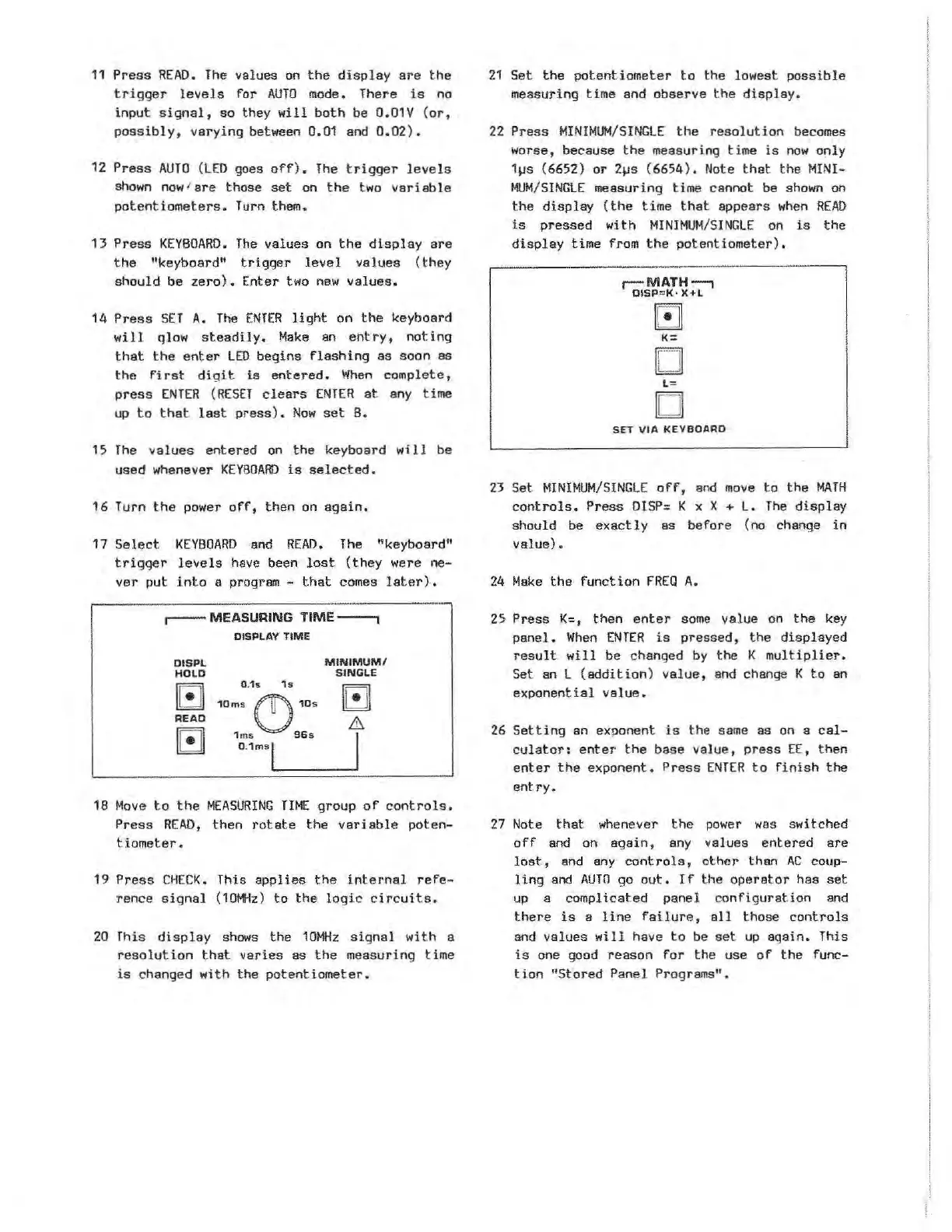
,--
MEASURING
TIME---,
DISPLAY
TIME
DISPL
HOLD
Gl
READ
Gl
0.
1s
1s
10ms
C)
10s
1m
s
96s
0 .
1msl
MINIMUM/
SINGLE
G1
&.
I
18
Move
to
the
MEASURING
TIME
group
of
controls.
Press
READ,
then
rotate
the
variable
poten-
tiometer.
19
Press
CHECK.
This
applies
the
internal
refe
-
rence
signal
(
10MHz)
to
the
logic
circuits.
20
This
display
shows
the
10MHz
signal
with
a
r
eso
lution
that
varies
as
the
measuring time
is
changed
with
the
potentiometer.
21
Set
the
potentiometer
t o
the
lowest
possible
measuring time and
observe
the
display.
22
Press
MINIMUM/SINGLE
the
resolution
becomes
worse, because
the
measuring time
is
now
only
1~s
(6652)
or
2~s
(6654).
Note
that
the
MINI-
MUM/SINGLE
measuring time cannot be
shown
on
the
display
(the
time
that
a
ppears
when
READ
is
pressed
wit.h
MINIMUM/SINGLE
on
is
the
display
time from
the
potentiometer).
r:-MATH-,
DISP
=
KĀ·
X+L
D
-
L=
D
SET
VIA
KEYBOARD
23
Set
MINIMUM/SINGLE
off,
and
move
to
the
MATH
controls.
Press
OISP: K x X +
L.
The
display
should be
exactly
as
before (no change
in
va]ue).
24
Make
the
function
FREQ
A.
25
Press
K=,
then
enter
some
value on
the
key
panel.
When
ENTER
is
pressed,
the
displayed
result
will
be changed
by
the
K
multiplier.
Set
an L
(addition)
value,
and
change K
to
an
exponential
value.
26
Setting
an exponent
is
the
same
as on a
cal-
culator:
enter
the
base
value,
press
EE,
then
enter
the
exponent.
Press
ENTER
to
fin
ish
the
entry.
27
Note
that
whenever
the
power
wa
s switched
off
and
on
again,
any v
alues
entered
are
lost,
and
any
controls,
other
than
AC
coup-
ling
and
AUTO
go
out.
If
the
operator
has
set
up
a complicated panel con
figuration
and
there
is
a
line
failure,
all
those
controls
and
values
will
have
to
be
set
up
again.
This
is
one good
reason
for
the
use
of
the
func-
tion
"Stored
Panel Programs".
Artisan Technology Group - Quality Instrumentation ... Guaranteed | (888) 88-SOURCE | www.artisantg.com