EasyManua.ls Logo

Philips 6652C - Mathematics; Trigger Settings

Philips 6652C
60 pages
Print Icon
To Next Page IconTo Next Page
To Previous Page IconTo Previous Page
Loading...
TRIGGER SETTINGS
The
PM
6652/54
offers
a
variety
of
trigger
pos-
sibilities,
such
as
trigger
slope,
input
impe-
dance,
AC/DC
coupling
and two
trigger
level
ran-
ges
-5
•••
+5V
and -50
•••
+50V.
As
further
described
in
the
chapter
"Measurement
Theory",
always
try
to
set
the
controls
to
AC
coupling
and x10
attenuation
for frequency mea-
surements
and
DC
coupling
with
no
attenuation
for
time
measurements.
for
many
measurements
it
is
vital
to
have a
good impedance matching
to
avoid
reflections
which
might
make
the
trigger
level
setting
very
difficult.
Always
use
the
50
Ohm
termination
in
50
Ohm
systems.
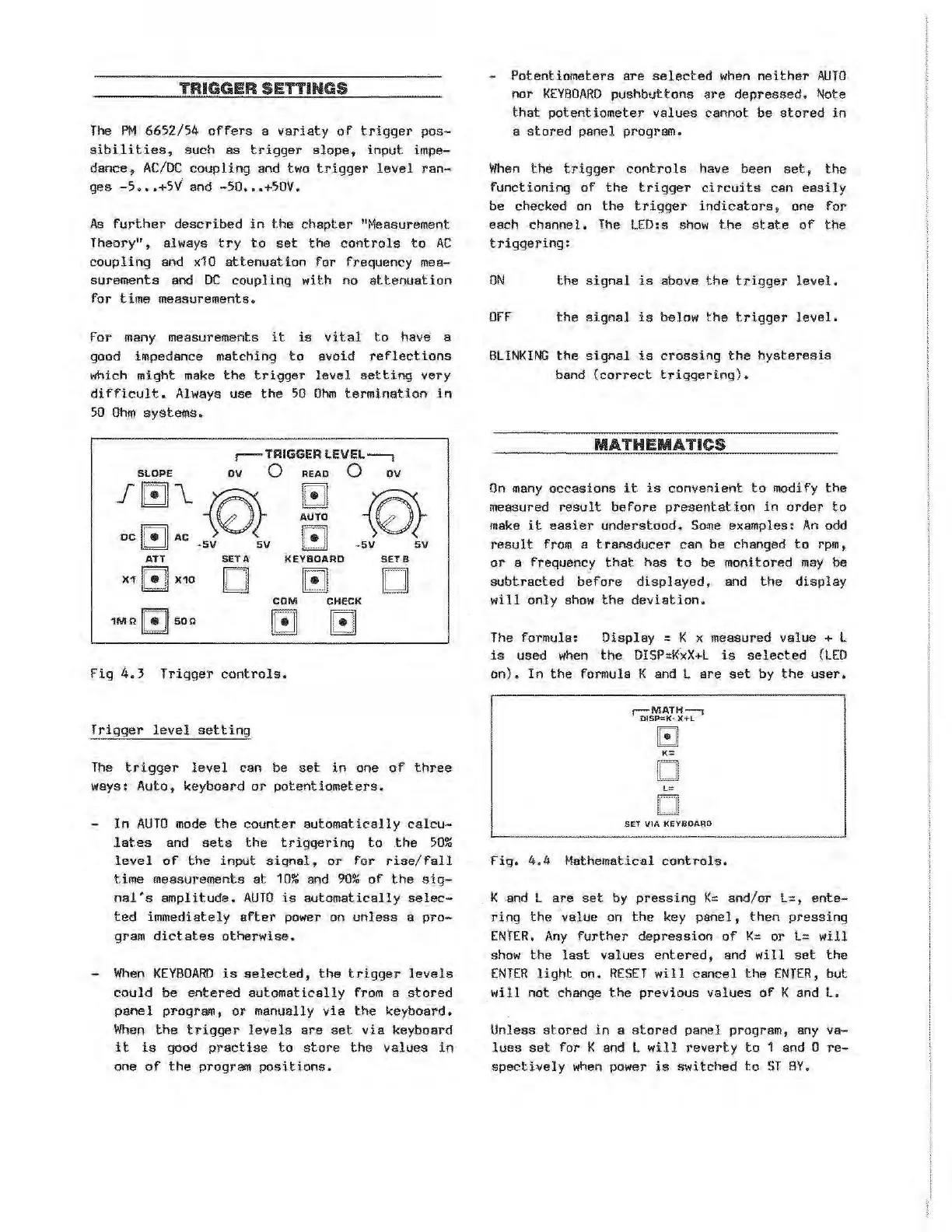
,-TRIGGER
LEVEL--,
SLOPE
OV
0
READ
0
OV
~~~-~
AUTO
-SV
sv
ATT
SETA
KEYBOARD
SETB
X1
IC!JI
X10
D
[!]
D
COM
CHECK
1M
n
IC!Jiso
n
G
GJ
Fig
4.~
Trigger
controls.
Trigger
level
setting
The
trigger
level
can be
set
in
one
of
three
ways:
Auto,
keyboard
or
potentiometers.
In
AUTO
mode
the
counter
automatically
calcu-
lates
and
sets
the
triggering
to
the
50%
level
of
the
input
signal,
or
for
rise/fall
time
measurements
at
10%
and
90%
of
the
sig-
nal's
amplitude.
AUTO
is
automatically
selec-
ted
immediat-ely
after
power on
unless
a
pro-
gram
dictates
otherwise.
-
When
KEYBOARD
is
selected,
the
trigger
levels
could
be
entered
automatically
from a
stored
panel
program,
or
manually
via
the
keyboard.
When
the
trigger
levels
are
set
via
keyboard
it
is
good
practise
to
store
the
values
in
one
of
the
program
positions.
-
Potentiometers
are
selected
when
neither
AUTO
nor
KEYBOARD
pushbuttons
are
depressed.
Note
that
potentiometer
values
cannot be
stored
in
a
stored
panel
program.
When
the
trigger
controls
have been
set,
the
functioning
of
the
trigger
circuits
can
easily
be
checked on
the
trigger
indicators
, one
for
each
channel.
The
LED:s
show
the
state
of
the
triggering:
ON
the
signal
is
above
the
trigger
level.
OFF
the
signal
is
below
the
trigger
level.
BLINKING
the
signal
is
crossing
the
hysteresis
band
(correct
triggering).
MATHEMATICS
On
many
occasions
it
is
convenient
to
modify
the
measured
result
before
presentation
in
order
to
make
it
easier
understood.
Some
examples:
An
odd
result
from a
transducer
can
be changed
to
rpm,
or
a frequency
that
has
to
be monitored
may
be
subtracted
before
displayed,
and
the
display
will
only
show
the
deviation.
The
formula:
Display
= K x measured
value
+ l
is
used
when
the
DISP::K:xX+L
is
selected
(LED
on).
In
the
formula K and L
are
set
by
the
user.
r-MATH--,
01SP=K·
X+L
Gl
K=
D
L=
D
SET
\11A
KEYBOARD
Fig.
4.
4 Mathematical
controls.
K and l
are
set
by
pressing
K=
and/or
l=,
ente-
ring
the
'
value
on
the
key
panel,
then
pressing
ENTER.
Any
further
depression
of
K::
or
l::
will
show
the
last
values
ent.
ered,
and
will
set
the
ENTER
light
on.
RESET
will
cancel
the
ENTER,
but
will
not
change
the
previous
values
of
K and
l.
Unless
stored
in
a
stored
panel
program, any
va-
lues
set
for
K and L
will
reverty
to
1 and 0
re-
spectively
when
power
is
switched
to
ST
BY.
Artisan Technology Group - Quality Instrumentation ... Guaranteed | (888) 88-SOURCE | www.artisantg.com