EasyManua.ls Logo

Philips 6652C - Service Request

Philips 6652C
60 pages
Print Icon
To Next Page IconTo Next Page
To Previous Page IconTo Previous Page
Loading...
SERVICE
REQUEST
A
Service
Request
(SRQ)
is
sent
from
the
counter
to
the
controller
in
the
following
cases:
When
service
request
is
disabled
(SQ~)
-
On
programming
errorst
such as
false
codes;
measuring time
out
of
range;
trigger
levels
out
of
range
etc.
After
the
execution
of
any
of
the
tests
TS1
•••
T56
and a
test
error
is
found.
When
service
request
is
enabled
(SQ1)
-
When
a measuring
result.
is
ready for
output.
Any
of
the
tests
fS1
•••
TS6
is
finished.
When
limit
monitoring
is
enabled (SQ2;
SQ3)
When
the
measuring
result
is
outside
(inside)
the
set
limits.
Monitoring
of
alarm limits
The
limit
monitoring
in
a
PM66S2/54
may
be
per-
formed
in
four
different
ways.
An
SRQ-alarm
is
given
in
the
following
cases:
If
the
value(X)
is
outside
the
range a
•••
b
(X<
at
X >
b).
"SQ2"
must be programmed.
If
the
value
(X)
is
inside
the
range a
...
b
(a
< X < b)
"SQ3"
must be programmed.
If
the
value
(X)
is
below
the
limit
c
(X
<
c)
"SQ2"
and
"SK1"
must be programmed.
If
the
value
(X)
is
above
the
limit
c
(X
> c)
"SQJ" and
"SK1"
must be programmed.
In
all
the
above
cases
a
prerequisit
is
that
the
MATH
function
is
enabled ("ME1").
The
range
a
•••
b
is
set
by
using
the
MATH.
constants
K and
L
to
appropriate
values.
If
an SRO-alarm
is
to
be
given
for
measuring
values
(X)
outside
the
range a
•••
b,
then
K and L should be
selected:
1 a
K =
L =
b - a
b-
a
For example:
The
counter
must monitor a frequen-
cy
with
a nominal value
of
455kHz.
The
counter
should
not
send
anything
on
the
bus as long
as
the
frequency
falls
inside
the
range
4
SO
••
460kHz.
When
the
measured frequency
falls
outside
that
range;
a
SRQ
is
sent
t.o
the
controller.
a :
450
X
103
b : 460 X 10J
The
constants
K
and
L should be
selected
as:
1
450x1o3
K =
=---:
10-4 L :
---=
-45
b-a
10x103
The
counter
should be programmed
as
follows:
1.
Set
K = 10-4
("SK1E-4")
2.
Set L =
-45
("SL-45")
3.·
Enable
Math
("ME1
")
4.
Activate
alarm Monitoring
("SQ2")
There
is
a spec
ial
case:
When
K
is
set
to
1,
the
counter
monitors whether
the
measured value
(X)
is
above or below a
limit
value
(c).
To
get
a
SRO-alarm
if
X > c then K and L have
to
be
selected
as:
K : 1
L = - C
Example:
An
SRQ
should be sent.
when
a time
interval
measurement
results
in
a
value
higher
than
400ms.
In
this
case
K = 1 and L = -
0.4.
fhe
counter
should be programmed
as
follows:
1
Set K = 1
("SK1")
2.
Set L :
-0.4
("SL-0.4")
3.
Enable
Math
("ME1")
4.
Activate
Alarm
monitoring
("503")
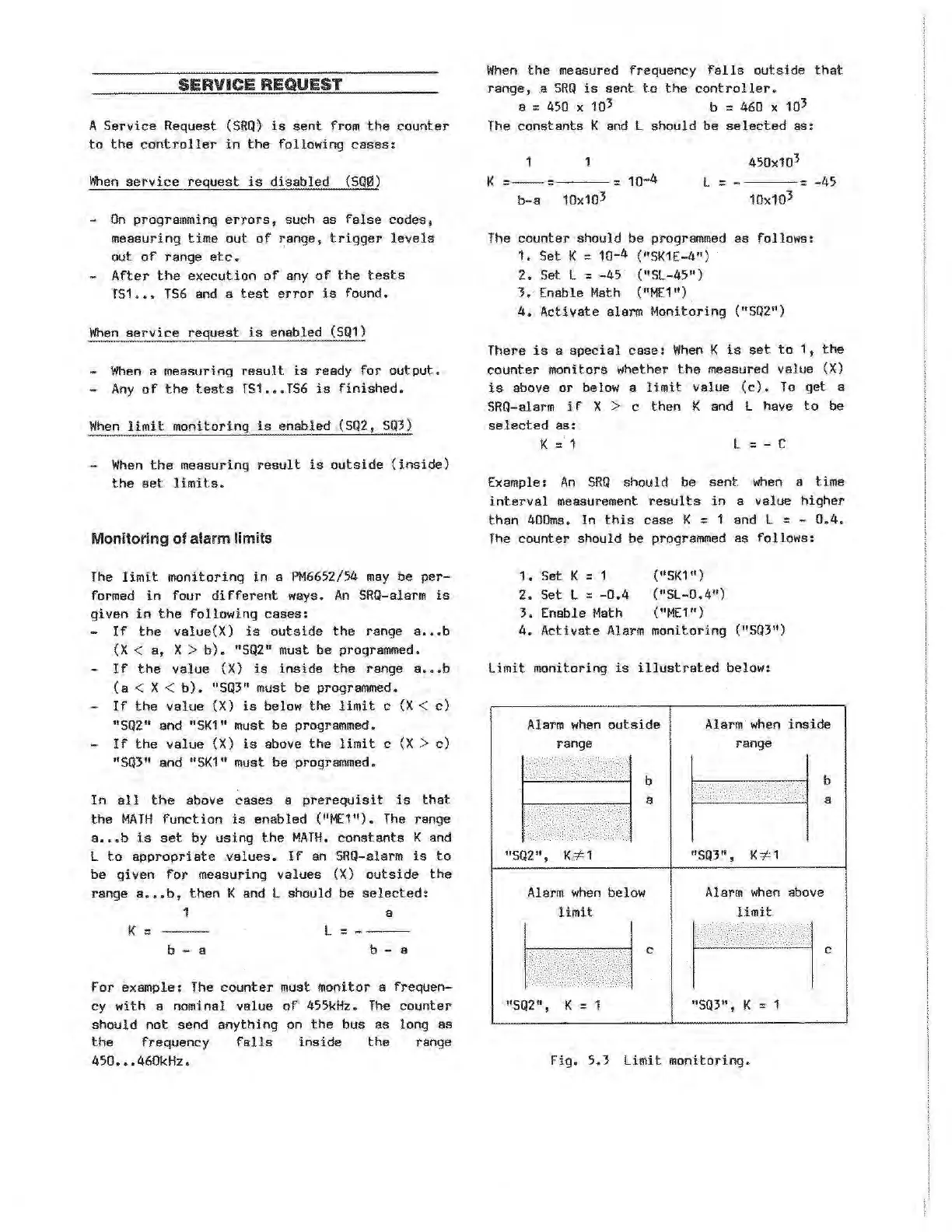
Limit monitoring
is
illustrated
below:
Alarm
when
outside
range
Alarm
when
inside
range
b
"502",
K::;t1
Alarm
when
below
limit
"SQ2",
K =
a
c
"SQ3", K
::;t
1
Alarm
when
above
limit
"SQ3", K = 1
Fig.
5.3 Limit
monitoring.
b
a
c
Artisan Technology Group - Quality Instrumentation ... Guaranteed | (888) 88-SOURCE | www.artisantg.com