EasyManua.ls Logo

Philips 6652C - Stored Panel Programs

Philips 6652C
60 pages
Print Icon
To Next Page IconTo Next Page
To Previous Page IconTo Previous Page
Loading...
-·-
STORED
PANEL
PROGRAMS
Introduction
Stored
panel
programs
are
of
great
assistance
to
those
users
who
have
repetitive
tasks
to
per-
form,
and/or
if
the
measurements
require
compli-
cated
control
configurations.
A
stored
panel
program
is
stored
in
a
non-vola-
tile
memory
with
a
·retention
life
of
at
least
ten
years,
Eight
programs can be
stored,
and
they
are
identified
by
the
titles
P1
••
P8.
Each
of
them
can
contain
a
full
panel
set-up
and
set
values,
with
the
following
exceptions:
READ,
ENTER,
and
STORE
cannot be
set
"ON".
The
potentiometer
trigger
level
values
cannot
be
stored
but
potentiometer
triggering
can
be
selected
by
specifying
AUTO
and
KEYBOARD
"OFF".
No
HOLD
OFF
value
can
be
stored.
But
HOLD
OFF
"ON"
can
be
specified.
No
external
reference
signal
can
be
speci-
fied.
In
P7
and
PB
only,
neither
MATH
on nor mathe-
matical
constants
can be
stored,
Stored
panel
programs can
be
initiated
and
crea-
ted
over
the
IEEE
488
bus.
Creating
stored
panel
programs
To
create
a
stored
panel
program
first
set
all
the
controls
and
values
(KEYBOARD
trigger
le-
vels,
measuring
time
and
the
K and L
MATH
con-
stants
as
required).
Select
the
function,
then
press
STORE
once.
The
P1
indicator
will
be
lit.
Step
the
cursor
down
to
the
desired
program
num-
ber,
then
press
STORE
again.
Any
program
that
previously
existed
in
that
area
will
be
over-
written
completely.
NOTE:
It
is
recommended that.
P1
is
used
as
a
"work
area",
rather
than
as
a
permanentl
y
stored
program. This means
that
when
there
is
a complex t temporary
set
up
in
use,
i t
can
be
stored
in
P1.
Any
accidental
power
off
or
line
failure
will
not,
then,
de-
stroy
t
he
set
up.
Overriding
stored
panel
p,r'o.grams
When
a
stored
panel
program
is
recalled,
all
the
controls,
indicators
and
values
will
be
set
ex-
actly
as
they
where
when
the
program
was
created
(except
as
specified
in
the
introduction).
The
program
controls
and
values
can
be
overridden
temporarily
by
setting
other
controls
and
va-
lues.
This
"real
time"
selection
will
last
as
long
as
the
power remains
on,
or
until
the
pro-
gram
is
reselected.
Exceptions
to
this
rule
are:
-
ARMING/AVG/EXT
GATE/OFF
and
SLOPE.
If
any
of
these
facilities
was
chosen
when
the
program
was
created,
that
facility
will
appear
as
the
default
when
the
program
is
reselected
what-
ever
the
current
position
of
the
switch.
Mov
-
ing
the
switch
while
the
program
is
active
will
give
the
ARMING/AVG/EXT
GATE
facility
which
is
displayed
on
the
front
panel.
Measuring
time.
The
measuring
time
set
by
the
program
when
the
program
is
reselect.ed
is
that
which
was
set
when
the
program
was
created,
whatever
the
current
position
of
the
measuring
time
potentiometer.
An
override
measuring
time
can be
set
by
rotating
the
potentiometer
. Note
that
to
guard
against
inadvertent
movement
of
the
potentiometer,
a
movement
of
1 decade
of
the
potentiometer
is
required.
Once
these
limits
are
exceeded,
the
potentiometer
assumes
its
full
analogue
range.
FR
EQ A
FIIEQ
C
I>EIIIOO
A
RATIO
AlB
RATIO
CIB
liM[
A-B
P
WIDTH
A
PHASE
A-8
Q
R~SE:'/FAll
A
DUTY
,:A(:T
A
TOT
Al
.r-1.8
T O T
A/
ILJ1.
8
TOT
A/MAN
Vmcu:
V
min
Vpp
A
TEST
r-
FUNCTION---,
D
D
STORE
G
P1
P2
P3
P4
P5
P6
P7
PB
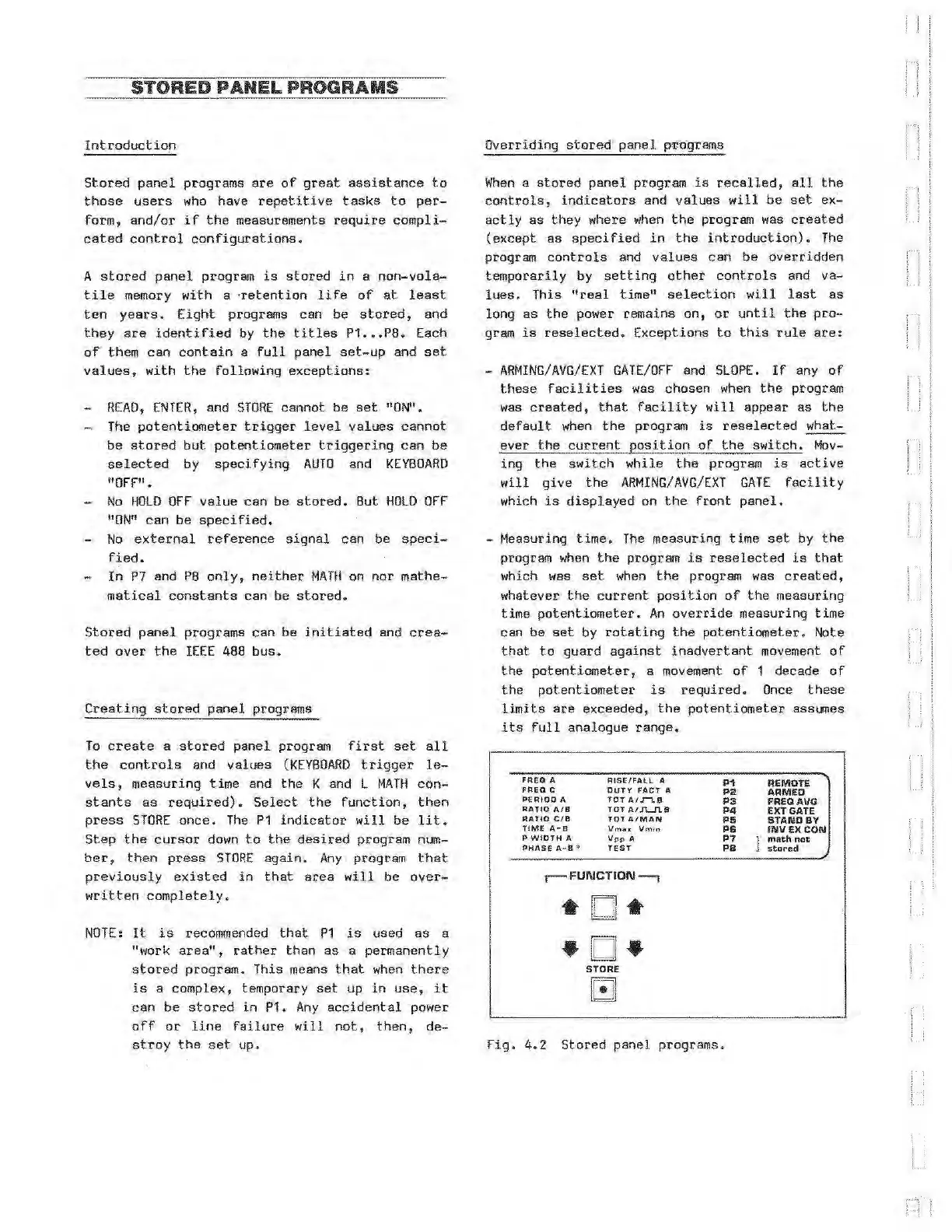
Fig.
4. 2
Stored
panel
programs.
REMOTE
ARMED
FREQAVG
EXT GATE
STANDBY
INVEXCON
math
not
stored
Artisan Technology Group - Quality Instrumentation ... Guaranteed | (888) 88-SOURCE | www.artisantg.com