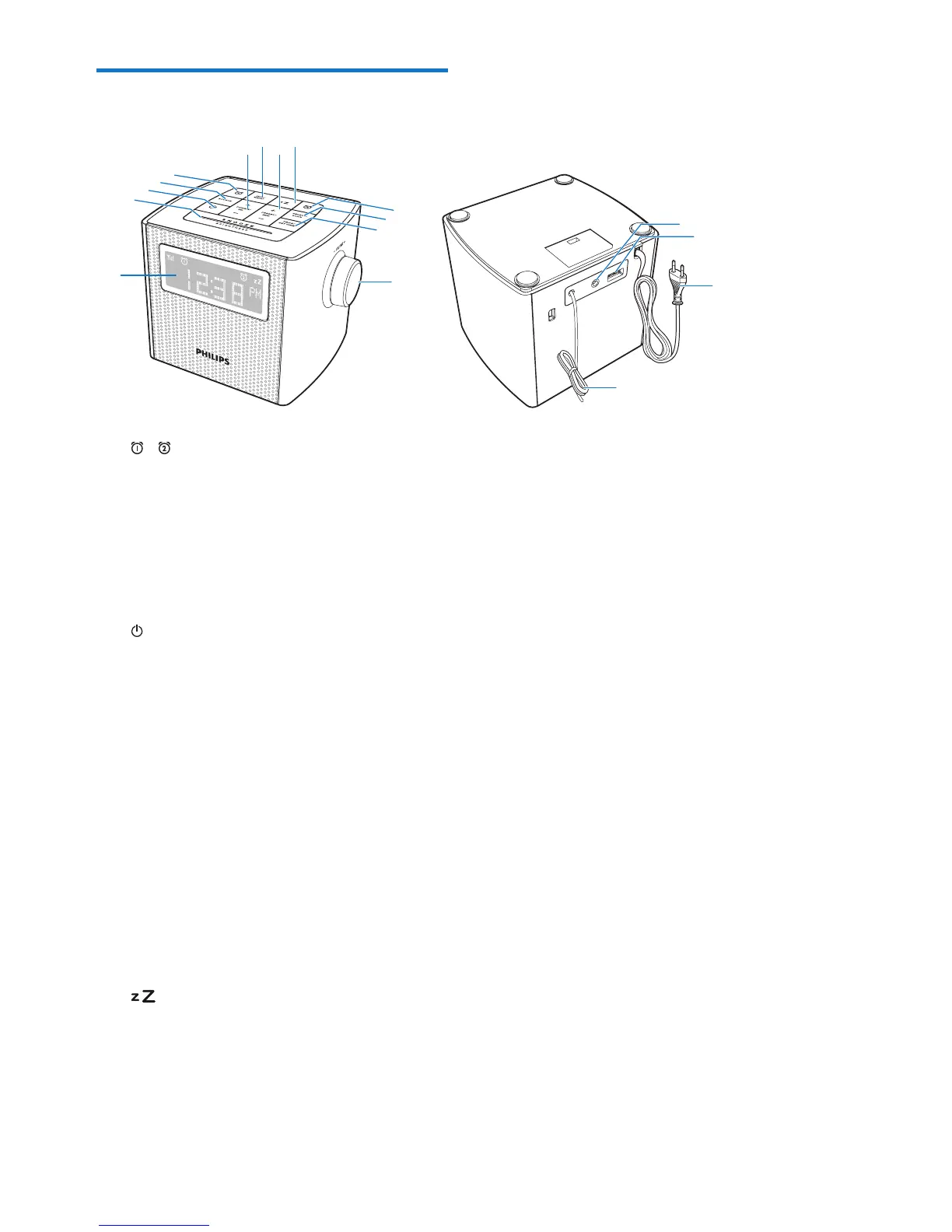
a /
• Set Alarm 1 or Alarm 2.
• View alarm settings.
• Activate or deactivate alarm timer.
b SOURCE
• Select a source: DAB Mode, FM Mode,
or AUDIO IN.
c
• Turn on the radio.
• Switch to standby mode.
d SNOOZE/BRIGHTNESS
• Snooze the alarm.
• Adjust display brightness.
e PROG/SET TIME
• Program the sequence of the radio
stations.
• Set time.
f SELECT/SCAN
• Scan and store radio stations
automatically.
• Conrmaselection.
g
• Set sleep timer.
h + PRESET/ MIN -
• Adjust minute.
• Select preset radio stations.
a
b
c
d
e
f
a
g
h
o
p
i INFO/MENU
• In DAB+ or FM mode, press and hold
to enter DAB+ or FM menu.
• In DAB+ mode, press to display DAB+
station information.
• In FM mode, press to display RDS
station information.
j + TUNING/ HR -
• Adjust hour.
• Tune to radio stations.
• Navigate through DAB+ station list.
• Navigate through FM/DAB+ menu.
k Display panel
• Show current status.
l VOL knob
• Adjust volume.
m Antenna
• Improve radio reception.
n Power cord
• Connect AC power.
o USB socket
• Charge your mobile devices.
p AUDIO IN
• Connect an external audio device.



 To Next Page