EasyManua.ls Logo

Philips AZ 1508 - Device Controls Overview; Cassette Recorder Controls; Tuner Controls; CD Player Controls

Philips AZ 1508
18 pages
Print Icon
To Next Page IconTo Next Page
To Previous Page IconTo Previous Page
Loading...
English
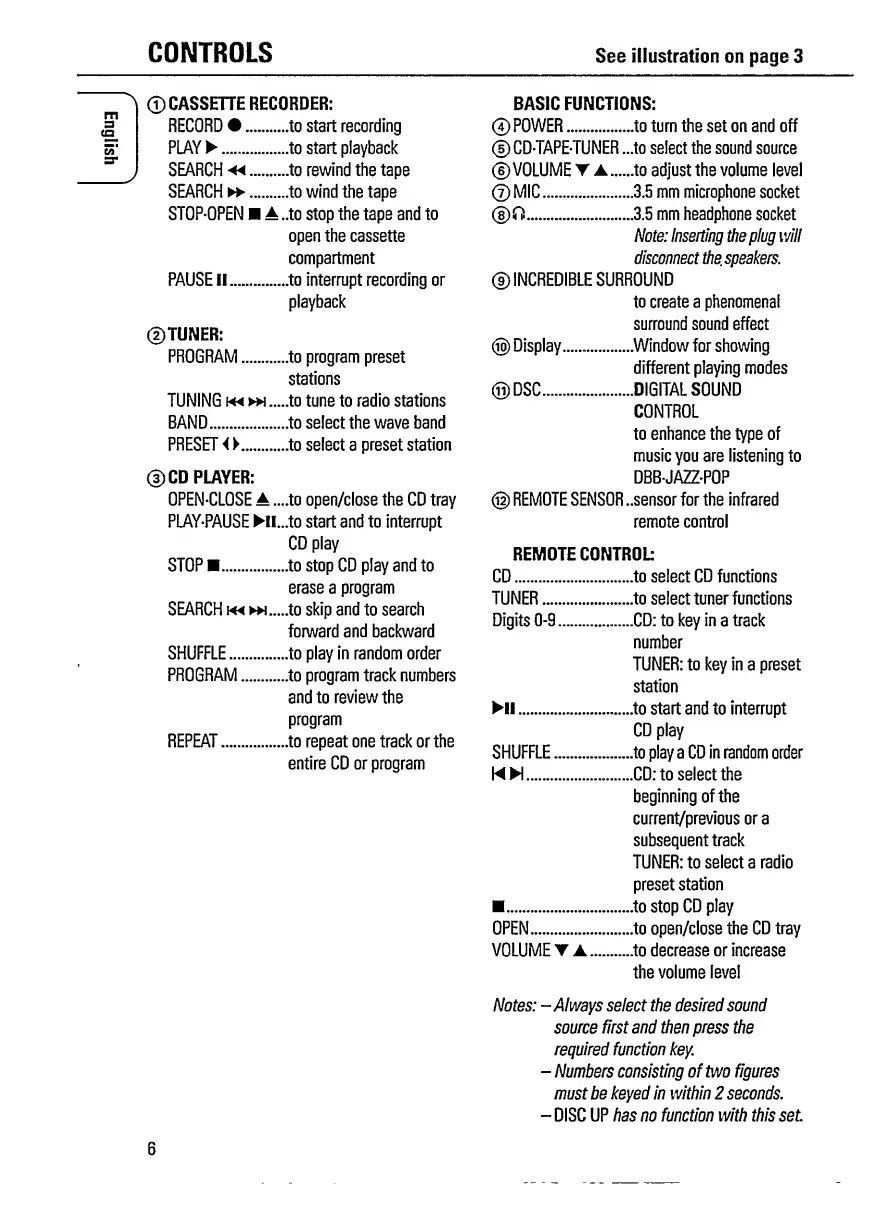
CONTROLS
See
illustration
on
page
3
©
CASSETTE
RECORDER:
BASIC
FUNCTIONS:
RECORD
•.to
start
recording
©
POWER.to
turn
the
set
on
and
off
PLAY
.
to
start
playback
©
CD-TAPE-TUNER
...to
select
the
sound
source
SEARCH
◄◄
.
to
rewind
the
tape
©VOLUME
T
.
to
adjust
the
volume
level
SEARCH
.
to
wind
the
tape
©
MIC.3.5
mm
microphone
socket
STOP-OPEN
A
..to
stop
the
tape
and
to
®
ft.3.5
mm
headphone
socket
open
the
cassette
Note:
Inserting
the
plug
will
compartment
disconnect
the.
speakers.
PAUSE
II
.
to
interrupt
recording
or
playback
©TUNER:
PROGRAM.to
program
preset
stations
TUNING
m
.to
tune
to
radio
stations
BAND.to
select
the
wave
band
PRESET
i
V
.
to
select
a
preset
station
©CD
PLAYER:
OPEN-CLOSE
A
....to
open/close
the
CD
tray
PLAY-PAUSE
Hl...to
start
and
to
interrupt
CD
play
STOP
.
.
to
stop
CD
play
and
to
erase
a
program
SEARCH
m
^.....to
skip
and
to
search
forward
and
backward
SHUFFLE.to
play
in
random
order
PROGRAM.to
program
track
numbers
and
to
review
the
program
REPEAT.to
repeat
one
track
or
the
entire
CD
or
program
©INCREDIBLE
SURROUND
to
create
a
phenomenal
surround
sound
effect
®
Display..Window
for
showing
different
playing
modes
©DSC.DIGITAL
SOUND
CONTROL
to
enhance
the
type
of
music
you
are
listening
to
DBB-JAZZ-POP
@
REMOTE
SENSOR
..sensor
for
the
infrared
remote
control
REMOTE
CONTROL
CD.to
select
CD
functions
TUNER.to
select
tuner
functions
Digits
0-9.CD:
to
key
in
a
track
number
TUNER:
to
key
in
a
preset
station
II
.
.
to
start
and
to
interrupt
CD
play
SHUFFLE.to
play
a
CD
in
random
order
WH.CD:
to
select
the
beginning
of
the
current/previous
ora
subsequent
track
TUNER:
to
select
a
radio
preset
station
.
.
to
stop
CD
play
OPEN.to
open/close
the
CD
tray
VOLUME
A..to
decrease
or
increase
the
volume
level
Notes:
-Always
select
the
desired
sound
source
first
and
then
press
the
required
function
key.
-
Numbers
consisting
of
two
figures
must
be
keyed
in
within
2
seconds.
-
DISC
UP
has
no
function
with
this
set
6

Related product manuals