EasyManua.ls Logo

Philips AZ 1508 - Radio Tuner Operations; Tuning to Radio Stations; Enhancing Radio Reception

Philips AZ 1508
18 pages
Print Icon
To Next Page IconTo Next Page
To Previous Page IconTo Previous Page
Loading...
TUNER
Tuning
to
radio
stations
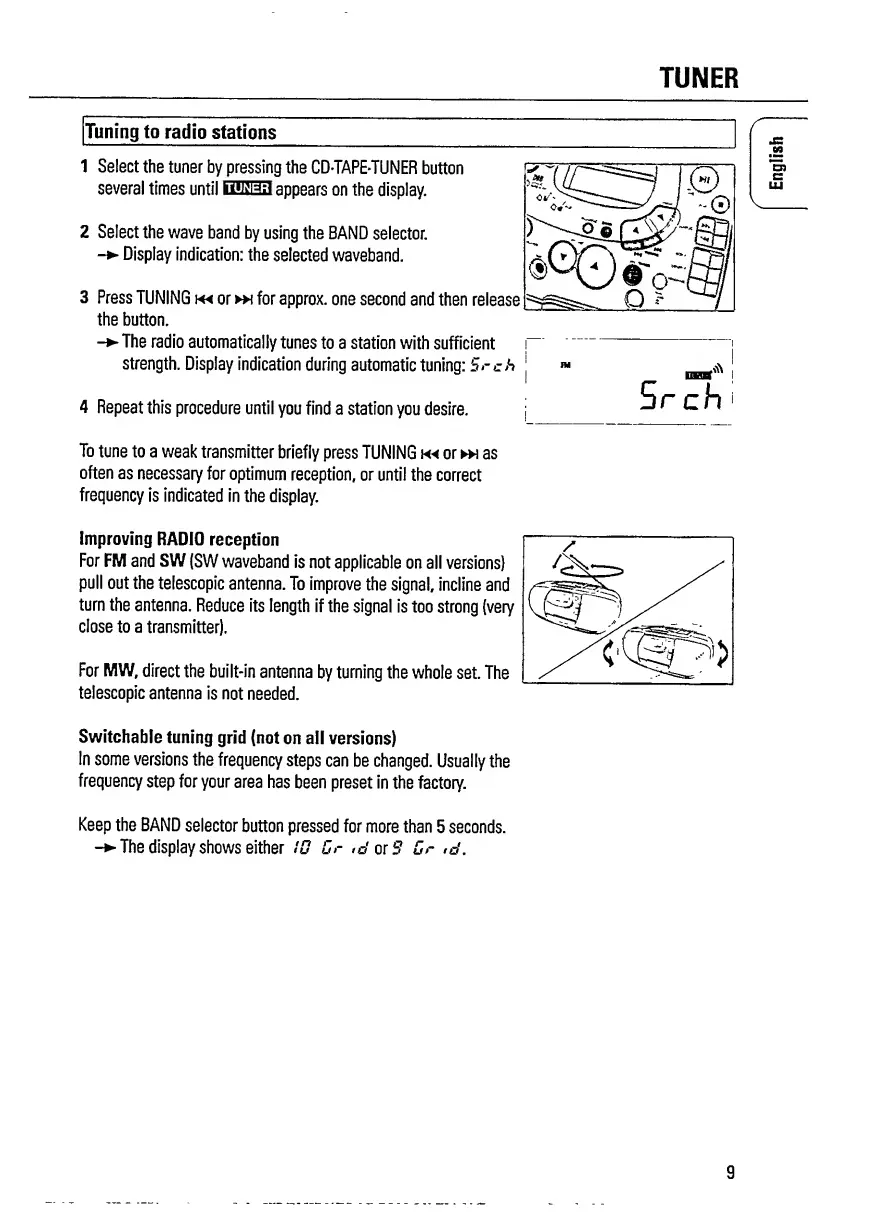
1
Select
the
tuner
by
pressing
the
CDTAPE-TUNER
button
several
times
until
SMS3
appears
on
the
display.
2
Select
the
wave
band
by
using
the
BAND
selector.
-
Display
indication:
the
selected
waveband.
3
Press
TUNING
m
or
»\
for
approx,
one
second
and
then
release
the
button.
-
The
radio
automatically
tunes
to
a
station
with
sufficient
strength.
Display
indication
during
automatic
tuning:
Srch
4
Repeat
this
procedure
until
you
find
a
station
you
desire.
r
v.
To
tune
to
a
weak
transmitter
briefly
press
TUNING
or
h
as
often
as
necessary
for
optimum
reception,
or
until
the
correct
frequency
is
indicated
in
the
display.
Improving
RADIO
reception
For
FM
and
SW
(SW
waveband
is
not
applicable
on
all
versions)
pull
out
the
telescopic
antenna.
To
improve
the
signal,
incline
and
turn
the
antenna.
Reduce
its
length
if
the
signal
is
too
strong
(very
close
to
a
transmitter).
For
MW,
direct
the
built-in
antenna
by
turning
the
whole
set.
The
telescopic
antenna
is
not
needed.
Switchable
tuning
grid
(not
on
all
versions)
In
some
versions
the
frequency
steps
can
be
changed.
Usually
the
frequency
step
for
your
area
has
been
preset
in
the
factory.
Keep
the
BAND
selector
button
pressed
for
more
than
5
seconds.
-
The
display
shows
either
ID
Dr
*o'orf?
Dr
,d.
9
English

Related product manuals