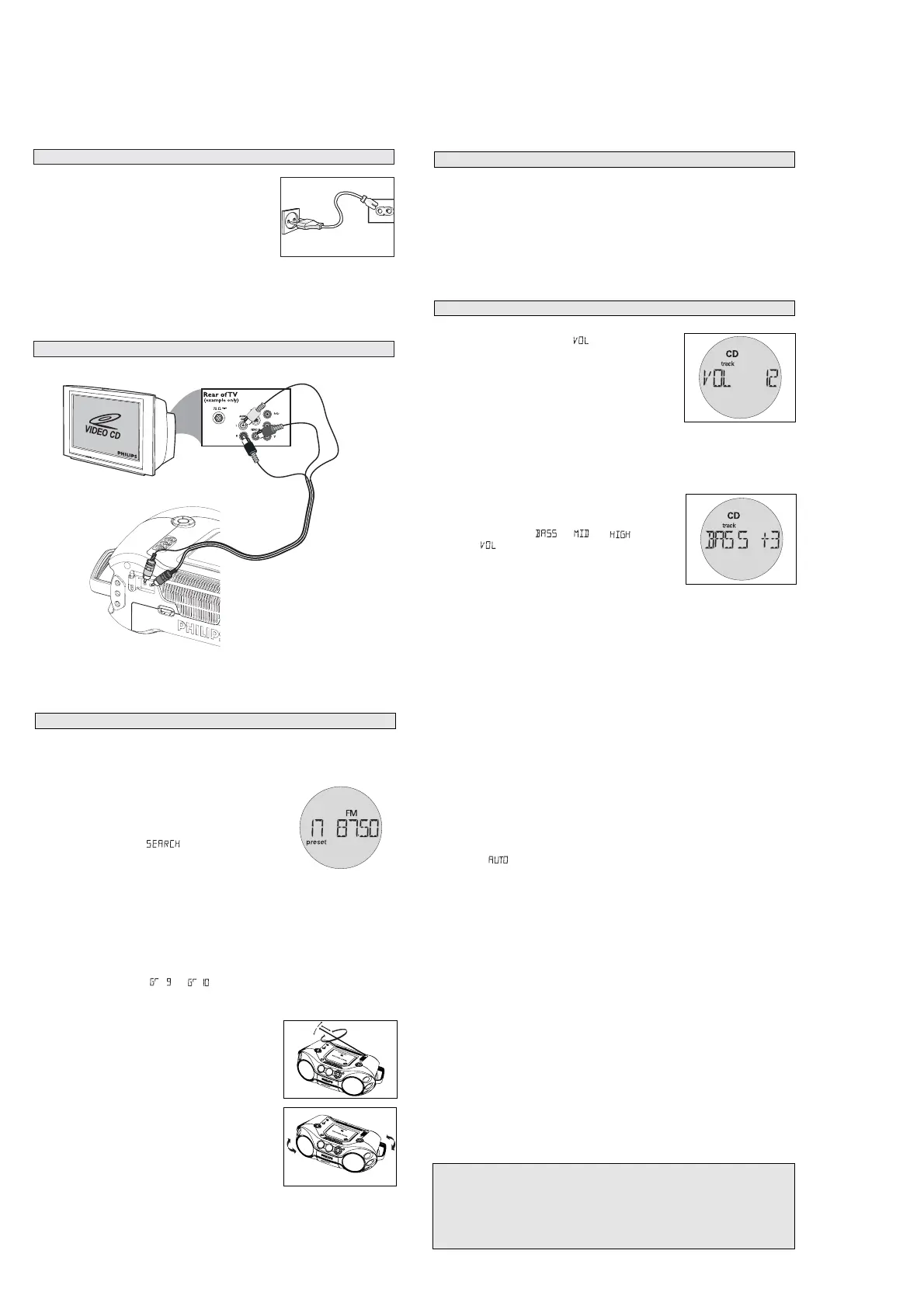
GENERAL OPERATION
1. Check if the mains voltage as shown on the type plate (on the
bottom of the set) corresponds to your local mains voltage.
Select 110 or 220V by the selector (for some version only).
2. If your set is equipped with a voltage selector, adjust the
selector so that it matches with the local mains.
3. Connect the mains lead to the AC MAINS
~ socket and the
wall socket.
™ The set is now ready for use.
4. To switch off the mains supply completely, pull the mains plug out of the wall socket.
™ Disconnect the mains lead when you change over to battery supply, or to protect the set
during heavy thunderstorms.
The type plate is located on the bottom of the set.
CONNECTING TO YOUR TV SYSTEM
MAINS
GENERAL OPERATION
1.
Press STANDBY ON
y
on the set to switch on.
2.
Press SOURCE once or more to select your desired function:
CD • VCD, FM, MW, TAPE
3.
Press STANDBY ON
y
to switch the set to standby.
Helpful hints :
–
To change from
TAPE
to
CD • VCD,
FM
or
MW
source, or when you are switching off the set:
first, make sure you press the tape
STOP
9
key to end playback and all the cassette keys are
released.
–
The tone, sound settings, tuner presets and the volume level (up to a maximum volume level of
VOL 20
) will be retained in the set's memory.
1.
Adjust the volume with the VOLUME control.
= Display shows the volume level and a number from 0-
32.
2.
MAX SOUND
To enhance the bass response: press MAX SOUND once or more to
switch on / off.
= MAX SOUND-key backlight lights up when MAX SOUND is
turned on.
Helpful hints :
–
MAX SOUND can be used when you play CD, VCD, FM, MW and TAPE
source.
–
Some discs might be recorded in high modulation, which causes a distortion at high volume. If this
occurs, deactivate MAX SOUND or reduce the volume.
3.
EQUALIZER
To adjust the bass, mid and high frequencies, press EQUALIZER once
or more (or press EQ on the remote control), then rotate VOLUME
within 3 seconds to adjust each level.
=Display briefly shows
,
, or
level (-5 to
+5) or
.
Helpful hints:
–
EQUALIZER can be used during CD, VCD, FM, MW and TAPE
source.
–
To prevent sound interference the bass control options operate exclusively.
You cannot combine the bass from EQUALIZER with MAX SOUND
ADJUSTING VOLUME AND SOUND
SWITCHING ON AND OFF
DIGITAL TUNER
CAUTION
Use of controls or adjustments or performance of procedures other than herein
may result in hazardous radiation exposure or other unsafe operation.
Environmental information
All unnecessary packaging material has been omitted. We have done our utmost to make the
packaging easily separable into three mono materials: cardboard, polystyrene and plastic.
Your set consists of materials which can be recycled if disassembled by a specialized
company. Please observe the local regulations regarding the disposal of packaging
materials, exhausted batteries and old equipment.
Programming tuner stations:
You can store up to a total of 30 radio stations in the memory (20 FM and 10 MW), manually or
automatically (Autostore).
Autostore
Automatic programming will start from preset 1 or a chosen preset number. The set will only program
stations which are not in the memory already.
1.
Press
ALBUM/PRESET -,+
(
¡ or ™
on the remote control) once or more to select the preset
number where programming should start.
Helpful hints:
–
If no tuner preset number is selected, default is preset 1 and all your presets will be erased.
2.
Press PROG for 4 seconds or more to activate auto store programming.
= Display: is shown and available stations are programmed in order of waveband FM,
followed by MW , the first preset station will then be played after all stations are stored
automatically.
Manual programming
1.
Tune to your desired station (see Tuning to stations).
2.
Press PROG to activate programming.
= Display: PROG flashes.
3.
Press
ALBUM/PRESET -,+
(
¡ or ™
on the remote control) once or more to allocate a number from
1 to 20 for FM or 1 to 10 for MW.
4.
Press PROG again to confirm.
= Display: shows the preset number, waveband and the frequency of the preset station.
5.
Repeat the above four steps to store other stations.
Helpful hints:
–
You can erase a preset station by storing another frequency in its place.
To listen to a preset station
Press
ALBUM/PRESET -,+
(
¡ or ™
on the remote control) once or more until the desired preset
station is displayed.
DIGITAL TUNER
Tuning to stations
1.
Press STANDBY ON
y
to on, then press SOURCE once or more to select
FM/MW
.
= Display: shows waveband, frequency, and preset station number if already stored.
2.
Tuning to stations: you can tune to your stations manually or by
automatic search tuning:
Press down on
or §
§
§
(
5 or 6
on the remote control) and
release button when the frequency in the display starts running.
= The radio automatically tunes to a station of sufficient
reception. Display shows
during automatic tuning.
3.
Repeat step 2 if necessary until you find the desired station.
• To tune to a weak station, press
or §
(
5 or 6
on the remote control) briefly and repeatedly
until you have found optimal reception.
Changing tuning grid (some versions only)
In North and South America the frequency step between adjacent channels in the AM and FM band
are 10 KHz and 100 KHz respectively. In the rest of the world this step is 9 KHz and 50 KHz. Usually
the frequency step has been preset in the factory for your area if not
:
1.
Select TUNER source.
2.
Press MODE on the set for at least 6 seconds.
= The display shows either or
.
Helpful hints:: All preset stations will be lost and need to be reprogrammed.
To improve radio reception:
• For FM, extend, incline and turn the telescopic antenna. Reduce
its length if the signal is too strong.
• For MW, the set uses a built-in antenna. Direct this antenna by
turning the whole set.
RADIO RECEPTION







 To Next Page