EasyManua.ls Logo

Philips AZ385 - Overview of the Main Unit

Philips AZ385
14 pages
Print Icon
To Next Page IconTo Next Page
To Previous Page IconTo Previous Page
Loading...
5 EN
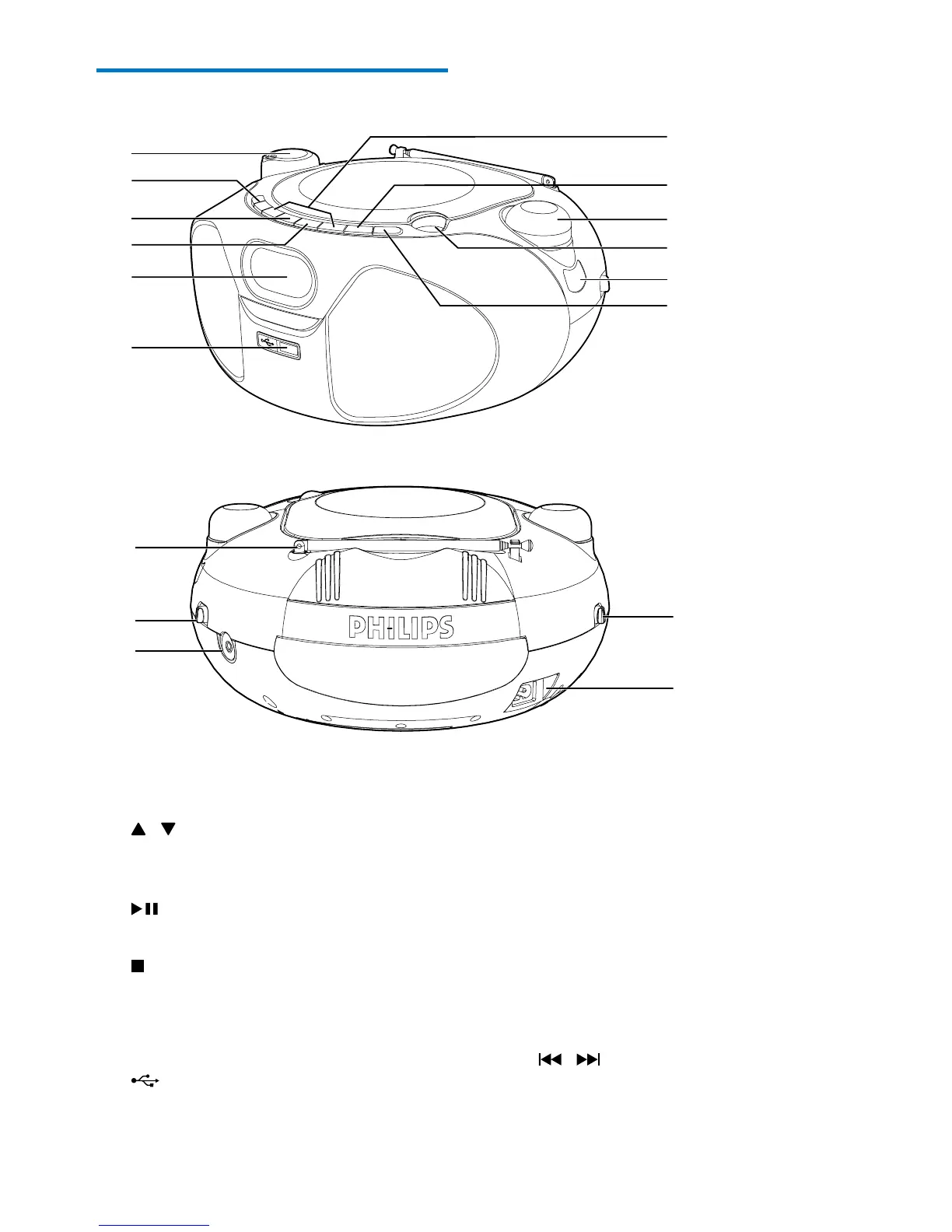
Overview of the main unit
a VOLUME
• Adjust volume.
b
/
• In CD or USB mode, skip to the
previous or next album.
c
• Start or pause play.
d
• Stop play.
• Erase a program.
e Display panel
f
• Connect a USB device.
a
k
l
d
c
b
e
f
h
g
i
j
n
o
p
m
q
g PROG
• In CD or USB mode, program the play
sequence of tracks.
h FM frequency indicator
i LIFT TO OPEN
• Open or close the disc compartment.
j - TUNING +
• Tune to FM radio stations.
k MODE
• Selectrepeatorshufeplaymode.
l
/
• Skip to the previous or next track.
• Search within a track.

Related product manuals