Maintenance
Clean the cabinet
Use a soft cloth slightly moistened with a mild detergent solution. Do
•
not use a solution containing alcohol, spirits, ammonia or abrasives.
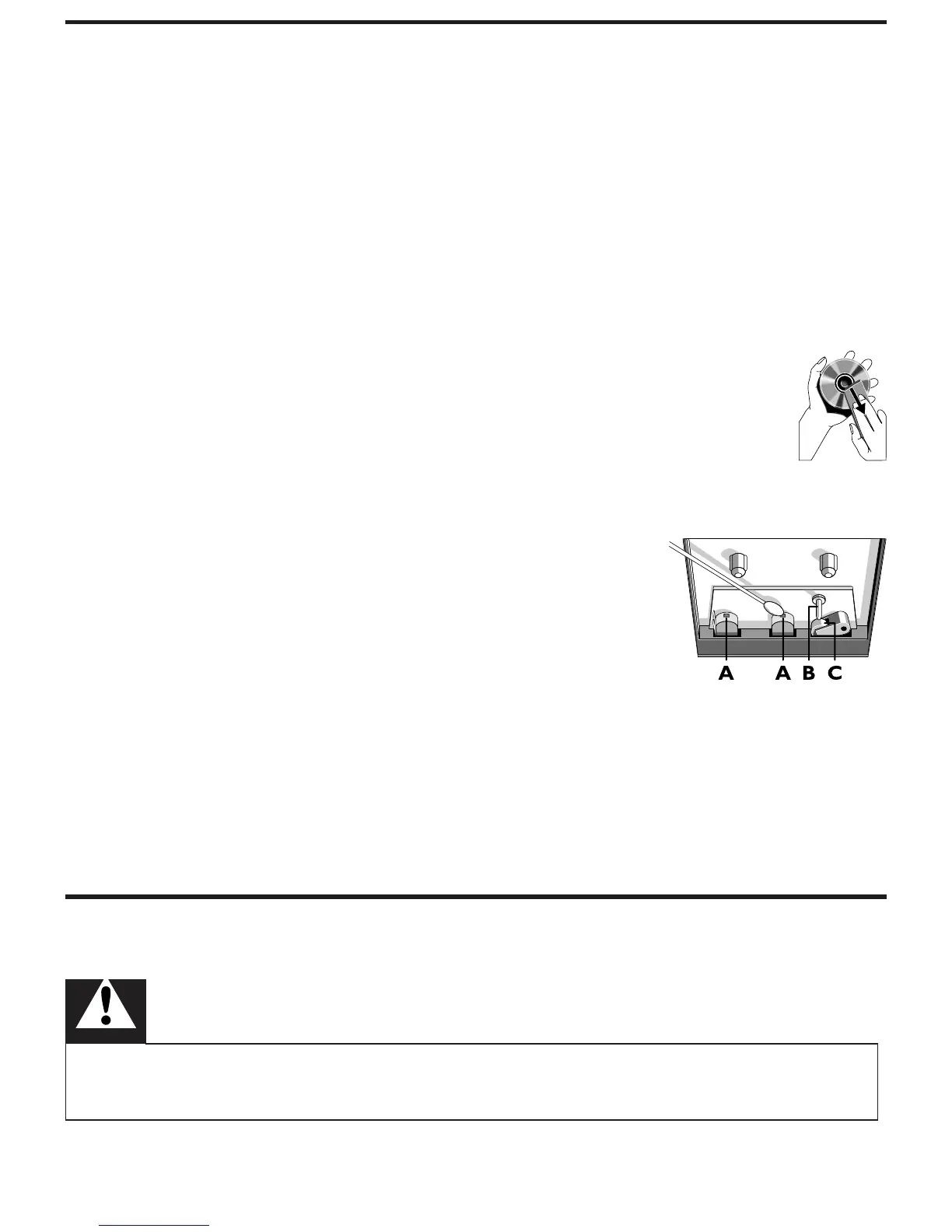
Clean discs
When a disc becomes dirty, clean it with a cleaning cloth. Wipe the
•
disc from the centre out.
•
Do not use solvents such as benzene, thinner, commercially available
cleaners, or antistatic spray intended for analogue records.
Clean the disc lens
After prolonged use, dirt or dust may accumulate at the
•
disc lens. To ensure good play quality, clean the disc lens
with Philips CD lens cleaner or any commercially available
cleaner. Follow the instructions supplied with cleaner.
Clean the heads and the tape paths
To ensure good recording and play quality, clean
•
the heads A, the capstan(s) B, and pressure
roller(s) C after every 50 hours of tape operation.
Use a cotton swab slightly moistened with
•
cleaning uid or alcohol.
•
You can also clean the heads by playing a cleaning tape once.
Demagnetise the heads
Use a demagnetising tape available at your dealer.
•
9 Troubleshooting
Troubleshooting
Warning
Never remove the casing of this apparatus. •
To keep the warranty valid, never try to repair the system yourself.



 To Next Page