1
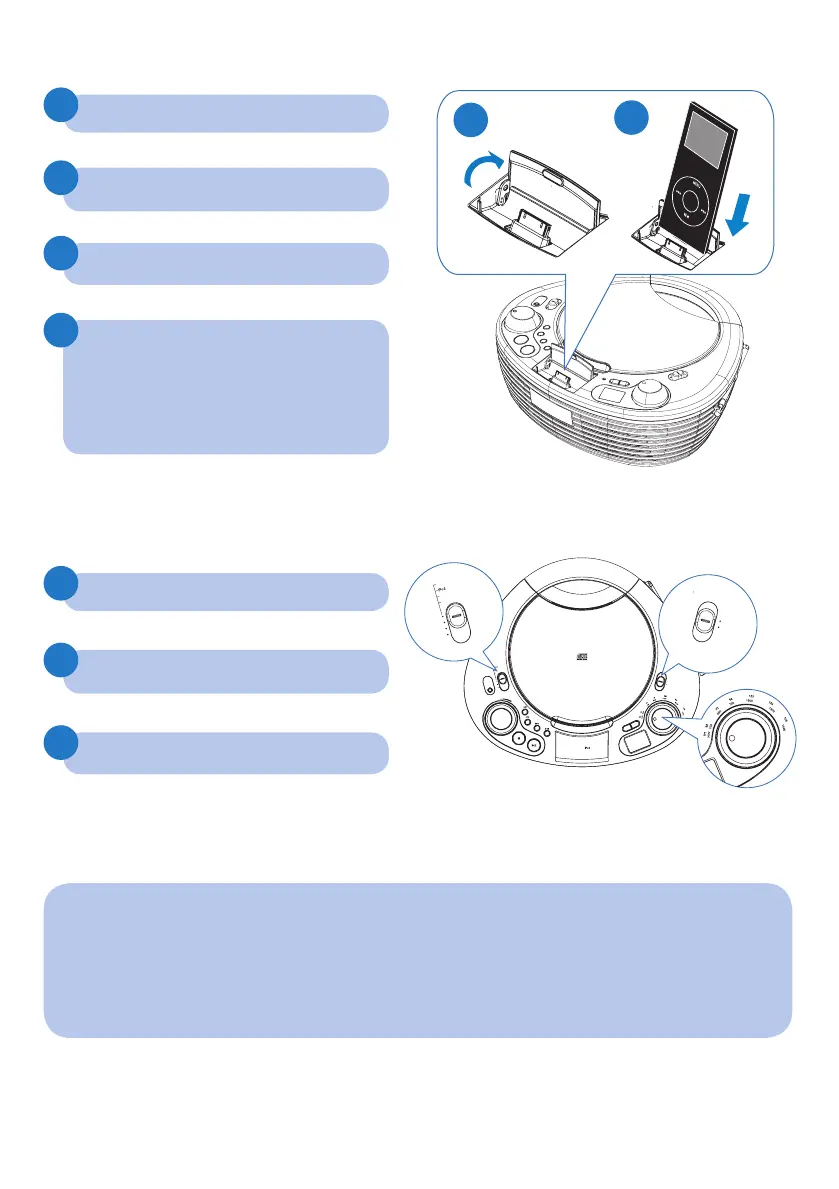
Listen to radio
Play from iPod
Tip
Detailed play features and additional functions are described in the supplied
user manual.
CD SOUNDMACHINE AZD208
MW
FM
V
O
L
U
M
E
D
B
B
P
R
O
G
D
O
C
K
F
O
R
OFF
TUNER
CD
MP
3
-
LINK
L
I
F
T
—
O
P
E
N
OFF
TUNER
CD
MW
FM
1
1
2
2
3
3
4
Lift to open the dock for iPod.
Push the source selector to TUNER.
Place the iPod player in the dock.
Push the band selector to FM or MW.
Push the source selector to iPod.
Turn TUNING to tune to a station.
To pause/resume play, press
ÉÅ
.
To skip to a track, press
J(
/
)K
.
To search during play, press and
hold
J(
/
)K
, then release to resume
normal play.
AZD208_05_QSG_Eng.indd 3 5/13/2010 3:07:47 PM



 To Next Page