BDL4330QL
4
2. Parts and Functions
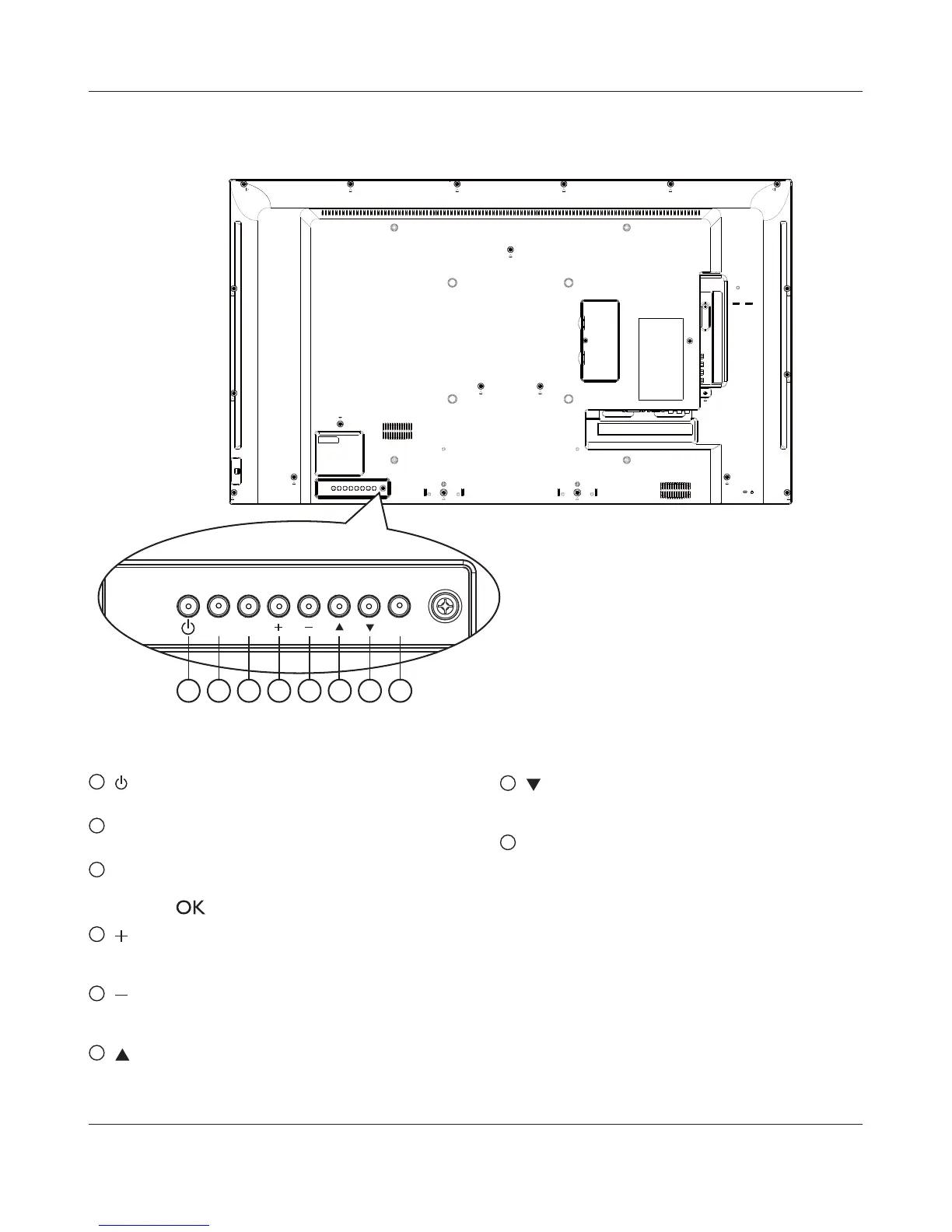
2.1. Control Panel
1 2 3 4 5 6 7 8
MUTE INPUT
MENU
1
[ ] button
Use this button to turn the display on or put the display to standby.
2
[MUTE] button
Switch the audio mute ON/OFF.
3
[INPUT] button
Choose the input source.
Used as [
] button in the On-Screen-Display menu.
4
[ ] button
Increase the adjustment while OSD menu is on, or increase the
audio output level while OSD menu is off.
5
[ ] button
Decrease the adjustment while OSD menu is on, or decrease the
audio output level while OSD menu is off.
6
[ ] button
Move the highlight bar up to adjust the selected item while OSD
menu is on.
7
[ ] button
Move the highlight bar down to adjust the selected item while OSD
menu is on.
8
[MENU] button
Return to previous menu while OSD menu is on, or to activate the
OSD menu when OSD menu is off.











 To Next Page