BDL4330QL
20
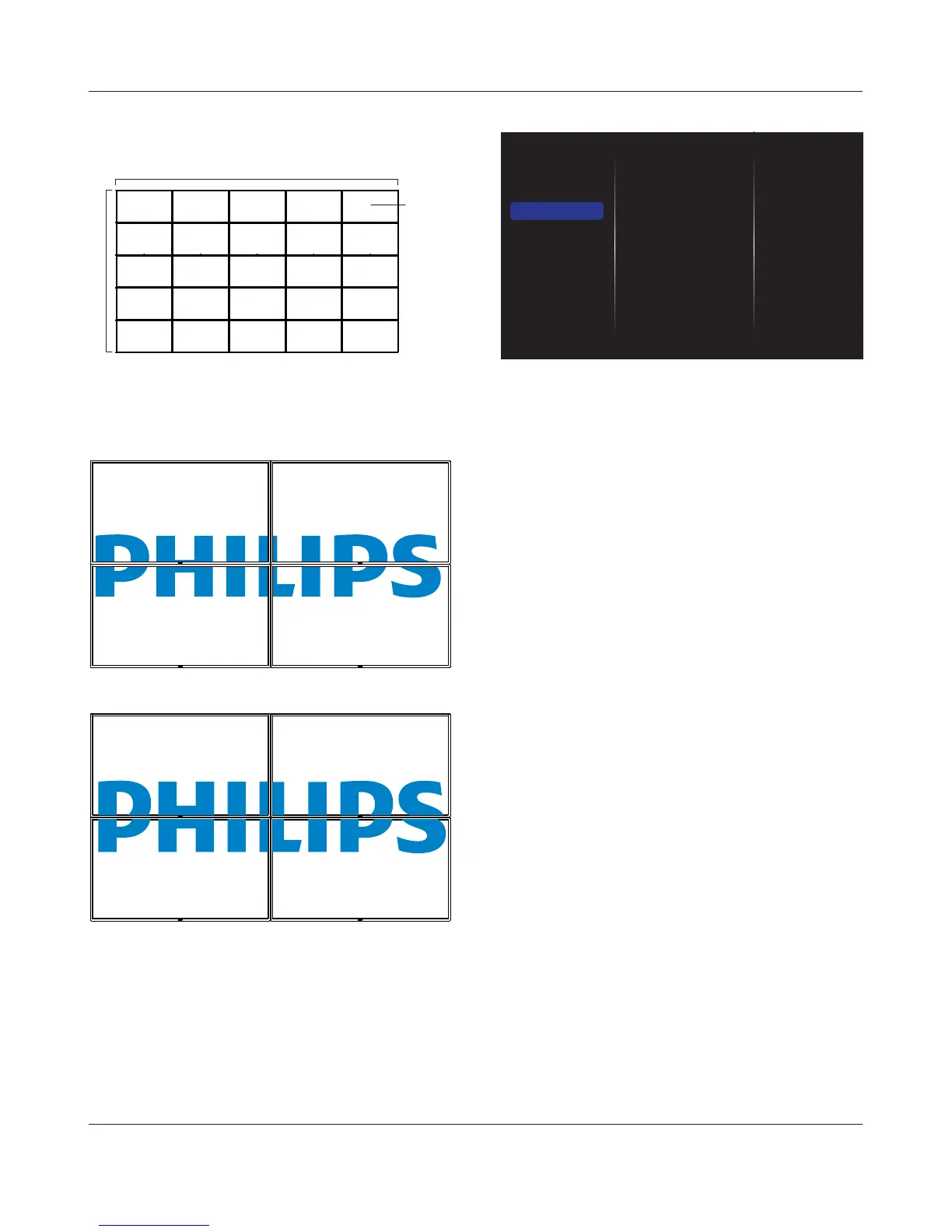
([DPSOH[VFUHHQPDWUL[GLVSOD\V
H monitors = 5 displays
V monitors = 5 displays
12
67
34
89
5
10
11 12 13 14 15
16 17 18 19 20
21 22 23 24 25
H monitors
V monitors
Position
Frame comp.
Choose to turn the frame compensation function on or off. If selected
{On}, the display will adjust the image to compensate for the width of
the display bezels in order to accurately display the image.
{On}
{Off}
NOTE: You need to enter factory mode to set up the compensation
width
Switch on delay
$GMXVWWKHSRZHURQGHOD\LQJWLPHLQVHFRQGVDOORZVDVHTXHQWLDO
powering-on for each display by their ID number when multiple displays
are connected.
5.1.4. Network
Picture
Sound
Tiling
Network
Storage
General settings
Network settings
Static IP Configuration
Digital Media Rendere...
Network name
Clear Internet memory
Network settings
{1HWZRUNFRQÀJXUDWLRQ}: Choose how this display should assign
addresses to the network resources.
The user can choose {DHCP & Auto IP} (suggested) or {Static IP}.
Static IP ConÀguration
^6WDWLF,3`LVFKRVHQ'HÀQH^,3DGGUHVV`^1HWPDVN`^*DWHZD\`^'16`
and {DNS2} for this display. If {Network settings}
Digital Media Renderer - DMR
5HFHLYHPXOWLPHGLDÀOHVIURPWKHFRQQHFWHGGHYLFHE\\RXUQHWZRUN
Network name
In the multiple-display connection, you can rename each display for easy
LGHQWLÀFDWLRQ
Use the on-screen keyboard or the remote control keypad to enter the
name.
Clear Internet memory
&OHDUDOOWKHFRRNLHVERRNPDUNVKLVWRU\OLVWDQGWH[WXVHGIRUDXWRÀOO










 To Next Page