6
5 On the BD-Live interface, select an item
to access.
Note
• BD-Live services vary from discs and countries.
• When you use BD-Live, data on the disc and this player
are accessed by the content provider
• Use a USB storage device with at least 1GB of free
space to store the download.
Set up a network
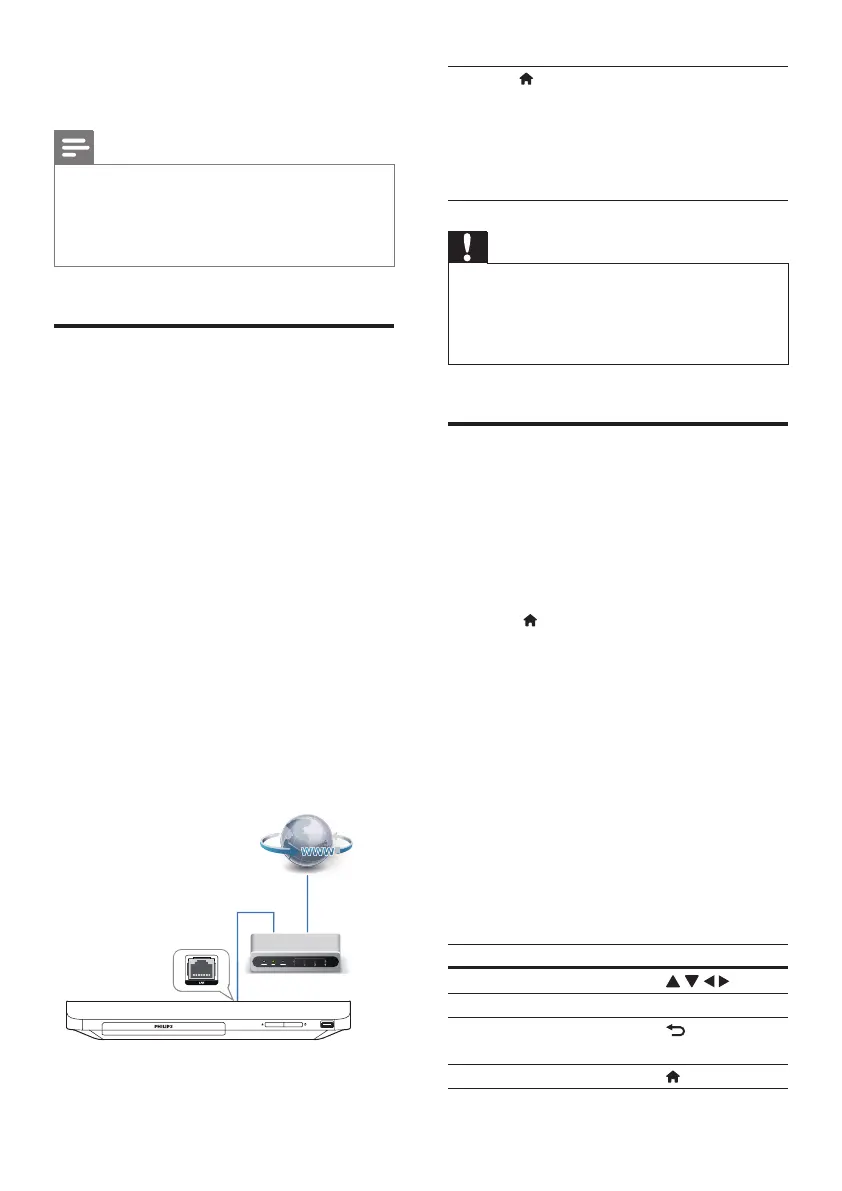
Connect this player to a computer network and
the Internet to access the services:
• Update software: update the software of
this player via the Internet.
• BD-Live: access online bonus features
(applicable to Blu-ray discs that are BD-
Live enabled).
• Online services: access Internet services
such as YouTube, Picasa, Facebook and
Twitter.
1 Connect this player to a computer
network and the Internet, through wired
(Ethernet) connection.
• For wired connection, connect a
network cable (not supplied) to the
LAN port on the back panel of this
player.
2 Perform the network installation.
1) Press .
2) Select [Setup], and press OK.
3) Select [Network] > [Network
installation], and press OK.
4) Follow the instructions on the TV screen to
complete the installation.
Caution
• Before you connect to a network, familiarize yourself
with the network router and networking principles. If
necessary, read documentation accompanying network
components. Philips is not responsible for lost, damaged,
or corrupt data.
Enjoy Internet services
With this player, you can access online services,
such as movies, pictures and music.
What you need
• Connect this player to the Internet (see
"Setupanetwork").
1 Press .
2 Select a service and press OK.
• [YouTube]: a video-sharing service
• [Netix]: an online subscription service
streaming movies & TV episodes over the
Internet
• [Picasa]: an online photo album
• [AccuWeather]: an online weather
forecasting service worldwide
• [Facebook]: a social networking service
• [Twitter]: an online social networking
service and microblogging service
3 Follow the on-screen instruction and use
your remote control to enjoy the services.
Function Button/Action
Select a service or item.
Conrmaselection. OK
Return to a previous page, or
delete input text.
Return to the home page.
EN


 To Next Page