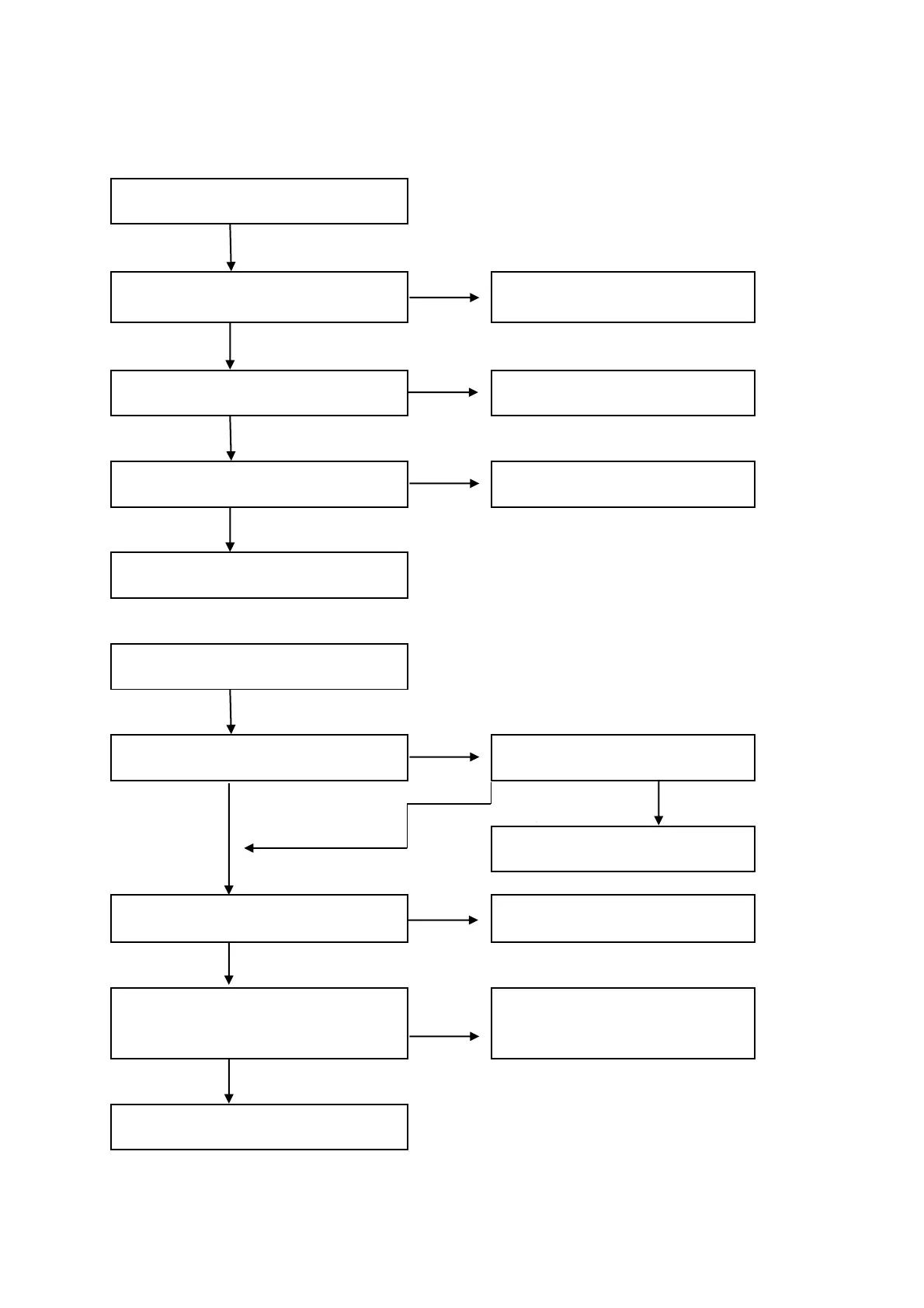
NO
YES
NO
YES
NO
YES
NO
YES NO
YES
NO
YES
NO
YES
Display is OK
Check Y1,C17,C23,U4,Q3 etc.
components
A:NO POWER OUTPUT
Check R159,T1
Check the fifth feet of IC3 is
with around 14V or not.
Check R162,D20,T1,IC5
Check EC33 is with 310V direct
voltage or not
Check F1,LF2,LF1,U12
Check switching tube OP2 is
with 310V voltage or not.
Check Y1(32.768KHZ)if start
oscillation or not
D10 5.2V,D21~D23 20.5V regular
voltage
Check IC7 is with 3.3V voltage
output or not
Check D10 L34 is with 5.2V
voltage or not
B: NO DISPLAY
Check D10,IC3,IC5
Check R44,R46,R47 LED display
drive signal CLK,DATE,STB is
normal or not
Check U1,CON4 and U2 on
display board,CON3,FFC
cabel
10.Trouble Shooting


 To Next Page