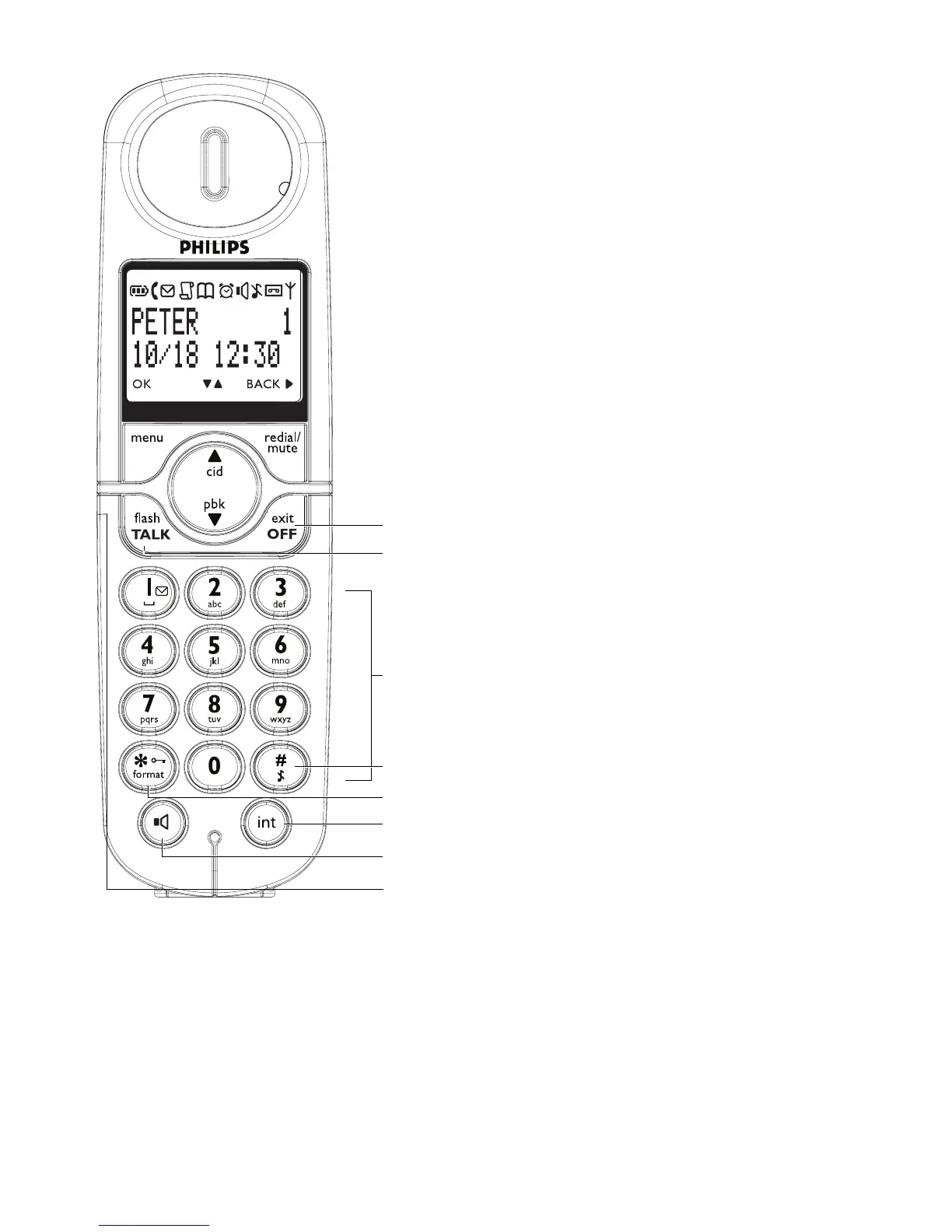
Your phone
8
F Talk off/Exit key
In idle mode : Long press for about 5 seconds
to power off the handset. If the handset is
powered off, short press to power on the
handset.
In menu mode : Long press to return to idle
mode, short press to return to previous
menu.
During call connection : Press to hang up a call
G Talk on/R key
In idle mode : Press to answer when there is
an incoming external or internal call
During call connection : Press to insert R for
operator services
HAlphanumeric keypad
I Hash key
In idle/dialing mode : Short press to insert a #
In idle mode : Long press to mute the ringer
In dialing mode : Long press to enter a pause
In editing mode : Short press to switch
between uppercase and lowercase
J Star key/Format key
In idle/dialing mode : Short press to insert a *
In idle mode : Long press to activate or
deactivate keypad lock
In call log reviewing mode : Press repeatedly
to view the alternate dialling sequences
K Call Transfer/Intercom/conference
In idle mode : Short press to initiate an
intercom call
During external call connection : Short press
to initiate an internal call or switch call
between an internal call and an external call
Long press to initiate a conference call with
an external call and another internal call
L Loudspeaker key
During call connection : Press to switch the
loudspeaker on or off
MHeadset jack (Country dependent)
Allow handsfree communication through the
headset by plugging the headset into the
headset jack
F
G
H
J
K
L
I
M



 To Next Page