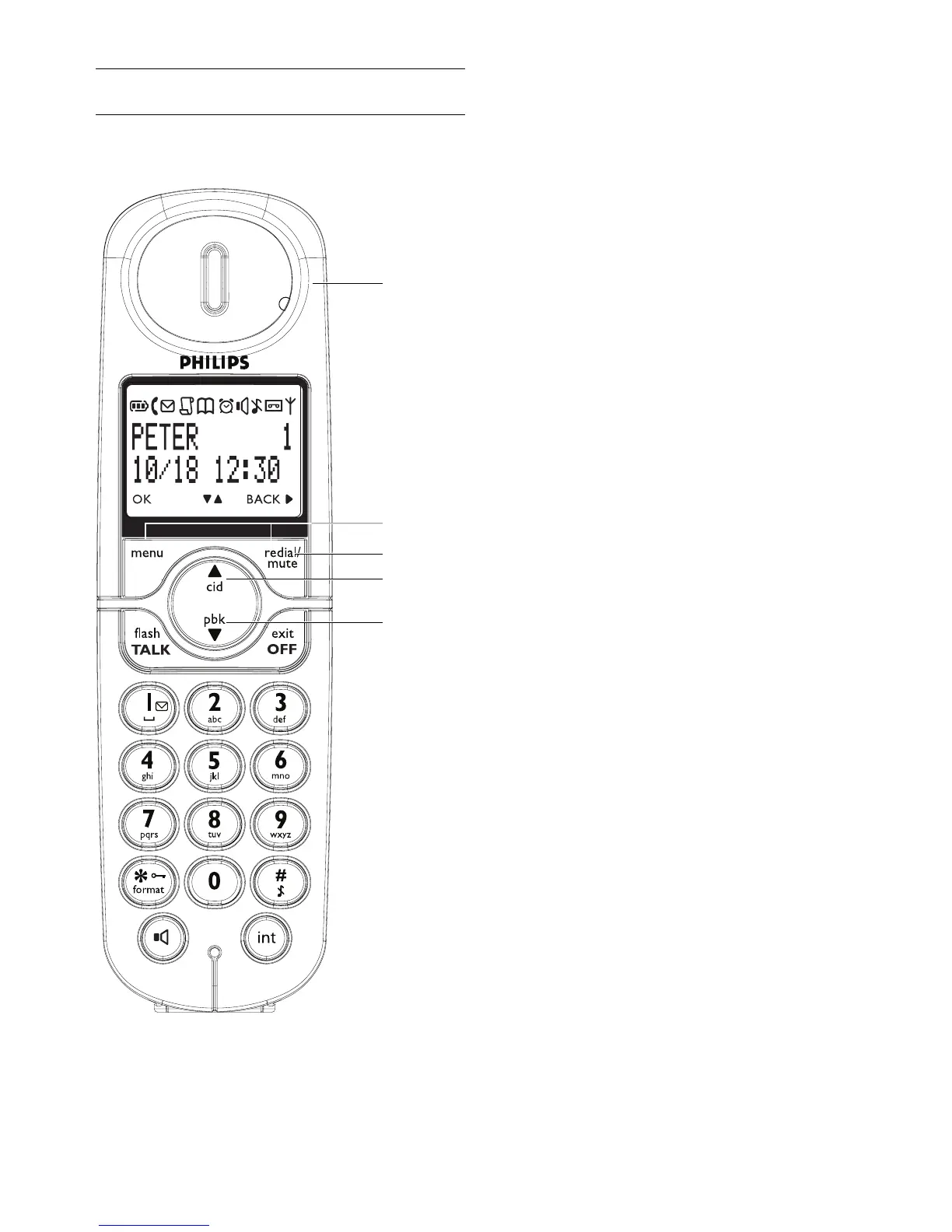
Your phone
7
A Event LED
OFF : No new events
RED BLINKING : Unread events (example : a
missed call if you have subscribed the Caller
Line Identification Service (CLI) from your
network provider.)
B Menu/OK key
In idle mode : Press to enter the main menu
In menu mode : Select the function displayed
on the handset screen directly above it
C Redial/Mute/Next key
In idle mode : Press to access the redial list
In editing mode/predialling mode : Short press
to delete one character/digit
In idle mode: If voice mail waiting icon is on,
long press to turn off the voice mail waiting
icon
In editing mode/predialling mode : Long press
to delete all the characters/digits
During call connection : Press to mute the
microphone
In menu mode : Press to go back to previous
level
D Call log/Up key
In idle mode : Press to access call log
In menu mode : Press to scroll up the menu
list
In phonebook/call log/Redial reviewing mode :
Press to scroll up to other entries
During call connection : Press to increase
earpiece volume
In editing mode : Press to go to the previous
character or digit
E Phonebook/Down key
In idle mode : Press to access phonebook
In menu mode : Press to scroll down the
menu list
In phonebook/call log/redial reviewing mode :
Press to scroll down to other entries
During call connection : Press to decrease
earpiece volume
In editing mode : Press to go to the next
character or digit
2.2 Overview of the phone
2.2.1 Handset
A
B
C
D
E



 To Next Page