EasyManua.ls Logo

Philips CDP 200 - Connections; Connecting Headphones and Remote; Connecting to a Stereo System; Headphone Usage Safety

Philips CDP 200
16 pages
Print Icon
To Next Page IconTo Next Page
To Previous Page IconTo Previous Page
Loading...
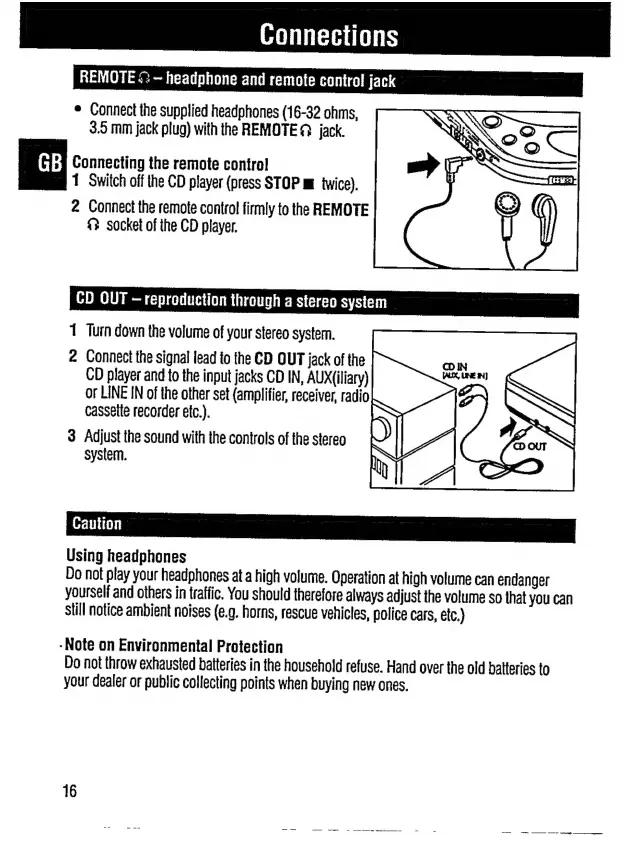
REMOTE
<>
--
headphone
and
remote
control
jack
e
Connect
the
supplied
headphones
(16-32
ohms,
3.5
mm
jack
plug)
with
the
REMOTE?
jack.
Connecting
the
remote
control
1
Switch
off
the
CD
player
(press
STOP
m
twice).
2
Connect
the
remote
contro!
firmly
to
the
REMOTE
£?
socket
of
the
CD
player.
CD
QUT
-
reproduction
through
a
stereo
system
1
Turn
down
the
volume
of
your
stereo
system.
2
Connect
the
signal
lead
to
the
CD
OUT
jack
of
the
CD
player
and
to
the
input
jacks
CD
IN,
AUX(iliary)
or
LINE
IN
of
the
other
set
(amplifier,
receiver,
radio
cassette
recorder
etc.).
3
Adjust
the
sound
with
the
controls
of
the
stereo
system.
Using
headphones
Do
not
play
your
headphones
at
a
high
volume.
Operation
at
high
volume
can
endanger
yourself
and
others
in
traffic.
You
should
therefore
always
adjust
the
volume
so
that
you
can
still
notice
ambient
noises
(e.g.
horns,
rescue
vehicles,
police
cars,
etc.)
-Note
on
Environmental
Protection
Do
not
throw
exhausted
batteries
in
the
household
refuse.
Hand
over
the
old
batteries
to
your
dealer
or
public
collecting
points
when
buying
new
ones.
=:
デー-
nei
on
=
---
ーー
ee
a

Related product manuals