EasyManua.ls Logo

Philips CDP 200 - Power Supply; Mains Adapter Usage; Battery Operation; Battery Status Indicator

Philips CDP 200
16 pages
Print Icon
To Next Page IconTo Next Page
To Previous Page IconTo Previous Page
Loading...
Power
supply
Mains
adapter
(supplied)
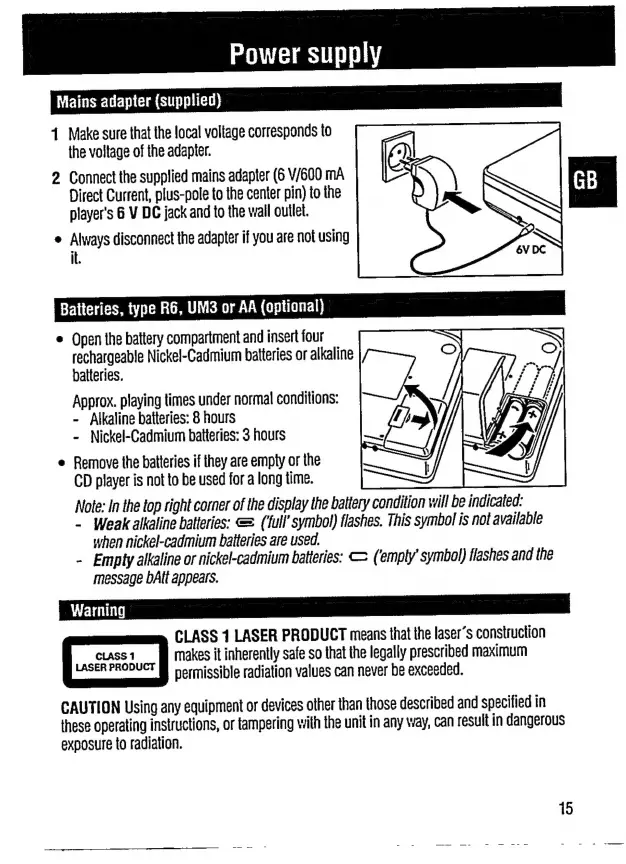
1
Make
sure
that
the
local
voltage
corresponds
to
the
voltage
of
the
adapter.
2
Connect
the
supplied
mains
adapter
(6
V/600
mA
Direct
Current,
plus-pole
to
the
center
pin)
to
the
player's
6
V
DC
jack
and
to
the
wall
outlet.
e
Always
disconnect
the
adapter
if
you
are
not
using
it.
Batteries,
type
R6,
UM3
or
AA
(optional)
e
Open
the
battery
compartment
and
insert
four
rechargeable
Nickel-Cadmium
batteries
or
alkaline
batteries.
Approx.
playing
times
under
normal
conditions:
-
Alkaline
batteries:
8
hours
-
Nickel-Cadmium
batteries:
3
hours
e
Remove
the
batteries
if
they
are
empty
or
the
CD
player
is
not
to
be
used
for
a
long
time.
Note:
In
the
top
right
corner
of
the
display
the
battery
condition
will
be
indicated:
-
Weak
alkaline
batteries:
=
(full
symbol)
flashes.
This
symbol
is
not
available
when
nickel-cadmium
batteries
are
used.
-
Empty
alkaline
or
nickel-cadmium
batteries:
E
(emply'
symbol)
flashes
and
the
message
bAtt
appears.
CLASS
1
LASER
PRODUCT
means
that
the
laser’s
construction
EA
makes
it
inherently
safe
so
that
the
legally
prescribed
maximum
permissible
radiation
values
can
never
be
exceeded.
CAUTION
Using
any
equipment
or
devices
other
than
those
described
and
specified
in
these
operating
instructions,
or
tampering
with
the
unit
in
any
way,
can
result
in
dangerous
exposure
to
radiation.

Related product manuals