EasyManua.ls Logo

Philips CDP 200 - Operating the CD Player; Playing a CD; Adjusting Volume and Sound; Interrupting and Resuming Play

Philips CDP 200
16 pages
Print Icon
To Next Page IconTo Next Page
To Previous Page IconTo Previous Page
Loading...
OPERATION
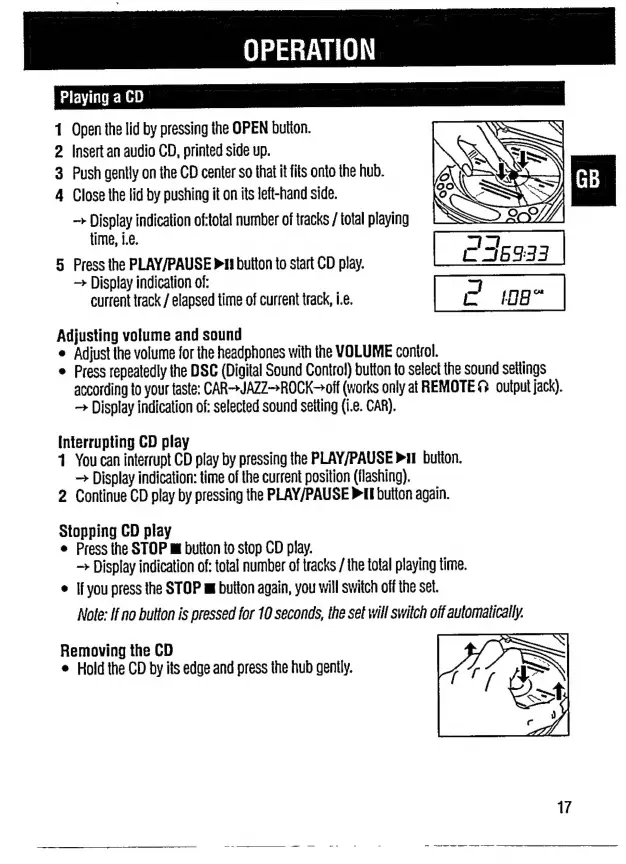
Playing
a
CD
1
Open
the
lid
by
pressing
the
OPEN
button.
2
Insert
an
audio
CD,
printed
side
up.
3
Push
gently
on
the
CD
center
so
that
it
fits
onto
the
hub.
4
Close
the
lid
by
pushing
it
on
its
left-hand
side.
Display
indication
of:total
number
of
tracks
/
total
playing
5
Press
the
PLAY/PAUSE
»
button
to
start
CD
play.
C
6333
Display
indication
of:
3
current
track
/
elapsed
time
of
current
track,
i.e.
198”
Adjusting
volume
and
sound
e
Adjust
the
volume
for
the
headphones
with
the
VOLUME
control.
e
Press
repeatedly
the
DSC
(Digital
Sound
Control)
button
to
select
the
sound
settings
according
to
your
taste:
CAR>JAZZ>ROCK-off
(works
only
at
REMOTE
Ω
output
jack).
Display
indication
of:
selected
sound
setting
(i.e.
CAR).
Interrupting
CD
play
1
You
can
interrupt
CD
play
by
pressing
the
PLAY/PAUSE
»iI
button.
>
Display
indication:
time
of
the
current
position
(flashing).
2
Continue
CD
play
by
pressing
the
PLAY/PAUSE
PI
button
again.
Stopping
CD
play
e
Press
the
STOP
m
button
to
stop
CD
play.
>
Display
indication
of:
total
number
of
tracks
/
the
total
playing
time.
e
If
you
press
the
STOP
πι
button
again,
you
will
switch
off
the
set.
Note:
If
no
button
is
pressed
for
10
seconds,
the
set
will
switch
off
automatically.
Removing
the
CD
e
Hold
the
CD
by
its
edge
and
press
the
hub
gently.
17

Related product manuals