EasyManua.ls Logo

Philips CDP 200 - Maintenance and Care; Handling and Cleaning CDs; Cleaning the Player Unit; CD Hub Issues

Philips CDP 200
16 pages
Print Icon
To Next Page IconTo Next Page
To Previous Page IconTo Previous Page
Loading...
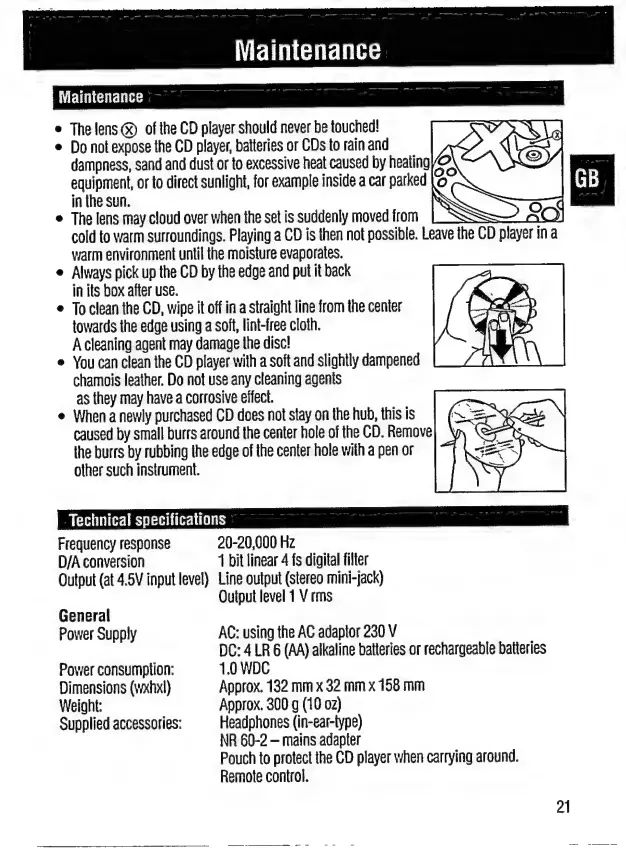
Maintenance
e
The
lens
GO
οἱ
the
CD
player
should
never
be
touched!
e
Do
not
expose
the
CD
player,
batteries
or
CDs
to
rain
and
dampness,
sand
and
dust
or
to
excessive
heat
caused
by
heating
equipment,
or
to
direct
sunlight,
for
example
inside
a
car
parked
in
the
sun.
.
The
lens
may
cloud
over
when
the
set
is
suddenly
moved
from
cold
to
warm
surroundings.
Playing
a
CD
is
then
not
possible.
Leave
the
CD
player
ina
warm
environment
until
the
moisture
evaporates.
Always
pick
up
the
CD
by
the
edge
and
put
it
back
in
its
box
after
use.
To
clean
the
CD,
wipe
it
off
in
a
straight
line
from
the
center
towards
the
edge
using
a
soft,
lint-free
cloth.
A
cleaning
agent
may
damage
the
disc!
You
can
clean
the
CD
player
with
a
soft
and
slightly
dampened
chamois
leather.
Do
not
use
any
cleaning
agents
as
they
may
have
a
corrosive
effect.
When
a
newly
purchased
CD
does
not
stay
on
the
hub,
this
is
caused
by
small
burrs
around
the
center
hole
of
the
CD.
Remove
the
burrs
by
rubbing
the
edge
of
the
center
hole
with
a
pen
or
other
such
instrument.
Technical
specifications
Frequency
response
20-20,000
Hz
D/A
conversion
1
bit
linear
4
fs
digital
filter
Output
(at
4.5V
input
level)
Line
output
(stereo
mini-jack)
Output
level
1
V
rms
General
Power
Supply
AC:
using
the
AC
adaptor
230
V
DC:
4
LR
6
(AA)
alkaline
batteries
or
rechargeable
batteries
Power
consumption:
1.0
WDC
Dimensions
(wxhxl)
Approx.
132
mm
x
32
mm
x
158
mm
Weight:
Approx.
300
g
(10
oz)
Supplied
accessories:
Headphones
(in-ear-type)
NR
60-2
mains
adapter
Pouch
to
protect
the
CD
player
when
carrying
around.
Remote
control.
21

Related product manuals