17
Play from USB
Note
Ensure that the USB device contains playable •
music.
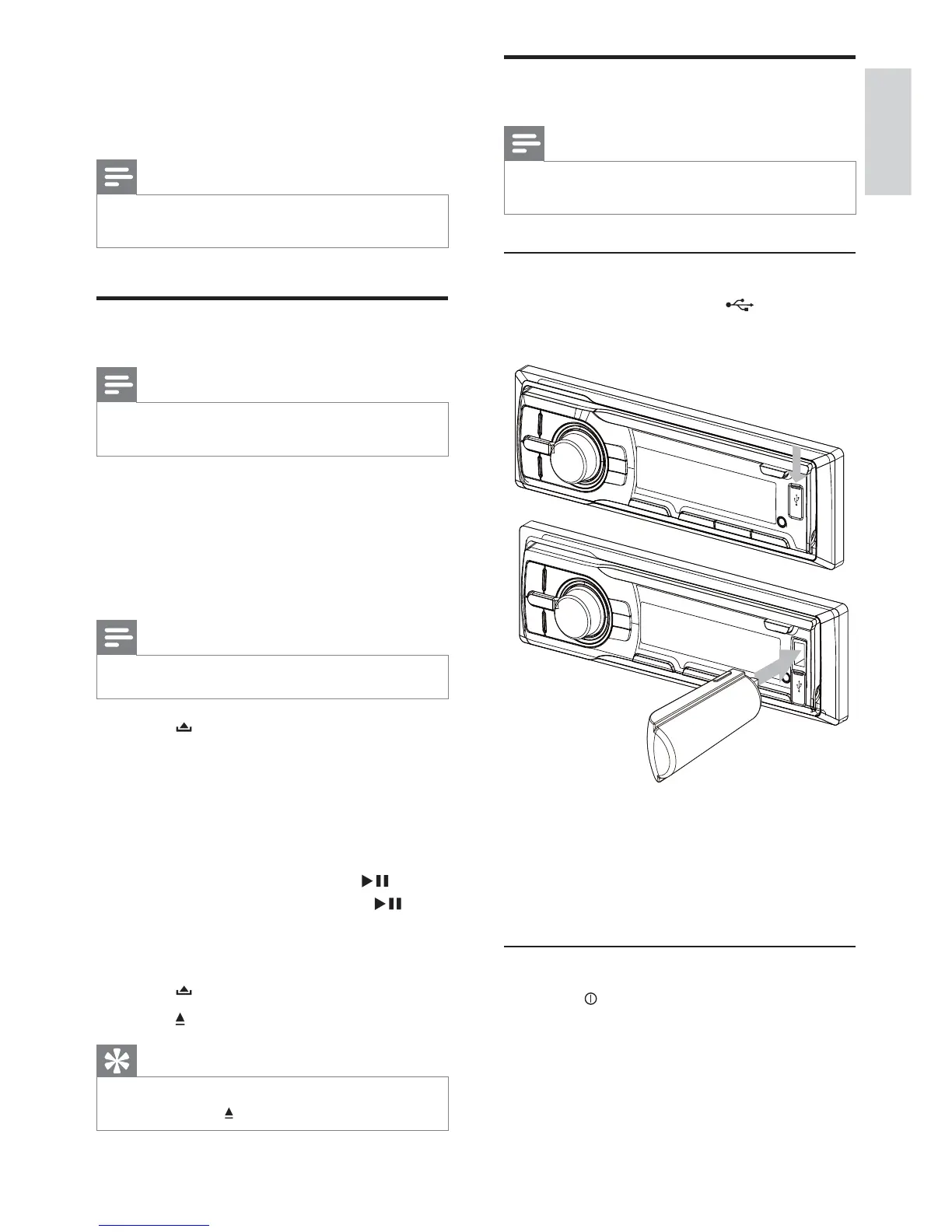
Insert the USB device
1 Open the cover marked on the front
panel.
2 Insert the USB device into the USB
socket.
The unit starts playing from the USB »
device automatically.
Remove the USB device
1 Press to turn off the unit.
2 Remove the USB device.
5 Play audio files
Note
Ensure that the disc or device contains playable •
files.
Play a disc
Note
You cannot play CDs encoded with copyright •
protection technologies.
You can play commercially available audio CDs
and these discs:
CD-Recordables (CD-R)•
CD-Re-writables (CD-RW)•
MP3 CDs•
WMA CDs•
Note
Ensure that the disc contains playable content. •
1 Press on the front panel to release the
panel.
2 Insert a CD with the printed side facing
up.
3 Close the panel.
Play starts automatically. »
To pause CD play, press 1•
.
To resume CD play, press 1•
again.
Remove the CD
To take out the CD,
1 Press .
2 Press beside the disc slot.
Tip
If the disc is blocked in the disc compartment, •
press and hold until the disc comes out.
English
EN



 To Next Page