8
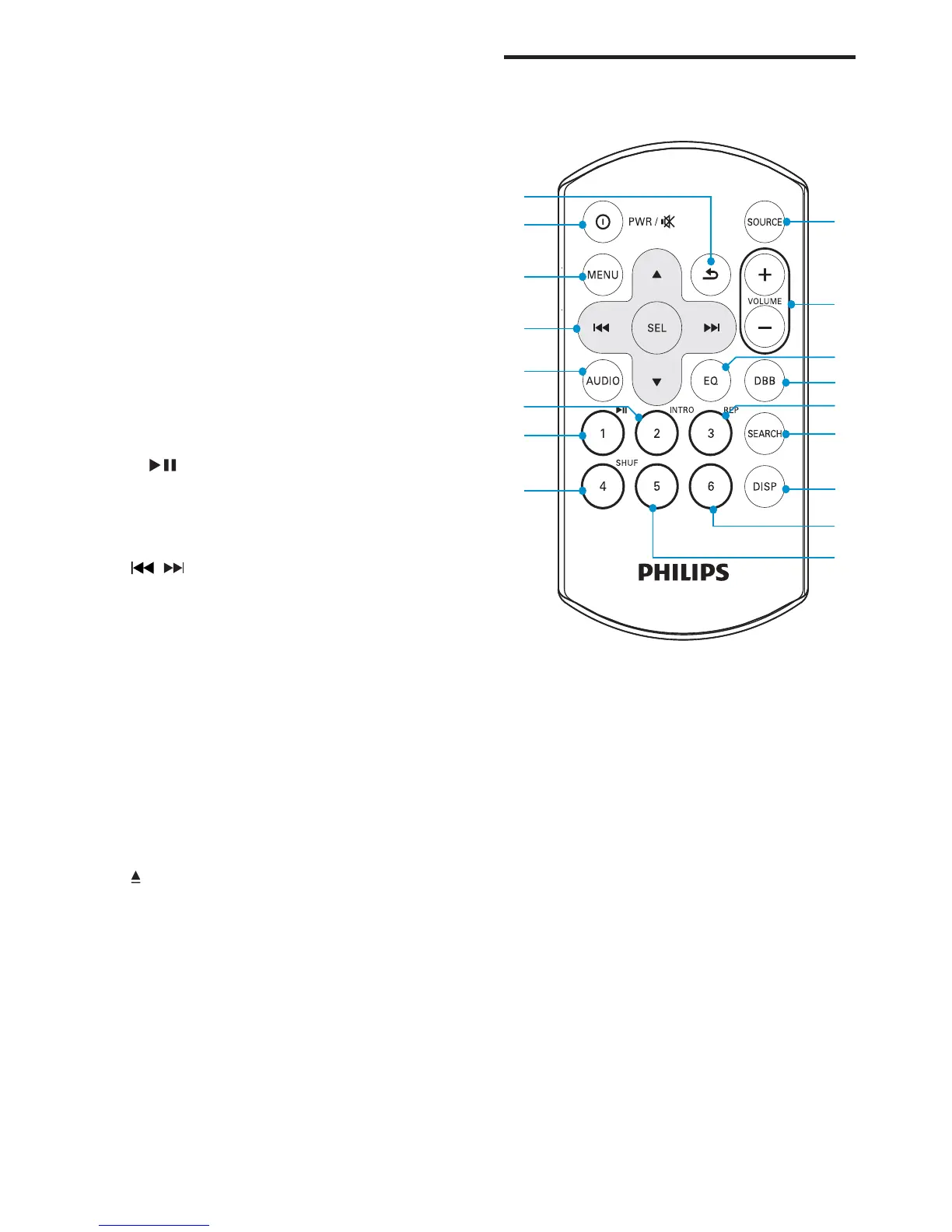
Overview of the remote
control
a SOURCE
Select audio source.•
b VOLUME +/-
Adjust volume.•
c EQ
Select EQ setting.•
d DBB
Turn on or off Dynamic Bass Boost •
(DBB) sound.
e 3, REP
Select repeat play mode.•
Select preset station no. 3.•
f SEARCH
Store radio stations automatically.•
Search a track or folder.•
j
k
m
n
o
p
q
l
a
b
d
f
g
i
h
c
e
j
k
m
n
o
q
l
a
b
d
f
g
i
h
c
e
j External device socket
k 6
Select preset station no. 6•
l 5
Select preset station no. 5•
m SHUF, 4
Activate or deactivate shuffle mode.•
Select preset station no. 4•
n 3, REP
Set repeat play mode.•
Select preset station no. 3•
o INTRO, 2
Turn intro play on or off.•
Select preset station no. 2•
p 1,
Start play•
Pause or resume play.•
Select preset station no. 1•
q
/
Tune to a radio station•
Skip/search for a track.•
r EQ/Audio
Select equalizer (EQ) setting.•
Access audio setting menu.•
s SEARCH
Store radio stations automatically.•
Search a track or folder. •
t Panel power connection
u Disc slot
v
Take disc out.•
w RESET
Restore default settings.•
EN



 To Next Page